
Performance Max for cleaning services can bring in leads from Search, Maps, YouTube, Gmail, Discover and Display with one campaign. It can also burn a small budget on cheap, poor-quality leads. This guide shows when Performance Max makes sense for a cleaning company, how to set it up step by step, what happened when I tested it for a real cleaning business, and the new controls that change the picture in 2026.
Key takeaways
- Start with Local Services Ads and Search. Add Performance Max only once you track real bookings and have enough budget.
- A very low cost per conversion (like $3.36) is a warning sign, not a win.
- Negative keywords can’t stop Display or partner-site traffic.
- New controls (Partners Alpha, channel prioritization, budget caps) let you keep spend on Google Search and Maps.
- Always measure cost per booked clean, not cost per conversion.
What is Performance Max for cleaning services?
Performance Max (PMax) is a Google Ads campaign type that uses one budget and one set of assets (headlines, descriptions, images, videos) to show ads across all of Google: Search, Maps, YouTube, Gmail, Discover, the Display Network and Search partner sites. Google’s AI decides where to show your ads and how much to bid, based on the conversions you tell it to chase.
For a cleaning company, that sounds ideal: one campaign that finds people who need a house cleaner. The catch is that the AI only knows what you teach it. If it counts every form fill or 10-second call as a “conversion”, it will find the cheapest way to get more of them, and that is usually not real customers.
When should a cleaning company use Performance Max?
| Use Performance Max when… | Wait when… |
|---|---|
| You track booked jobs or qualified calls (60+ seconds), not just form fills | Your conversions are page views, button clicks or every form submission |
| You get roughly 30+ tracked bookings or qualified calls a month | You get only a handful of leads a month |
| Your budget is comfortably above what LSA and Search can spend | LSA and Search aren’t spending their full budget yet |
| You have real photos and short videos of your team and work | You only have stock images |
| You can turn off or limit Display and Search partners | You can’t control where the budget goes |
For most small residential cleaning businesses, the best order is Local Services Ads first, then a small Search campaign, then Performance Max. See LSA vs Google Ads vs Performance Max for cleaning companies for a full comparison.
Case study: a Performance Max test for a low-budget cleaning company
I tested Performance Max for an office and commercial cleaning company with a small monthly budget. The test ran for 15 to 20 days, before the newer channel controls existed.

| Metric | Result |
|---|---|
| Cost | $484.52 |
| Conversions | 144 |
| Cost per conversion | $3.36 |
| Conversion rate | 7.09% |
| Implied cost per click | About $0.24 (144 ÷ 7.09% ≈ 2,000 clicks) |
What happened
- Leads and calls came in, but most were poor quality: spam forms, wrong services and people who never booked.
- The numbers were too good to be true. Real cleaning leads from Search usually cost $40 to $50. A $3.36 lead is a warning sign.
- About $0.24 a click points away from Google Search, where cleaning clicks cost around $8.50. Most of the traffic likely came from Display, Search partners and other cheap placements.
- Thousands of negative keywords didn’t help, because negatives don’t apply to Display or partner sites.
What we did
We stopped the test and moved the budget to Local Services Ads, where the business pays per real lead and can dispute bad ones. You can see what that cleaning LSA setup achieved in our Local Services Ads for cleaning companies guide.
Lessons
- Judge Performance Max by booked jobs, not cost per conversion.
- A small budget makes Performance Max riskier: too little data, too many cheap placements.
- Check channel performance in week one (Campaigns → Insights and reports → Channel performance).
- Protect forms from spam before any test, so fake leads don’t train the AI.
How to set up Performance Max for a cleaning company (step by step)
Step 1: Set conversions to real bookings
Make online bookings and calls of 60 seconds or more your primary conversions. Set form fills to secondary unless you filter spam. If you can, import booked jobs from your CRM as offline conversions so Google learns what a paying customer looks like. Our conversion tracking ideas for cleaning companies explain the options.
Step 2: One asset group per service
Create separate asset groups for standard or recurring house cleaning, deep cleaning, and move-in/move-out cleaning (plus office cleaning if you offer it). Each gets its own landing page, headlines and images, so a move-out searcher sees a move-out ad.
Step 3: Add search themes
Search themes tell Google which searches each asset group should match, for example “move out cleaning service” or “biweekly house cleaning”. Use the phrases your customers really search; our cleaning keyword lists are a good starting point.
Step 4: Add audience signals
Upload your customer list and add custom segments of people searching for cleaning services. Signals guide the AI at the start; they don’t limit who sees your ads.
Step 5: Block the waste
- Add negative keywords for job seekers (“cleaning jobs”, “cleaner hiring”), DIY (“how to clean”) and services you don’t offer.
- Add brand exclusions if you run a separate brand campaign.
- Turn off final URL expansion, or exclude careers and blog pages, so job seekers don’t land there.
Step 6: Target only your service area
Use “Presence: people in or regularly in your included locations” so the ads show only to people in the areas you clean.
Step 7: Control the channels
This is the step that would have saved our test budget. See the next section.
New Performance Max controls that change the picture
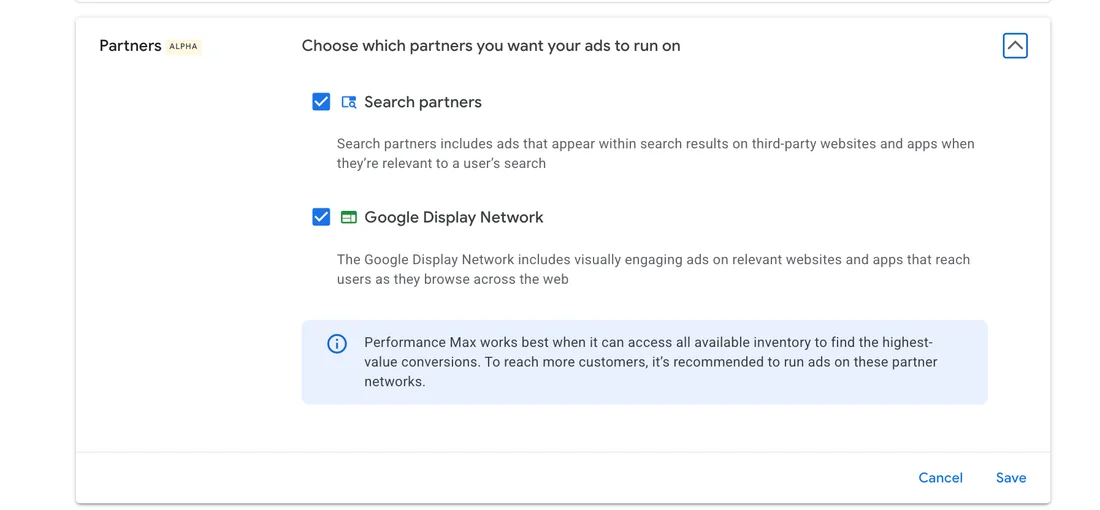
Partners (Alpha): turn off Search partners and Display
Google is testing a Partners setting in Performance Max that lets you untick Search partners and the Google Display Network for a campaign. It isn’t in every account yet. If you have it, unticking both is the safest start for a cleaning company.
Channel prioritization and budget caps
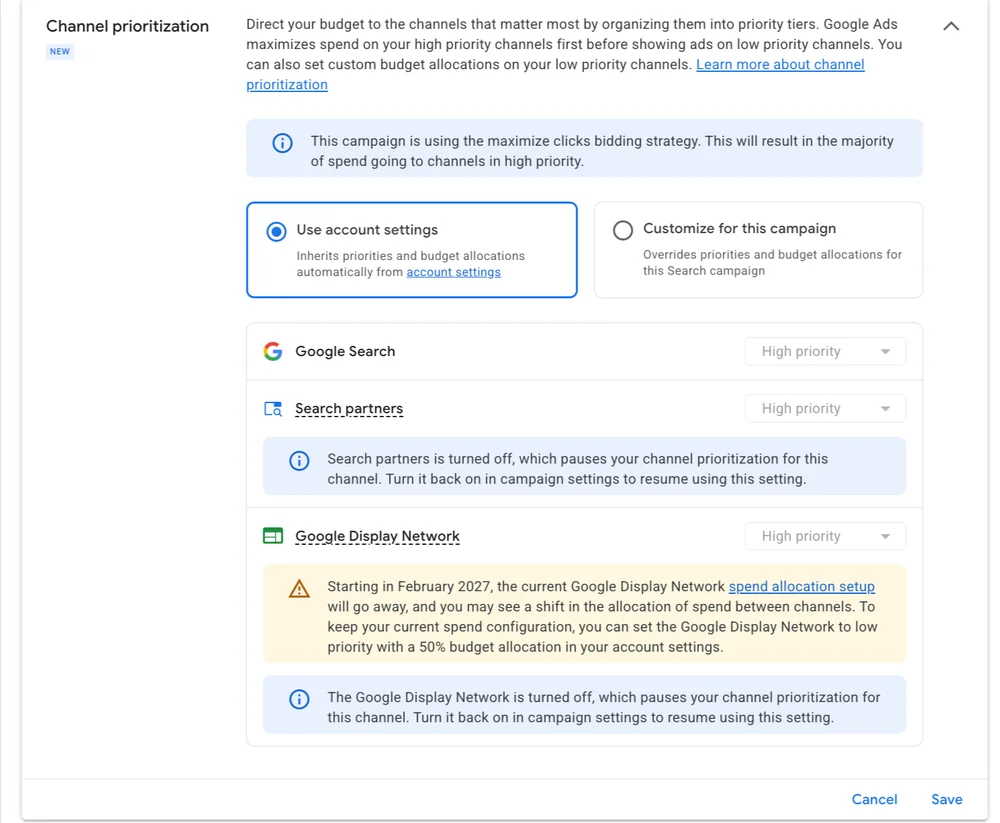
Channel prioritization lets you set channels to high or low priority, so Google Search and Maps are funded first. For low-priority channels you can cap spend at a percentage of the daily budget. In Performance Max, Google’s own channels are grouped as one tier, with Search partners and Display set separately. Read the full channel prioritization guide.
Important: I haven’t re-tested Performance Max for cleaning with these controls yet. They fix the main problem we saw (cheap Display and partner traffic), but treat any new test as a test: small budget, booked jobs as the goal, and a channel check every few days.
Local Services Ads are becoming Performance Max too
Don’t confuse a normal Performance Max campaign with the new pay-per-lead Performance Max that replaces Local Services Ads. The LSA version still shows as Local Services Ads with the Google Verified badge, and you still pay per lead, not per click. See what LSA looks like after the move into Google Ads.
Performance Max checklist for cleaning companies
- Booked jobs or 60+ second calls are the primary conversions
- Form spam protection is on
- Separate asset groups for each cleaning service
- Search themes and audience signals added
- Job-seeker and DIY negatives added; brand exclusions set
- Final URL expansion off or limited
- Location set to Presence
- Search partners and Display off, or low priority with a small cap
- A Search campaign still covers your best keywords
- Channel performance reviewed weekly for the first month
FAQs
Does Performance Max work for cleaning companies?
It can, but rarely on a small budget without controls. It needs real booking data and protection from cheap placements. In our own short test for a low-budget cleaning company it reported 144 conversions at $3.36 each, and most leads were poor quality.
How much budget does Performance Max need for a cleaning business?
There is no official minimum, but as a rule of thumb you want enough budget for around 30 tracked bookings or qualified calls a month, so the AI can learn. For most local cleaning companies that means starting with Local Services Ads and Search first.
Can I stop Performance Max showing on the Display Network?
If your account has the Partners (Alpha) setting, you can untick Search partners and the Google Display Network in the campaign. If not, use channel prioritization to set those channels to low priority with a small budget cap.
Why didn’t negative keywords fix my Performance Max lead quality?
Negative keywords only control search queries. Low-quality leads from Performance Max often come from Display, YouTube or partner sites, where negative keywords have no effect.
Should I run Performance Max and a Search campaign together?
Yes, if you run Performance Max at all. Keep a Search campaign for your most valuable searches, like house cleaning near me, so you keep control of keywords, ads and landing pages.
Is Local Services Ads now Performance Max?
Local Services Ads are moving into Google Ads as pay-per-lead Performance Max campaigns. They still show as Local Services Ads to customers and you still pay per lead, but they are managed inside Google Ads.
Want help with Performance Max or LSA?
I manage Google Ads and LSA for cleaning companies, month-to-month, and you own the account.
Already running Google Ads or LSA? Get a free audit of your account.
More Google Ads guides for cleaning companies
- Google Ads for cleaning companies (complete guide)
- Local Services Ads for cleaning companies
- LSA vs Google Ads vs Performance Max for cleaning
- Google Ads keywords and negative keywords for cleaning
- Google Ads for commercial and office cleaning
- Google Ads for carpet cleaners
- Google Ads for window cleaners
- Google Ads for pool cleaners
- Google Ads & LSA management for cleaning companies