
Part of our Google Ads for Local Businesses guide.
This is a complete guide to Google Ads and Local Services Ads (LSA) for home inspectors. Home buyers usually have only a few days after an accepted offer to book an inspection, so they search Google, call the first trusted inspector they find, and book fast. This guide covers what leads cost, whether LSA or Google Ads is better, how to set up both, the keywords to target and avoid, lead tracking, tools, challenges and solutions, pre-launch checklists, conversion tracking and bidding.
1. Home inspection industry: data and cost per lead
Quick answer: Home inspection leads are cheap on Local Services Ads, often around $20–$50 per lead, and more expensive on Google Search ads, often $100 or more per lead. Search clicks for home services average about $8. Judge both on cost per booked inspection.
Home inspectors serve three groups: home buyers (pre-purchase inspections), sellers (pre-listing inspections) and real estate agents who book on behalf of clients. Most demand follows the housing market, so spring and summer are busiest and winter is quieter. Add-on services such as radon testing, sewer scopes, mold and termite (WDO) inspections raise the value of each booking.
| Metric | Typical range (third-party 2026 benchmarks) |
|---|---|
| Google Search cost per click (home & home improvement) | About $8.33 |
| Search conversion rate | About 8% |
| Search cost per lead | Roughly $100–$135+ |
| LSA cost per lead for home inspectors | Roughly $19–$50, depending on market and reviews |
| LSA cost per lead, all home services | About $53 average |
These are industry estimates, not guarantees. Your market, review count and how quickly you answer calls change them a lot. Estimate your own numbers with our Google Ads budget calculator (choose Home Inspection).
Cost per booked inspection: a worked example
Quick answer: Cost per booked inspection = cost per lead ÷ close rate. On industry benchmarks, $1,500 a month in Search brings about 14 leads at $107 each; closing 50% gives about 7 inspections at roughly $214 each, while the same spend in Local Services Ads at about $49 a lead gives about 16 at $94 each.
| Step | Google Search (benchmark) | Local Services Ads |
|---|---|---|
| Monthly ad spend | $1,500 | $1,500 |
| Cost per lead | $107 ($8.33 per click, 8.05% conversion) | $49 (estimate) |
| Leads | 14 | 31 |
| Close rate (example) | 50% | 50% |
| Booked inspections | 7 | 16 |
| Cost per booked inspection | $214 | $94 |
| Revenue at $400 each | $2,800 | $6,400 |
| Ad spend as % of revenue | 54% | 23% |
Revenue uses a $400 average inspection (estimate).
Your ceiling per lead: if you aim to spend no more than 20% of a $400 inspection on ads ($80) and you close 50%, you can pay up to about $40 per lead. The benchmark cost per lead ($107) is above this ceiling, so profit depends on beating the averages: tight keywords and negatives, a strong landing page, fast call answering and a higher close rate or job value.
These are benchmark and example figures, not a promise. Swap in your own cost per lead, close rate and job value, or use the Google Ads budget calculator.
2. Which is best for home inspectors: LSA or Google Ads?
Quick answer: Start with Local Services Ads if you have strong Google reviews and answer calls live, because LSA leads usually cost far less. Add Google Search ads for add-on services, new construction inspections and online-booking traffic. Most growing inspection companies run both.
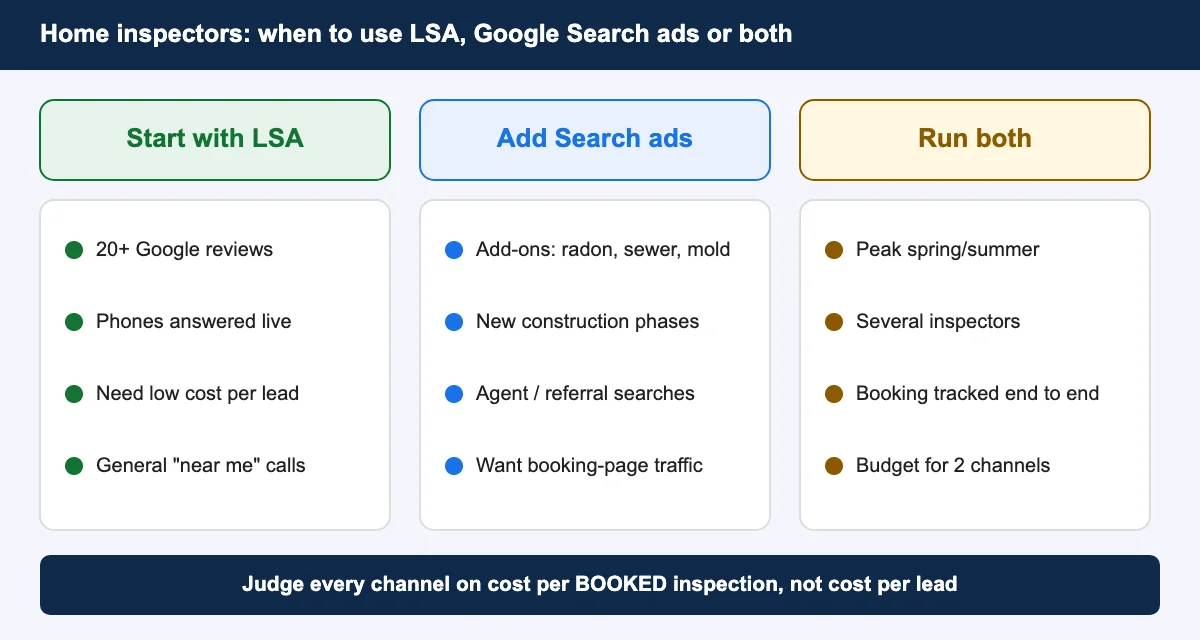
| Local Services Ads | Google Search Ads | |
|---|---|---|
| You pay for | Each valid lead (call, message, booking) | Each click |
| Where you show | Very top of Google and Maps, with a Google Verified badge | Below LSAs, above maps and organic results |
| Control | Services, area, hours, budget | Keywords, ads, landing pages, bids, schedule |
| What ranks you | Reviews, responsiveness, distance, profile | Bid, ad relevance, landing page |
| Best for | “Home inspector near me” calls | Specific services and booking online |
3. How do you set up Local Services Ads for home inspection?
Quick answer: Create a Local Services profile, choose the home inspection category and services, add your service area, pass Google’s licence, insurance and background checks, link your Google Business Profile, set a budget and turn on lead notifications. Since August 2026, LSA campaigns are managed inside Google Ads as Performance Max campaigns with pay-per-lead goals.
- Get your Google Business Profile right. The name, address, phone and hours must match your LSA profile. Ask every happy client for a review; review count and rating strongly affect LSA ranking.
- Create the LSA profile and choose the home inspection category, then switch on only the services you offer (for example general, radon, mold, sewer).
- Set your service area by ZIP code or city, only where you actually travel.
- Complete verification: licence (where your state requires one), insurance and background checks. Keep documents current or your ads stop.
- Set hours you can answer. Missed calls hurt your ranking, so only show ads when someone picks up.
- Set a daily budget and bidding (see section 15) and turn on lead alerts by text and email.
- Learn the new home in Google Ads. Leads now appear under Goals → Conversions → Leads. Read what changed for home inspection LSA accounts.
4. How do you set up Google Ads for a home inspection business?
Quick answer: Set up conversion tracking first, then build a Search campaign split by service (pre-purchase, add-ons, new construction), target the area you serve with “presence” location targeting, add negative keywords, send each ad group to a matching landing page with online booking, and start with a controlled budget.
- Tracking first: calls from ads, website calls, online bookings and forms (see sections 8 and 14).
- Campaign structure: Search campaign with ad groups for pre-purchase inspection, pre-listing inspection, add-ons (radon, sewer scope, mold) and new construction / 11-month warranty inspections.
- Location: your real service area, with “Presence: people in or regularly in your targeted locations”.
- Ads: mention availability (“inspections this week”), report turnaround (“report in 24 hours”), credentials and online booking.
- Assets: call, location (link Business Profile), sitelinks for each service and pricing, callouts like “Licensed & Insured”.
- Landing pages: one per service, with price or “from” price, booking widget at the top, sample report, reviews and service area.
- Schedule: run call-focused ads when your office answers; booking ads can run 24/7, because agents often book at night and weekends.
Example ads for a home inspection company
Responsive search ads take up to 15 headlines (30 characters each) and 4 descriptions (90 characters each). Replace [City] with your city and keep within the limit.
| Headline | Characters |
|---|---|
| Home Inspection in [City] | 25 |
| Report Within 24 Hours | 22 |
| Certified Home Inspector | 24 |
| Book Your Inspection Online | 27 |
| Pre-Listing Inspections | 23 |
| Description | Characters |
|---|---|
| Buying a home? Detailed inspection with photos and a report in 24 hours. Book online. | 85 |
| Certified, insured inspector. Radon, sewer scope and termite add-ons available. | 79 |
Only use claims that are true for your business (prices, guarantees, response times), and add call, location, sitelink and callout assets.
5. What is best for home inspectors: Performance Max, Search or Display?
Quick answer: Search is the best starting campaign type for home inspectors because it targets people actively looking to book. Use Performance Max only after you track booked inspections, and add brand exclusions. Skip standard Display for lead generation; use it only for small remarketing budgets.
| Campaign type | Use it when | Watch out for |
|---|---|---|
| Search | Always first: high intent, full keyword control | Needs negatives and tight match types |
| Performance Max | Booked-inspection tracking works and you have 30+ conversions a month | Spends on brand searches and low-quality placements without exclusions |
| Display | Small remarketing to site visitors and agents | Cheap clicks that rarely book an inspection |
| LSA (pay-per-lead PMax) | You have strong reviews and answer calls live | Missed calls and invalid leads |
If AI Max is switched on in your Search campaigns, check its search terms weekly. Our AI Max guide and search_term_matchtype tracking guide explain how.
$10 Audit Report
Find out what is wasting money in your home inspection company Google Ads
I review your search terms, tracking, Local Services Ads and targeting, and send a clear list of what to fix first. No contract.
6. Which 10 keywords generate home inspection leads?
Quick answer: The best home inspection keywords show booking intent: “home inspector near me”, “home inspection near me”, “pre purchase home inspection”, “home inspection company” and add-on services like “radon testing near me” and “sewer scope inspection”.
| # | Keyword | Intent | Match type |
|---|---|---|---|
| 1 | home inspector near me | Ready to book | Exact + phrase |
| 2 | home inspection near me | Ready to book | Exact + phrase |
| 3 | home inspection company | Comparing companies | Phrase |
| 4 | pre purchase home inspection | Buyer under contract | Phrase |
| 5 | certified home inspector | Trust-focused buyer | Phrase |
| 6 | home inspection cost | Price check before booking | Phrase |
| 7 | pre listing home inspection | Seller | Phrase |
| 8 | new construction home inspection | Higher-value job | Phrase |
| 9 | radon testing near me | Add-on service | Exact |
| 10 | sewer scope inspection | Add-on service | Phrase |
Add your city to each for location versions, such as “home inspector [city]”.
7. Which keywords should home inspectors avoid?
Quick answer: Block job, training and DIY searches. People searching “home inspector salary”, “home inspection course”, “home inspection checklist” or “car inspection” will never book you.
- Jobs and careers: jobs, hiring, salary, how to become, apprentice
- Training and licensing: course, school, class, exam, licence requirements, certification course, training
- DIY and research: checklist, template, DIY, what do home inspectors look for, report sample (if you don’t want research traffic)
- Software: software, app, report writer
- Wrong inspection: car, vehicle, state inspection, emissions, elevator, fire inspection, building permit, city inspection
- Price-only: free home inspection, cheap (test before blocking)
- Services you don’t offer: commercial, pool, mold or termite, if you don’t do them
Estimate Your Google Ads Budget
8. What is the best way to track home inspection leads?
Quick answer: Track every call, form and online booking back to its source with call tracking and Google Tag Manager, then mark which leads became paid inspections. The best setup connects your booking software to Google Ads so bidding learns from booked jobs.
- Use a dynamic call tracking number on your website and the call asset in your ads.
- Track the booking confirmation from your scheduler, not the “Book now” button click.
- Store the Google Click ID (gclid) and UTM values in hidden form fields and in your booking software.
- In LSA, mark each lead Booked or Completed in the lead manager so Google learns what a good lead looks like.
- Once a month, import paid inspections into Google Ads as offline conversions with their fee as the value.
Our Google Ads and call tracking dashboard guide shows how to report it all in one place.
9. Which booking and lead tracking tools can home inspectors use?
Quick answer: Popular home inspection booking tools are Spectora, ISN (Inspection Support Network), HomeGauge, Palm-Tech and Home Inspector Pro, plus general tools like Jobber and Housecall Pro. For lead tracking, use CallRail or WhatConverts with Google Tag Manager and GA4.
| Tool | Type | Useful for ads |
|---|---|---|
| Spectora | Inspection software | Online booking widget, automated confirmations |
| ISN (Inspection Support Network) | Inspection business platform | Online booking, agent communication, integrations |
| HomeGauge | Reporting + scheduling | Online scheduler included with subscription |
| Palm-Tech / Home Inspector Pro | Reporting software | Works with ISN for booking |
| Jobber / Housecall Pro | Field service software | Booking, reminders, payments |
| CallRail / WhatConverts | Call and lead tracking | Source of every call and form, Google Ads integration |
| Google Tag Manager + GA4 | Tracking | Booking and form conversions |
Check each tool’s current features and pricing before you choose; they change often.
10. What are the biggest LSA challenges for home inspectors, and how do you fix them?
Quick answer: The biggest LSA challenges are too few reviews, missed calls, invalid leads, limited control and the move into Google Ads. Fix them by collecting reviews weekly, answering every call, disputing bad leads and setting budgets by season.
| LSA challenge | Solution |
|---|---|
| Competitors have more reviews, so they rank above you | Ask every client for a review the day the report goes out; add a review link to your report email |
| Missed calls lower your ranking | Forward calls to a second phone or answering service; show ads only during staffed hours |
| Invalid leads (sales calls, job seekers, wrong service) | Dispute them in the lead manager quickly; keep notes of each call |
| Little control over which searches you show for | Turn off services you don’t offer; tighten ZIP codes; run Search ads for specific services |
| Changes after the move to Google Ads (daily budgets, automated bidding, new lead location) | Export old reports, re-check budget and service settings, learn the new lead manager |
| Seasonal swings in lead volume | Raise budgets in spring and summer, lower in winter |
11. What are the biggest Google Ads challenges for home inspectors, and how do you fix them?
Quick answer: The biggest Google Ads challenges are expensive clicks for a modest job value, wasted clicks from job seekers and DIY searches, untracked calls and short buyer timelines. Fix them with tight keywords and negatives, call and booking tracking, fast response and service-specific landing pages.
| Google Ads challenge | Solution |
|---|---|
| Cost per lead is high compared with the inspection fee | Focus on high-intent and add-on keywords; sell bundles (inspection + radon + sewer) to raise job value |
| Wasted clicks from job, training and DIY searches | Use the negative list in section 7 and review search terms weekly |
| Calls and bookings aren’t tracked, so bidding guesses | Set up call tracking and booking conversions before scaling |
| Buyers book within days, so slow replies lose the job | Online booking on every landing page; reply to forms within minutes |
| Agents and buyers need different messages | Separate ad groups or pages for agents (easy booking, fast reports) and buyers (thoroughness, price) |
| Too few conversions for smart bidding to learn | Start with one tight campaign; add offline conversions for paid inspections |
12. Checklist before turning on LSA
- Google Business Profile verified, with name, address, phone and hours matching LSA
- A steady base of recent Google reviews, with a plan to get more weekly
- Licence (where required), insurance and background checks approved and current
- Only services you offer are switched on
- Service area limited to where you travel
- Ad hours match when someone answers the phone
- Lead notifications on (text + email) and a person responsible for replies
- Daily budget set for the season
- You know how to dispute an invalid lead and mark leads Booked
13. Checklist before turning on a Google Ads campaign
- Conversion tracking tested: calls from ads, website calls, bookings, forms
- Search campaign split by service, with phrase and exact match keywords
- Negative keyword list added (section 7)
- Location set to “presence” in your real service area
- Call, location, sitelink and callout assets added
- Each ad group points to a matching landing page with online booking
- Ad schedule matches office hours for call ads
- Budget and bidding chosen (section 15)
- Auto-applied recommendations reviewed and switched off if you don’t want them
- AI Max settings checked if they’re on
14. Conversion tracking ideas for home inspection Google Ads
Quick answer: Track calls from ads over 60 seconds, website calls, completed online bookings and form submissions as primary conversions. Then import paid inspections with their fee as an offline conversion so Google bids for booked jobs, not just leads.
- Calls from ads: count calls of 60 seconds or more.
- Website calls: Google forwarding numbers or CallRail on your site.
- Online booking confirmed: fire a conversion on the scheduler’s confirmation page or event.
- Quote/contact form: thank-you page or form success event via Google Tag Manager.
- Offline conversion: inspection paid, with the real fee as the value.
- Enhanced conversions for leads: improves matching of forms to clicks.
- Agent vs buyer tag: a hidden field or call tracking tag to see which audience books more.
- Secondary only: clicks on the phone number or booking button, for diagnosis, not bidding.
15. Bidding ideas for LSA and Google Ads
Quick answer: For LSA, start with maximize leads and a daily budget, then set a target cost per lead once you get steady volume. For Google Ads, start with Maximize Clicks with a CPC cap or Maximize Conversions, then move to Target CPA once you have about 30 conversions a month.
| Stage | LSA (pay-per-lead) | Google Search ads |
|---|---|---|
| Launch | Maximize leads with a daily budget | Maximize Clicks with a CPC cap, or Maximize Conversions if tracking works |
| Steady volume | Set a target cost per lead close to your recent average | Target CPA at about your current cost per lead |
| Mature | Raise budget in peak season; lower in winter | Value-based bidding using offline inspection values |
Change targets by 10–20% at a time and wait 1–2 weeks between changes so the system can adjust.
16. KPIs to watch every week
- Cost per lead and cost per booked inspection, for LSA and Search separately
- Lead-to-booking rate
- Answered-call rate and response time to forms
- LSA disputed leads and credits
- Search terms report: new negatives to add
- Review count and rating compared with your top 3 competitors
FAQs
How much do Google Ads cost for home inspectors?
Third-party 2026 benchmarks put home services clicks at about $8 and Search leads at roughly $100 or more, while Local Services Ads leads for home inspectors often cost about $20 to $50. Your cost depends on your market, reviews and setup.
Are Local Services Ads worth it for home inspectors?
Yes, for most inspectors with good reviews. You pay per lead instead of per click, and LSA leads usually cost much less than Search leads.
Should home inspectors use Performance Max?
Only after booked inspections are tracked and the account has steady conversions. Start with Search, and add brand exclusions if you test Performance Max.
What keywords should home inspectors target?
Booking-intent keywords like “home inspector near me”, “pre purchase home inspection”, “home inspection company” and add-on services such as radon testing and sewer scope inspections.
How do home inspectors track leads from Google Ads?
Use call tracking for phone leads, track completed online bookings and forms with Google Tag Manager, and import paid inspections as offline conversions.
What changed for home inspection LSA in 2026?
Google began moving Local Services Ads into Google Ads as Performance Max campaigns with pay-per-lead goals in August 2026, with daily budgets and a new lead manager inside Google Ads.
Get a Google Ads & LSA Audit for Your Inspection Business
Paying for leads that don’t book? I’ll review your Local Services Ads, Google Ads campaigns, keywords and tracking, and send a clear report showing what to fix first. It costs $10 and there is no long-term contract.
More industry guides: dentists, nail salons and painting contractors.