
This is a complete guide to Google Ads for local businesses, written for owners and agencies who want more calls, bookings and jobs from people nearby. Most local customers search Google when they need a service, compare a few results and call the first business that looks trustworthy and answers. Below you will find what Google Ads costs for local businesses, when to use Local Services Ads, Search or Performance Max, how to set up and track campaigns, and detailed guides for 19 local industries.
Get Your Audit Report Estimate Your Budget
1. What is Google Ads for local businesses?
Quick answer: Google Ads for local businesses means showing ads to people searching for your service in your area, such as “plumber near me” or “dentist in Austin”. You choose where ads show, pay per click (or per lead with Local Services Ads) and can track every call, form and booking.
For a local business, Google Ads is less about brand awareness and more about being there when someone nearby needs you now. The best local accounts are small, tightly targeted and measured by booked jobs, not clicks.
- Search ads appear above and below the results for the keywords you choose.
- Local Services Ads appear at the very top for eligible categories, with a Google badge, and charge per lead.
- Performance Max shows your ads across Search, Maps, YouTube, Gmail and Discover from one campaign.
- Maps ads come from your linked Google Business Profile and location assets.
2. How much does Google Ads cost for a local business?
Quick answer: Across all industries, Search ads average about $5.42 per click and about $67 per lead (WordStream/LocaliQ 2026), but local costs vary widely: home services and legal clicks often cost $8 to $12 or more, while beauty and auto services are cheaper. Most small local businesses start at $15 to $100 a day.
| Industry | Typical Search CPC | Typical cost per lead | Guide |
|---|---|---|---|
| All industries (2026 average) | About $5.42 | About $67 | — |
| Home & home improvement | About $8.33 | About $91 | HVAC, roofing |
| Attorneys & legal | About $9.87 | About $132 | Lawyers |
| Dentists | About $8 | About $75 | Dentists |
| Beauty (nail salons) | About $4.62 | About $45 | Nail salons |
Industry figures other than the all-industry average are the benchmarks used in our calculator. Get an estimate for your industry and city with the Google Ads budget calculator.
3. LSA vs Search vs Performance Max: which should a local business use?
Quick answer: If your category is eligible, use Local Services Ads plus Search: LSA brings pay-per-lead calls at the top of Google, and Search gives you control over services and areas. Add Performance Max once you track at least 30 conversions a month. Standalone Display rarely works for local leads.
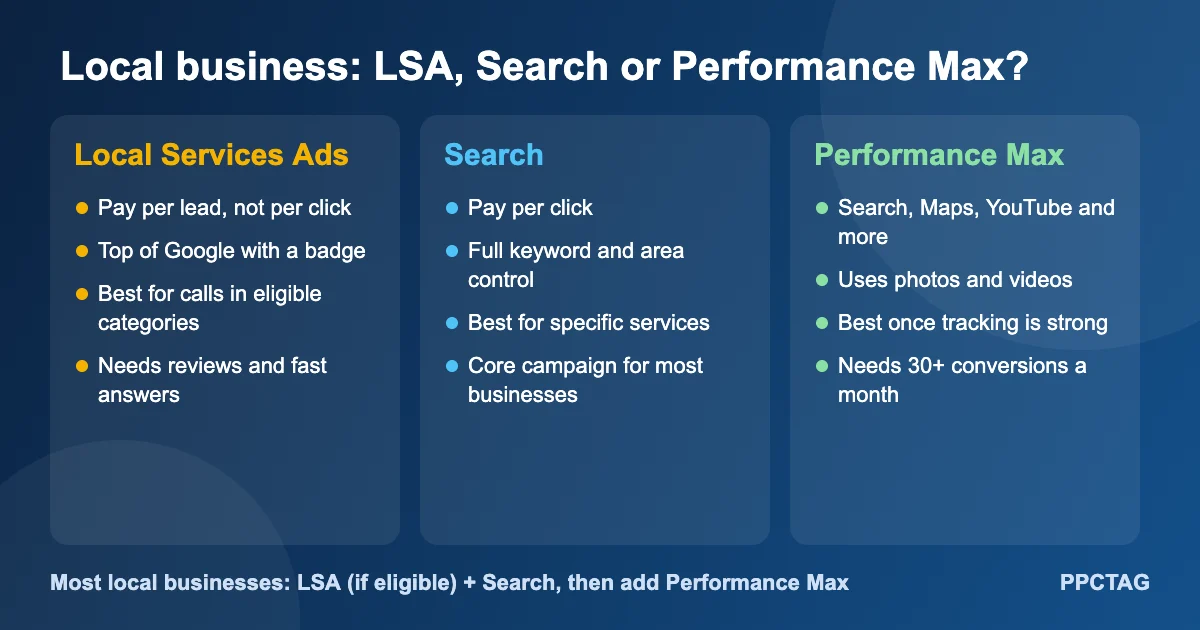
| Local Services Ads | Search | Performance Max | |
|---|---|---|---|
| You pay for | Each lead | Each click | Each click |
| Control | Job types and area | Keywords, areas, ads | Assets and signals |
| Best for | Calls in eligible categories | Specific services | Extra reach once tracked |
| Start when | Category eligible and reviews strong | Day one | 30+ conversions a month |
4. How do you set up Google Ads for a local business?
Quick answer: Set up conversion tracking first, link your Google Business Profile, create a Search campaign around your main services, target the area you serve with presence targeting, set a daily budget, write ads with your location and offer, add call and location assets, and send clicks to a fast, service-specific landing page.
- Tracking: calls from ads, website calls, forms and bookings.
- Google Business Profile: verified, linked, with photos and reviews.
- Campaign: Search, one ad group per main service.
- Location: your real service area, “Presence” targeting.
- Budget: enough for at least 10 to 20 clicks a day on your main service.
- Ads: service, area, proof (reviews, licensed, years) and a clear offer.
- Assets: call, location, sitelinks, callouts, images.
- Landing page: one per service, click-to-call, short form, reviews.
5. How should a local business target locations in Google Ads?
Quick answer: Target only the area you actually serve, using a radius or list of cities and ZIP codes, and choose “Presence: people in or regularly in your locations”. Exclude areas you do not serve, and raise bids on the ZIP codes that bring your best customers.
- Presence targeting avoids clicks from people just interested in your area.
- Start tight (5 to 25 miles depending on the trade) and expand when profitable.
- Exclude cities you never serve.
- Review location reports monthly and adjust bids by area.
6. What keywords should a local business target?
Quick answer: Target keywords that show someone is ready to hire: “[service] near me”, “[service] in [city]”, emergency and same-day terms, and specific services like “AC repair” or “teeth whitening”. Avoid broad research terms and block jobs, DIY and free searches with negative keywords.
| Keyword type | Example | Why it works |
|---|---|---|
| Near me | plumber near me | Ready to hire, local |
| Service + city | dentist in Austin | Clear location intent |
| Urgent | emergency roof repair | High value, fast decision |
| Specific service | tub to shower conversion | Clear need, better match |
| Cost or quote | roof replacement cost | Quote stage; test carefully |
Common negatives: jobs, hiring, salary, how to, DIY, free, course, school, Home Depot, Amazon, and services you do not offer.
7. How do you write Google Ads that win local clicks?
Quick answer: Mention your service and area in the headline, add proof such as reviews, licences or years in business, include a clear offer like a free estimate or same-day service, and use call, location, sitelink and image assets so your ad takes up more space and earns more trust.
- Headline ideas: “Same-Day AC Repair in [City]”, “Licensed & Insured Roofers”, “Book Online in 60 Seconds”.
- Use real photos, not stock images.
- Only promise what you deliver (prices, guarantees, response times).
- Match each ad to its landing page.
$10 Audit Report
Find out what is wasting money in your local business Google Ads
I review your search terms, tracking, Local Services Ads and targeting, and send a clear list of what to fix first. No contract.
8. How should a local business track Google Ads results?
Quick answer: Track calls from ads, calls from your website, forms and online bookings as conversions, then import booked jobs or sales from your CRM. Bidding on booked jobs instead of raw leads is one of the biggest improvements a local account can make.
- Calls from ads (60 seconds or more).
- Website calls with call tracking numbers.
- Form submissions and online bookings via Google Tag Manager.
- Offline conversions: booked jobs and revenue from your CRM.
- Enhanced conversions for leads.
9. Why does your Google Business Profile matter for Google Ads?
Quick answer: Your Google Business Profile powers location assets, Maps ads and Local Services Ads, and its reviews and photos affect whether people call you. Link it to Google Ads, keep details accurate and ask every happy customer for a review.
- Same name, address and phone everywhere.
- Correct categories and service areas.
- Recent photos of your team and work.
- A steady flow of reviews, with replies.
10. What are the most common Google Ads mistakes local businesses make?
Quick answer: The most common mistakes are no conversion tracking, targeting too wide an area, broad keywords without negatives, sending every click to the homepage, ads running when nobody answers the phone, and judging results by clicks instead of booked jobs.
| Mistake | Fix |
|---|---|
| No tracking | Set up calls, forms and bookings first |
| Area too wide | Presence targeting, real service area |
| No negative keywords | Block jobs, DIY and free searches |
| Homepage as landing page | One page per main service |
| Missed calls | Ad schedule matches answering hours |
| Judging by clicks | Track booked jobs and cost per job |
11. Checklist before launching Google Ads for a local business
- Calls, forms and bookings tracked and tested
- Google Business Profile verified and linked
- Campaign split by main service
- Service area set with presence targeting
- Negative keyword list added
- Call, location, sitelink and image assets added
- Landing pages per service, fast on mobile
- Ad schedule matches when someone answers
- Budget and bidding set
- LSA eligibility checked
12. Google Ads guides by industry
Quick answer: Every local industry has different costs, keywords and lead types. Pick your industry below for a full guide covering cost per lead, LSA vs Google Ads, setup, keywords, tracking, checklists and bidding.
Home services
- Google Ads for hVAC: Repair vs replacement campaigns and revenue tracking.
- Google Ads for roofing: Storm and replacement campaigns, signed-contract tracking.
- Google Ads for pest control: Pest-specific ads and recurring plans.
- Google Ads for garage doors: Urgent repairs, LSA verification and install value.
- Google Ads for tree services: Removal, storm and stump jobs.
- Google Ads for cleaning services: Online bookings and blocking job seekers.
- Google Ads for pressure washing: Search-first strategy and seasonal budgets.
Home projects
- Google Ads for kitchen & bath remodelers: Consultation-ready buyers, not idea seekers.
- Google Ads for windows & doors: Competing with national brands, tracking in-home sales.
- Google Ads for painting contractors: Interior and exterior painting leads.
- Google Ads for home inspectors: LSA and Search for buyers near closing.
- Google Ads for junk removal: Cheap LSA leads plus cleanouts.
- Google Ads for dumpster & bin rental: Size-based campaigns and beating brokers.
Lawyers
- Google Ads for lawyers & law firms: Costs by practice area, LSA, intake and bar rules.
- Google Ads for personal injury lawyers: Case-type targeting and signed cases.
- Google Ads for criminal defense lawyers: Charge-specific ads and 24/7 intake.
- Google Ads for family lawyers: Divorce and custody leads without DIY clicks.
Health & beauty
- Google Ads for dentists: Real case study: calls up 95%, LSA leads at $49.
- Google Ads for nail salons: Real case study: 3x conversions at $1.36.
13. Should a local business manage Google Ads itself or hire a specialist?
Quick answer: You can run a small account yourself if you have time to set up tracking, check search terms weekly and adjust bids. Hire a specialist when spend passes about $1,500 a month, results are flat, or you do not know your cost per booked job, because mistakes at that level cost more than management.
Not sure where your account stands? A $10 audit report shows what to fix first, whether you keep managing it yourself or not.
FAQs
Is Google Ads worth it for local businesses?
Yes, for most service businesses. People searching for your service nearby are ready to buy, and you can target only your service area and track calls and bookings. It works best with tight targeting, good tracking and a phone that is always answered.
How much should a small local business spend on Google Ads?
Many start at $15 to $100 a day depending on industry and city. The budget should cover at least 10 to 20 clicks a day on your main service; our budget calculator gives an estimate for your industry.
What is the difference between Google Ads and Local Services Ads?
Google Ads Search charges per click and lets you choose keywords. Local Services Ads charge per lead, show at the very top with a Google badge, and are only available for eligible categories such as plumbers, HVAC, lawyers and cleaners.
How long does it take for Google Ads to work for a local business?
Search ads can bring calls in the first week. Automated bidding needs about 4 to 6 weeks of conversion data to settle, so judge results after the first month or two.
Do I need a website to run Google Ads?
For Search and Performance Max you need a landing page. Local Services Ads can run from your profile without a website, but a fast, service-specific page usually improves results for all campaign types.
Which local businesses get the best results from Google Ads?
Businesses with urgent or high-value services do best, such as HVAC, roofing, plumbing, pest control, lawyers and dentists, but low-cost services like salons and cleaners also do well with cheap clicks and repeat customers.
Get a Google Ads & LSA Audit for Your Local Business
I will review your campaigns, search terms, tracking, location targeting and Local Services Ads setup, and send a clear report showing what to fix first. It costs $10 and there is no long-term contract.