
Should you raise your budget? Loosen your target CPA? Turn on AI Max? Most advertisers answer these questions by making the change and hoping. Google Ads experiments give you a better way: split your traffic, run the old setting and the new one side by side, and let the numbers decide before you commit the whole campaign.
On November 19, 2026, Google’s Ads & Commerce Blog published three rules for testing from its Ads Decoded podcast: start with templated experiments, judge tests on real business outcomes over four to six weeks, and match the confidence level to the size of the decision. Alongside that, Google now offers a template for testing budgets and bid targets in Search campaigns, and an AI Max experiment that runs inside your existing campaign instead of a copy.
This guide shows you how to set up each one step by step, how long to run it, how to read the result, and when a small local business is better off not testing at all.
Key takeaways
- Google Ads experiments are under Campaigns > Experiments. Templates split traffic 50/50 inside one campaign; custom experiments create a trial copy.
- The budget or bidding targets template tests a new daily budget, target CPA or target ROAS in Search campaigns. Google’s help page labels it Alpha, so not every account sees it yet.
- During a budget test each arm gets half of its budget: testing $100 against $200 spends about $150 a day.
- Google suggests running tests for four to six weeks, judging qualified conversions, and using 80% confidence for small changes and 95% for big ones.
- Google’s AI Max guide recommends an A/B test only for campaigns with at least 50 conversions a month. Smaller accounts should use a before-and-after comparison or fix the basics first.
What are Google Ads experiments?
An experiment is a controlled A/B test inside your Google Ads account. Part of your campaign’s traffic (the control arm) keeps your current settings. The other part (the treatment or trial arm) runs the change you want to test. Because both arms run at the same time, in the same auctions and the same season, the difference between them is much more trustworthy than comparing “last month” with “this month”.
You don’t need to know the statistics behind it. Google shows a range for the difference and tells you when it is clear enough to call a winner.
There are four kinds of experiment a local service advertiser is most likely to use:
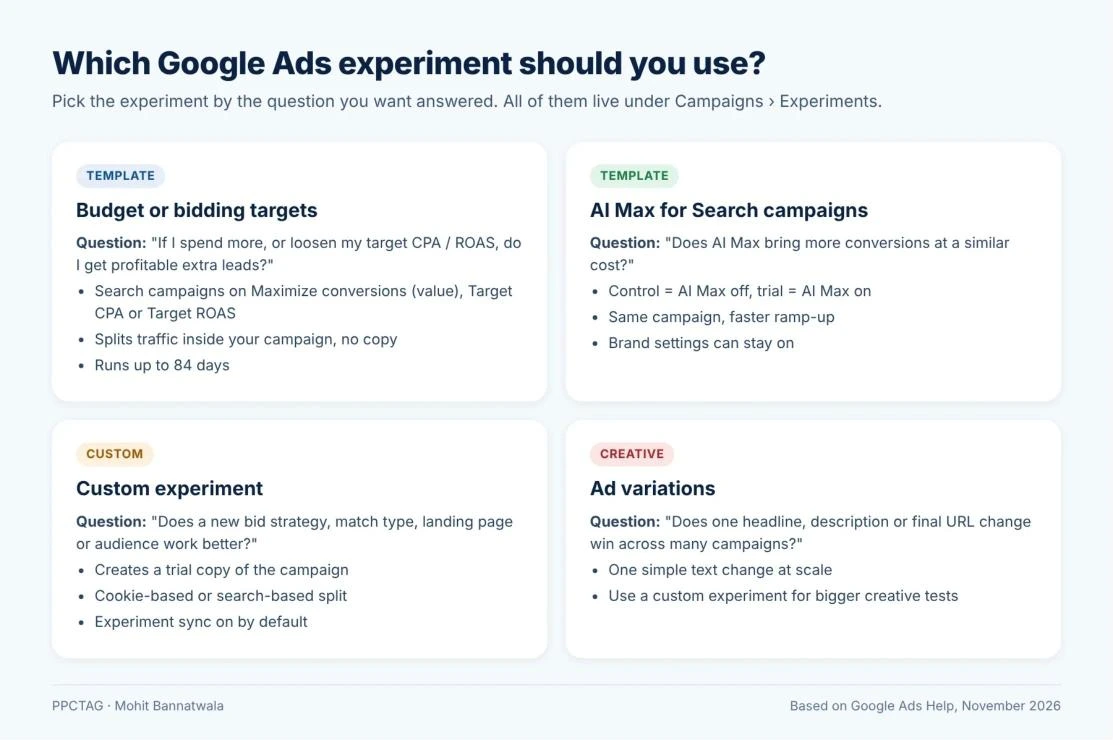
- Budget or bidding targets for Search campaigns: tests a new daily budget, target CPA or target ROAS.
- AI Max for Search campaigns: tests your campaign with AI Max on against the same campaign with it off.
- Custom experiments: test almost anything (a bid strategy, match types, landing pages, audiences) using a copy of the campaign.
- Ad variations: test one text change, such as a headline or final URL, across many campaigns.
What’s new in Google Ads experiments in 2026
Three recent changes make experiments much more useful for budget and automation decisions:
- August 20, 2026: Google announced A/B tests of different budgets and ROI targets across multiple Search campaigns in a single experiment, rolling out from September. The same announcement said AI Max experiments can now run with brand and location controls switched on.
- October 2026: Google published a four-step guide to testing AI Max, with conversion thresholds for choosing a test method.
- November 19, 2026: Google’s Ads & Commerce Blog summarised the Ads Decoded episode on A/B testing with three rules: start with templates, focus on business outcomes and give tests four to six weeks, and use 80% confidence for directional tweaks and 95% for major changes.
The budget and bidding targets help page now says a single experiment can cover multiple campaigns. It is still labelled Alpha, so if you don’t see the option in your account yet, use a custom experiment or wait for the rollout.
What you need before you start
A test is only as good as the data going into it. Check these before you create anything:
- Working conversion tracking. Calls from ads, calls from your website, forms and bookings should all record in Goals > Conversions. Only real leads should be set as Primary. Our Google Ads optimization guide covers how to check this.
- Enough volume. Google’s AI Max testing guide recommends at least 50 conversions a month for an A/B experiment, and a before-and-after comparison for campaigns with 20 to 50.
- An eligible campaign. For the templates: a Search campaign with its own budget (not a shared budget), a standard bid strategy (not a portfolio strategy) and no other active experiment.
- The right bid strategy. Budget tests need Maximize conversions or Maximize conversion value. Target tests need Target CPA or Target ROAS, on a campaign that isn’t limited by budget.
- A written hypothesis. For example: “Raising the budget from $100 to $150 a day will bring at least 8 more booked jobs a month at under $90 each.”
- One success metric agreed in advance, and a decision on 80% or 95% confidence.
- A quiet period. Avoid launching right before a holiday, a price change, a website rebuild or your busiest season.
How to set up a budget or bidding targets experiment
This template answers the question every business owner asks: “If I spend more, do I get more customers, and at what cost?” Instead of relying on forecasts, it runs a live test by splitting traffic inside your existing campaigns.
1. Open the Experiments page
In Google Ads, go to Campaigns > Experiments. Under All experiments, select the plus button.
2. Choose the template
On the “Choose an experiment” page, select A/B test under “What kind of experiment do you want to run?”. Under “What do you want to test?”, select Campaign features and settings. Then choose Budget or bidding targets for search campaigns and select Continue. You can switch on “Only show options that are relevant to my account” to hide experiments you can’t use.
3. Select your campaigns
Under “Campaign selection”, select Select campaigns, tick the eligible Search campaigns and select Done. Google decides the type of test from each campaign’s settings:
- Budget adjustment: for campaigns using Maximize conversions or Maximize conversion value.
- Target adjustment: for campaigns using Target CPA or Target ROAS that aren’t limited by budget.
4. Enter the value to test
Under “Budget or bidding target adjustment”, enter the New daily budget, New target CPA or New target ROAS for each campaign. The experiment arm setup then shows how the budget is split and how the arms differ.
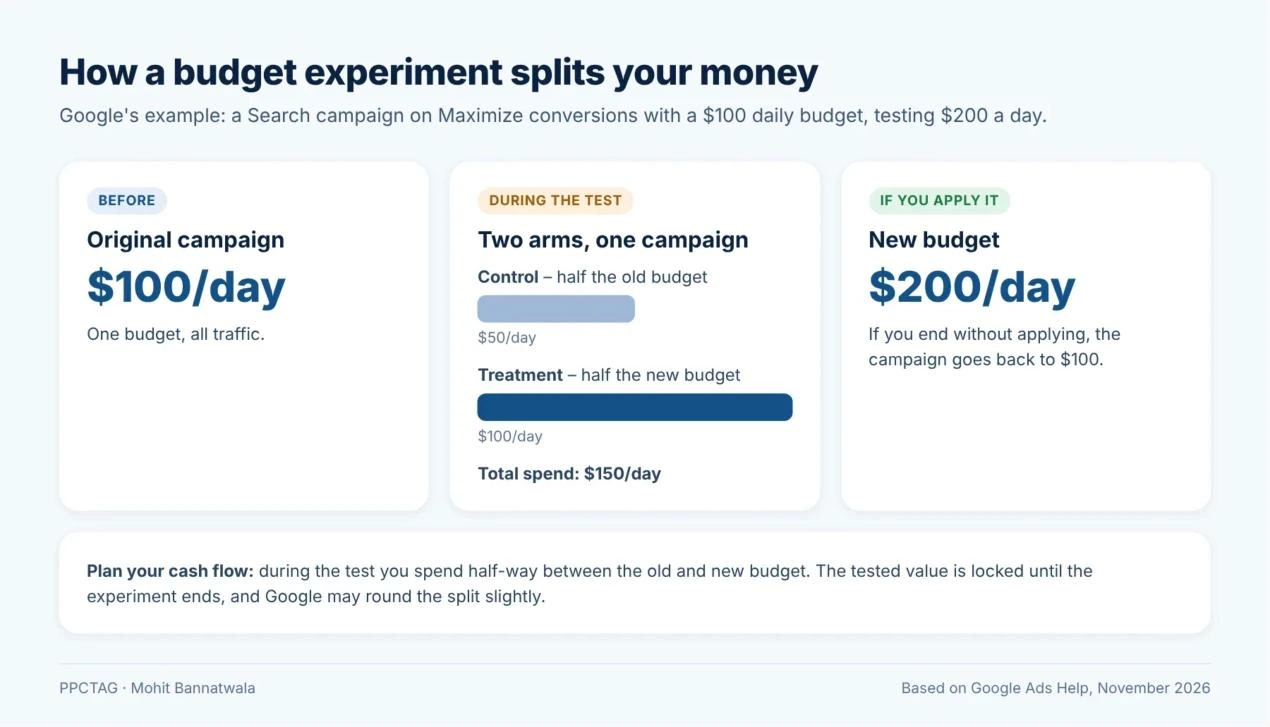
This is the part most people miss. Each arm runs on half of its budget. In Google’s example, testing a $100 daily budget against $200 gives the control arm $50 and the treatment arm $100, so the campaign spends about $150 a day during the test. Google may round the split slightly, and shows any rounding on screen.
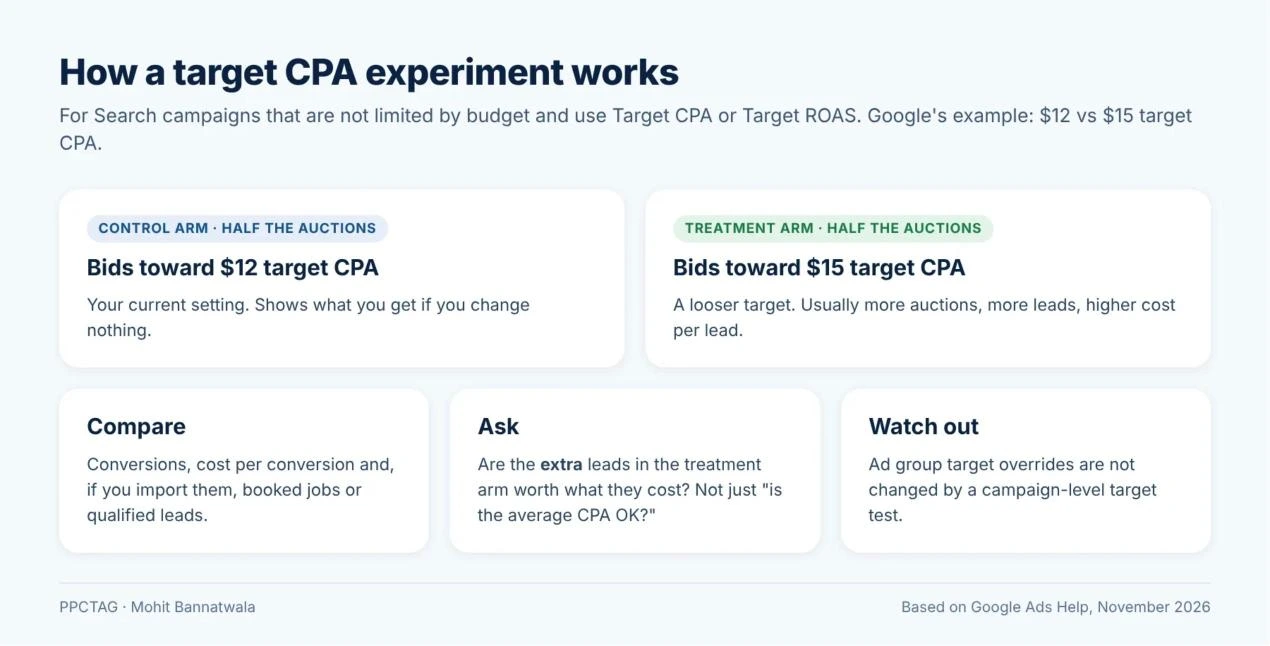
Target tests work differently. In Google’s example, half the auctions keep bidding toward a $12 target CPA and the other half bid toward $15. You then compare whether the extra conversions in the $15 arm are worth what they cost.
5. Set dates and a name
Under “Experiment dates”, choose a start and end date. Google allows up to 84 days. Plan for at least four to six weeks (see the timeline below). Give the experiment a clear name, such as “Plumbing Search – budget 100 vs 150 – Dec 2026”.
6. Create and leave it alone
Select Create. Once it starts, the budget or target you are testing is locked until the experiment ends. Avoid other changes too: new keywords, new ads or landing page edits during the test make the result harder to read.
How to set up an AI Max experiment
If you want to know whether AI Max for Search brings you more leads at a similar cost, this is the cleanest way to find out. The control is your campaign with AI Max off; the trial is the same campaign with AI Max on. Because there’s no copy, Google says the ramp-up is shorter and setup errors are less likely.
7. Start an AI Max experiment
Go to Campaigns > Experiments, select the plus button, choose Campaign features and settings, then AI Max for Search campaigns and Continue. Select Select campaigns, tick the campaigns to include and select Done.
8. Choose which AI Max features to test
On the “Create an AI Max experiment” page, set the arms, dates, name and auto-apply setting. By default, the treatment arm gets search term matching, text customization and final URL expansion. If you selected one campaign, you can untick Text customization or Final URL expansion under Asset optimization, and add Brand inclusions or Brand exclusions. Brand settings added here apply to both arms during the test. Ad group changes, such as switching off search term matching for one ad group, can’t be set during setup; edit them in the campaign afterwards.
For a dental practice or law firm, a sensible first test is search term matching only, with final URL expansion off until you’ve checked which pages Google could send people to.
9. Know when to use a custom experiment instead
The AI Max template can’t be used if the campaign targets the Display Network, already has text customization on, uses a shared budget, a portfolio strategy or bidding exploration, or has another active experiment. Most of these limits apply to custom AI Max experiments too, except the Display Network one.
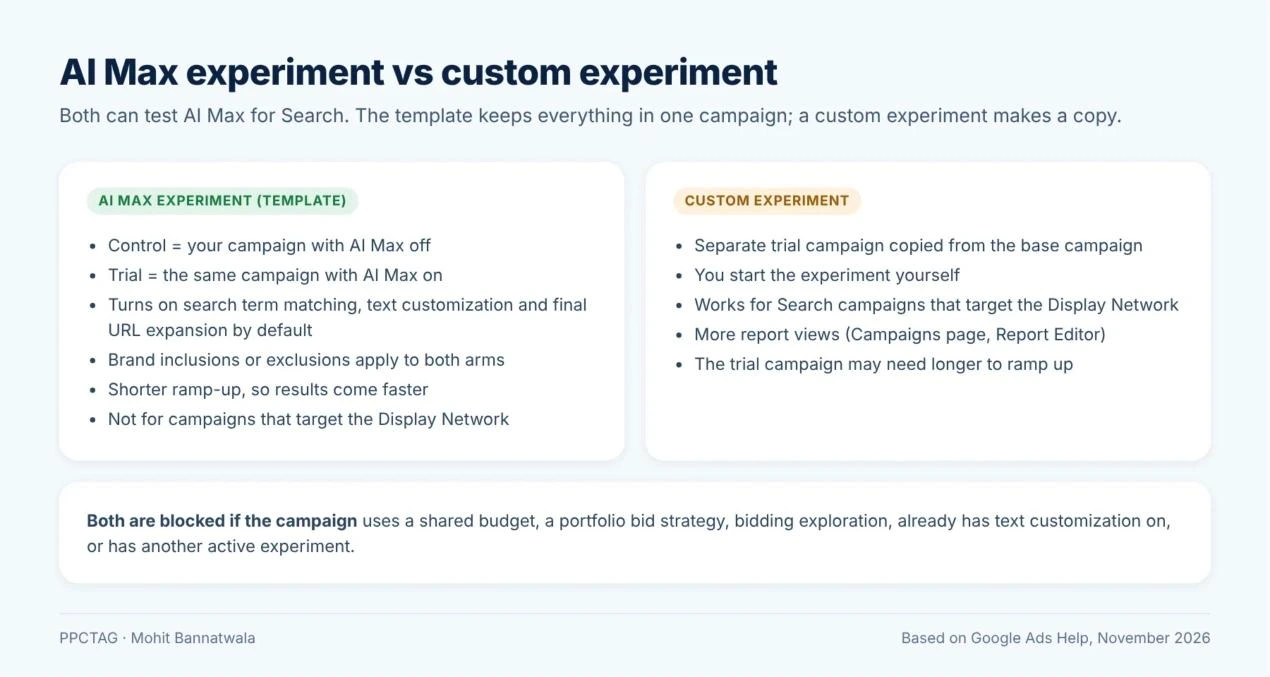
If you end an AI Max experiment without applying it, Google returns the AI Max settings to their pre-experiment state, and removes any brand controls added only for the test.
How to set up a custom experiment
Use a custom experiment when no template fits, for example testing Maximize conversions against Target CPA, a new landing page, broad match on proven keywords, or an audience change.
10. Create the custom experiment
Go to Campaigns > Experiments, select the plus button at the top of the “All experiments” table and select Custom. You can also start one while editing an active campaign: make your changes, then select Save as experiment. Pick the variable to test, select your campaigns, choose a success metric, set dates and a name, and select Schedule.
11. Choose the split and keep sync on
For Search, you can split by cookie (each person sees only one version, however often they search) or by search (each search is assigned separately, so one person can see both). Use a cookie-based split for anything that affects a person over several visits, such as a landing page or bidding toward a lead that converts days later. Display experiments always use cookie-based splits. Google notes that if you use audience lists with a cookie-based split, lists should have at least 10,000 users.
Experiment sync is on by default for custom Search and Display experiments. It copies changes you make to the original campaign (such as new negative keywords) into the trial campaign, one way only. You can only turn it off when you create the experiment, not afterwards, so leave it on.
You can schedule up to five experiments, but only one runs at a time.
How long to run an experiment
Google’s blog recommends four to six weeks to allow for conversion lag. Its experiments FAQ also suggests waiting for one or two full conversion cycles, and notes that the first 7 days can be left out of some experiment reports to allow for ramp-up. Google’s AI Max guide adds: wait 7 to 14 days after the test ends before pulling final numbers, so late leads are counted.
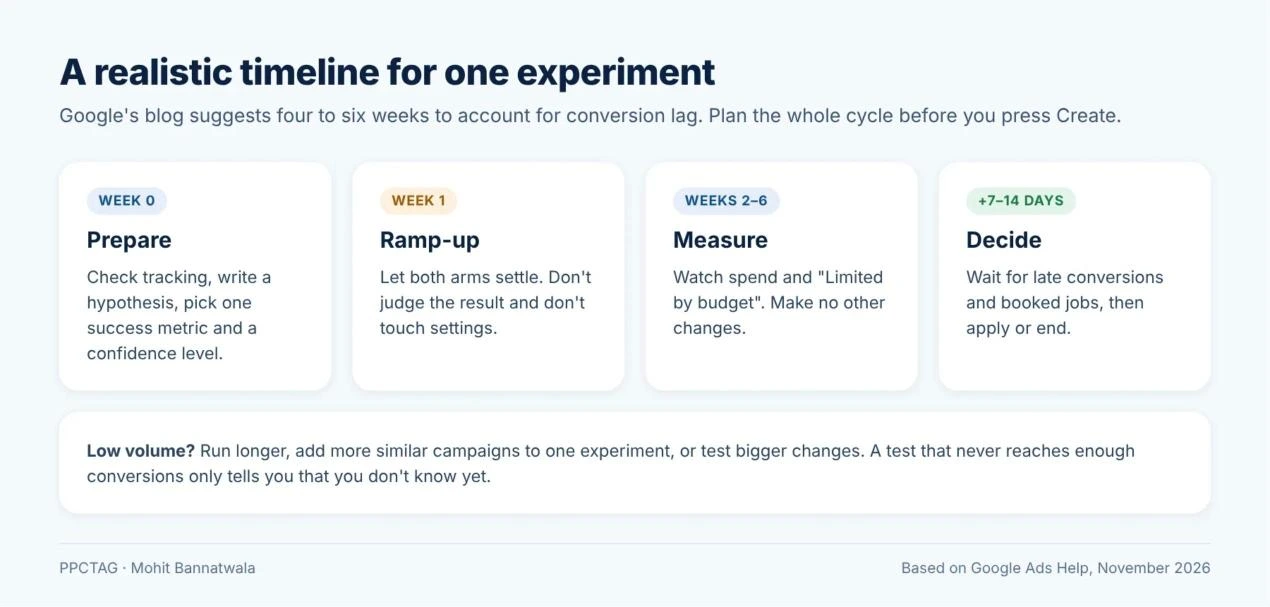
One Google help page still says 2 to 3 weeks may be enough to gather data. For local service businesses, where a lead can take days or weeks to book, we follow the longer advice.
How to read the results
12. Open the experiment report
Go to Campaigns > Experiments and select your experiment. The scorecard shows each metric for the treatment arm, the estimated difference against the control, and a range (the confidence interval). A blue asterisk means the result is statistically significant. The time series chart shows how up to two metrics changed over time in both arms, and some accounts now see an AI insights panel on the Summary tab.
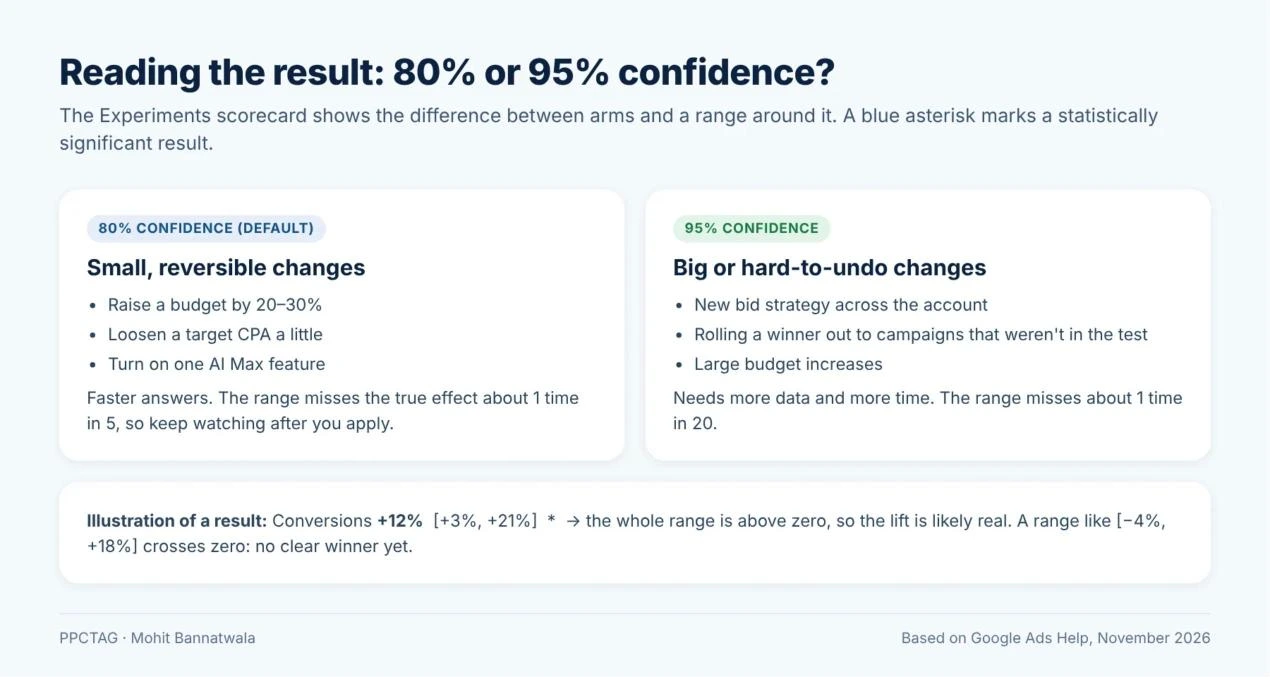
Google’s monitoring page says 80% is the default confidence level, and you can change it. Follow Google’s rule of thumb: 80% for small, reversible changes and 95% for big or hard-to-undo ones. If the range crosses zero (for example, −4% to +18%), there’s no clear winner yet.
Also check:
- Spend. A 50/50 split doesn’t mean equal spend. The arm that wins more auctions can spend more, within the campaign budget. Google’s FAQ says experiment campaigns can spend up to twice the daily budget on a given day, but not more than 30.4 times it in a month.
- “Limited by budget”. If the treatment arm runs out of budget, it can’t show its full effect.
- Lead quality. Compare booked jobs, not just form fills or calls. Our call tracking dashboard guide shows how to connect calls to outcomes.
13. Apply or end the experiment
If the treatment wins, select Apply on the experiment summary card or in the experiments table. For budget and target tests, your campaigns then keep the tested value permanently. If you select End, they return to their original settings.
Watch the auto-apply setting. Google’s help pages say auto-apply is on by default for some experiment types, including the AI Max template. If the result is favourable when the experiment reaches its end date, the change is applied for you. Google’s FAQ also says experiments you end manually are not auto-applied. If you want to review results yourself, untick “Apply experiment changes if results are favorable” during setup.
Limits and privacy
- Alpha feature: the budget or bidding targets template is labelled Alpha and may not be in every account yet.
- Shared budgets and portfolios: Google’s help pages still list these as not eligible for the templates. In the Ads Decoded episode, Google mentioned a pilot that lets some advertisers include them; until it reaches your account, give test campaigns their own budget and strategy.
- Ad group overrides: ad group target CPA or ROAS overrides aren’t changed by a campaign-level target test.
- Locked values: the budget or target under test can’t be edited until the experiment ends.
- Split can’t change: you can’t change the traffic split after an experiment is set up; create a new one instead.
- One at a time: Google recommends running experiments one after another, not at the same time, because they can interfere with each other.
- No user-level data: Google says advertisers can’t access the user-level data needed to rebuild the statistics, so you rely on Google’s reported intervals. Experiments use the same tracking and consent settings as your campaigns; they don’t collect extra personal data.
Common errors and fixes
| Problem | Likely cause | Fix |
|---|---|---|
| Campaign doesn’t appear in the selection list | Shared budget, portfolio bid strategy, active experiment, wrong bid strategy or paused campaign | Give the campaign its own budget and a standard strategy, end other experiments, and make sure it’s active |
| Can’t select a campaign for an AI Max test | Text customization already on, Display Network targeted, bidding exploration on, or legacy settings | Turn off “Optimize your campaign with AI”, untick the Display Network, or use a custom experiment |
| “Failed to create” on a custom experiment | Deprecated ad types (text ads, expanded text ads) or unsupported audiences in the base campaign | Remove the old ads and unsupported audiences, then create it again |
| No clear winner after weeks | Too few conversions, a change too small to detect, or a budget-limited treatment arm | Run longer, add similar campaigns to the same test, test a bigger change, or raise the budget |
| Spend isn’t split 50/50 | One arm wins more auctions | Normal. Judge cost per conversion and conversions, not equal spend |
| Results look good, but leads don’t book | Success metric was a shallow conversion such as page views or clicks to call | Use qualified leads or booked jobs as the success metric and set junk actions to Secondary |
| Change was applied without you | Auto-apply was left on | Untick the auto-apply option at setup, or turn it off from the experiment report before the end date |
What it means for local service businesses
For most local businesses, the most valuable test is the one Google built the budget template for: is more budget worth it? Plenty of accounts sit “Limited by budget” for months because nobody knows whether extra spend would bring profitable leads or just expensive ones.
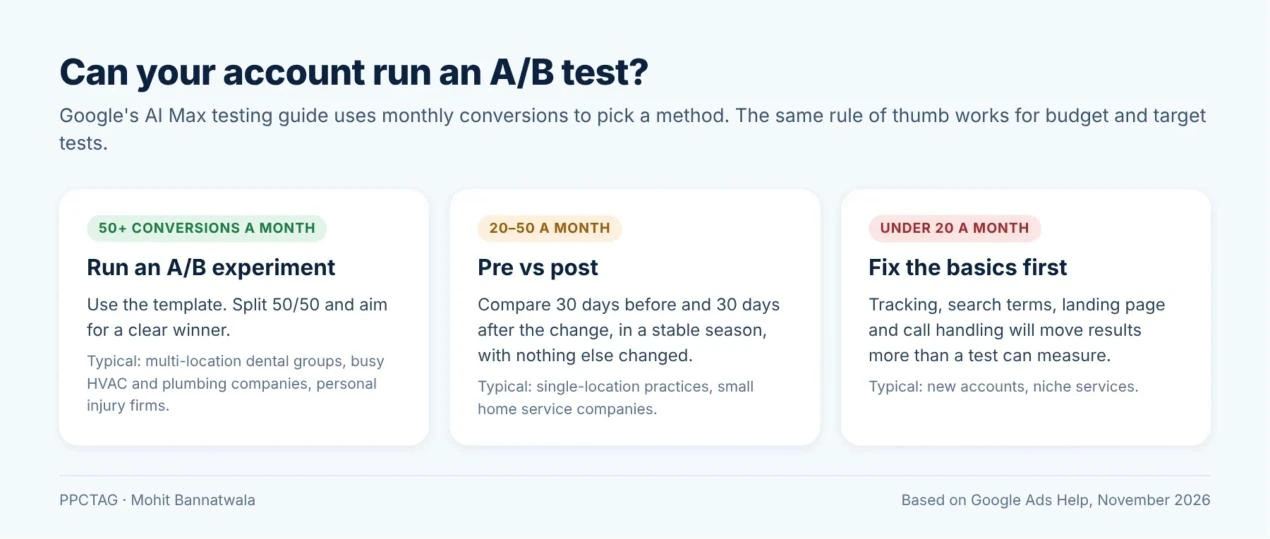
- Dentists: a multi-location group with steady new patient bookings can test a 50% budget increase on its implant or Invisalign campaign. Judge the result on booked consultations, not calls. See Google Ads for dentists.
- HVAC and plumbing: test a looser target CPA before peak season (not during it) to learn how many extra jobs each extra dollar buys. See Google Ads for HVAC.
- Lawyers: personal injury firms often have the volume for an AI Max experiment, but should keep final URL expansion off where ad wording and landing pages are regulated. See Google Ads for lawyers.
- Small single-location businesses: with fewer than 20 leads a month, a test will rarely reach a clear result. Use the Google Ads budget calculator to set a realistic budget, and fix tracking and search terms first.
Browse more industry setups in our Google Ads guides for local businesses.
PPCTAG’s take
The budget template is the most useful thing Google has added to experiments in years, because it answers a money question with real data instead of a forecast. But a test can only measure what you feed it. If “conversions” in your account include clicks on the call button and map directions, the experiment will happily tell you a bigger budget wins, while your phone stays quiet.
- Fix measurement first. Make qualified leads or booked jobs your success metric before you test anything.
- Test one thing. Budget, then target, then AI Max, in that order, with nothing else changing.
- Turn auto-apply off for anything that changes spend. Review the result, then apply it yourself.
- Write down every result, including the ones with no winner. “No difference” is useful: it means you can keep the cheaper option.
- Re-check after applying. Watch the first two to four weeks after you apply a winner; an 80% result can still be wrong.
FAQs
Where are experiments in Google Ads?
Go to Campaigns, then Experiments. Select the plus button to create a new experiment, or select an existing one to see its report.
Can I A/B test my budget in Google Ads?
Yes, with the budget or bidding targets template for Search campaigns using Maximize conversions or Maximize conversion value. Each arm runs on half of its budget, so testing $100 against $200 a day spends about $150 a day during the test. Google labels the feature Alpha, so it may not be in every account yet.
How long should a Google Ads experiment run?
Google recommends four to six weeks to account for conversion lag, and longer if customers take a long time to convert. Wait 7 to 14 days after the end before making a final decision.
What confidence level should I use?
Google suggests 80% confidence for small, directional changes and 95% for major structural changes. 80% is the default in the experiment report, and you can change it.
Will Google apply the experiment automatically?
For some experiment types, including AI Max experiments, auto-apply is on by default and applies the change if results are favourable at the end date. You can untick it during setup or turn it off from the experiment report. Experiments you end manually are not auto-applied.
Can I run an experiment on a campaign with a shared budget?
Not with the standard templates or custom experiments today. Google’s help pages list shared budgets and portfolio bid strategies as not eligible. Give the campaign its own budget and bid strategy before testing.
Not sure your account is ready to test, or what to test first? We’ll review your tracking, budgets and bidding and tell you where an experiment would pay off.
Sources
- Google Ads & Commerce Blog: Build strategic A/B tests to grow your ad performance (Nov 19, 2026)
- Google Ads & Commerce Blog: Make AI Max work for your business with new testing and planning tools (Aug 20, 2026)
- Google Ads Help: About budget or bidding targets experiments for Search (Alpha)
- Google Ads Help: About AI Max experiments
- Google Ads Help: Set up a custom experiment
- Google Ads Help: Monitor your experiments
- Google Ads Help: Experiments frequently asked questions
- Google Ads Help: About experiment sync
- Google Ads Help: The statistical methodology behind experiments
- Google: Four steps to test the impact of AI Max