
Google now lets advertisers whose Local Services Ads (LSA) accounts have moved into Google Ads download their historical LSA reports. This matters because Google’s transition help page says previous performance reports won’t carry over to Google Ads. The download is limited: Google says it includes your lead totals, but not impressions, clicks or other report data. The new Leads page in Google Ads also shows a notice that leads are stored for no more than 60 days and sensitive data for no more than 30 days.
So if you run Local Services Ads, it is worth doing two things now: download your historical report, and start keeping your own copy of new leads. The Leads page can download or schedule exports, and if you need call recordings, you can record calls through your own call tracking number. This guide covers what the historical report includes, what the 60-day notice means, three ways to keep your own records (including call tracking, with our ratings of the best tools) and how to manage leads from the Google Ads mobile app.
Key takeaways
- Historical LSA reports can now be downloaded after your account moves into Google Ads. Google says the file includes your lead totals (summary numbers, not a lead-by-lead list), but not impressions, clicks or other report data.
- The Leads page in Google Ads shows a notice that leads are stored for no more than 60 days and sensitive data for no more than 30 days.
- To keep your own records, download or schedule exports from the Leads page, run a daily backup, and use a call tracking number in your LSA profile if you need call recordings.
- For most local businesses, CallRail or WhatConverts is the simplest way to keep LSA call data long term.
- The Google Ads mobile app is good for replying to leads fast, but it is not a place to archive them.
What is the historical LSA report download?
Quick answer: After your account moves into Google Ads, Google says you can download your historical Local Services Ads reports on the redirection page. The download includes your lead totals. It does not include impressions, clicks or other report data, so it is a summary, not a lead-by-lead list.
Google’s transition help page says previous performance reports won’t carry over to Google Ads and will no longer be accessible. It advises saving your performance data before migrating, or taking screenshots if you need reports immediately. The historical download fills part of that gap.
| Data | In the historical report? | Where else to find it |
|---|---|---|
| Lead totals | Yes | — |
| Impressions and clicks | No (Google says these are not included) | Not available for old LSA data |
| Other report data | No | Screenshots taken before migration |
| Individual leads (lead details, status, notes) | Not part of the report | Leads page in Google Ads |
| Call recordings and message text | Not part of the report | Leads page (sensitive data: no more than 30 days, per Google’s notice) |
How to download your historical LSA report
- Open Local Services Ads after your account has moved into Google Ads. Google says the historical download is on the Local Services Ads redirection page.
- Sign in with the Google account that had access to the LSA profile.
- Download the historical report.
- Check the dates cover the full period you need, then save it with the business name and migration date.
- If you do not see the option yet: Google’s help page has also said a dedicated download page is coming, so it may still be rolling out. Google lists a dedicated phone line for advertisers who are migrating.
For a step-by-step backup of every individual lead and conversation, including a ready-to-use Google Sheets script, see our guide on how to back up LSA leads and download historical reports.
Google Ads shows a 60-day storage notice for LSA leads
Quick answer: The Leads page in Google Ads says leads are stored for no more than 60 days and sensitive data for no more than 30 days. Google’s transition help page says past leads transfer into the new Leads page, and in the home inspection account we checked, leads from early September were still listed in mid-November. Don’t rely on that lasting: keep your own copy.
After migration, your LSA leads live under Goals → Leads in Google Ads, on the Pay-per-lead leads tab. At the top of that page, Google now shows a notice that leads are stored for no more than 60 days and sensitive data for no more than 30 days.
The notice does not list exactly which fields count as sensitive. Plan as if call recordings, message text and customer contact details may disappear after 30 days, and everything else after 60.
| What | How long Google Ads keeps it | What to do |
|---|---|---|
| Lead row (date, type, status, charge) | No more than 60 days | Export monthly or back up daily |
| Sensitive data (likely recordings, messages, contact details) | No more than 30 days | Store calls through your own call tracking number |
| Historical report (totals) | Download any time | Save a copy now |
| Your own CRM or call tracking data | As long as you keep it | Make this your record of truth |
Three ways to keep your own copy of LSA lead data
Quick answer: Use the Download or Schedule option on the Leads page for regular exports, run an automatic daily backup to Google Sheets, and set a call tracking number as your LSA business phone if you need call recordings in your own account.
The Download button on the Leads page exports the table to Excel .csv, .csv, .tsv, .pdf, .xlsx, .xml or Google Sheets. It also offers Email now and Schedule, so you can set up recurring exports instead of remembering to download.
| Method | What it saves | Effort | Cost |
|---|---|---|---|
| 1. Download or schedule exports from the Leads page | The lead rows currently in the Leads table | A few minutes; Schedule makes it automatic | Free |
| 2. Automatic daily backup (Google Sheets script) | Leads and conversations the API returns | About 1 hour to set up once | Free |
| 3. Call tracking number in your LSA profile | Calls, caller number, duration and recordings in your own tool | About 30 minutes, plus a Google support request if needed | From about $30 to $80 a month |
Method 2 is covered in full, with the complete script, in our LSA backup guide. The rest of this article focuses on method 3, because it is the only one that records calls in your own account.
Need help keeping your LSA data?
Not sure which backup method fits your accounts?
I can help you set up the daily backup, a call tracking number for your LSA profile, or both, before more of your lead history disappears.
How call tracking saves your LSA calls and recordings
Quick answer: Create a tracking number in a call tracking tool and set it as the business phone in your LSA profile. Customers still call Google’s forwarding number, but the call then passes through your tracking number, which logs and records it in your own account, independent of Google’s storage limits.
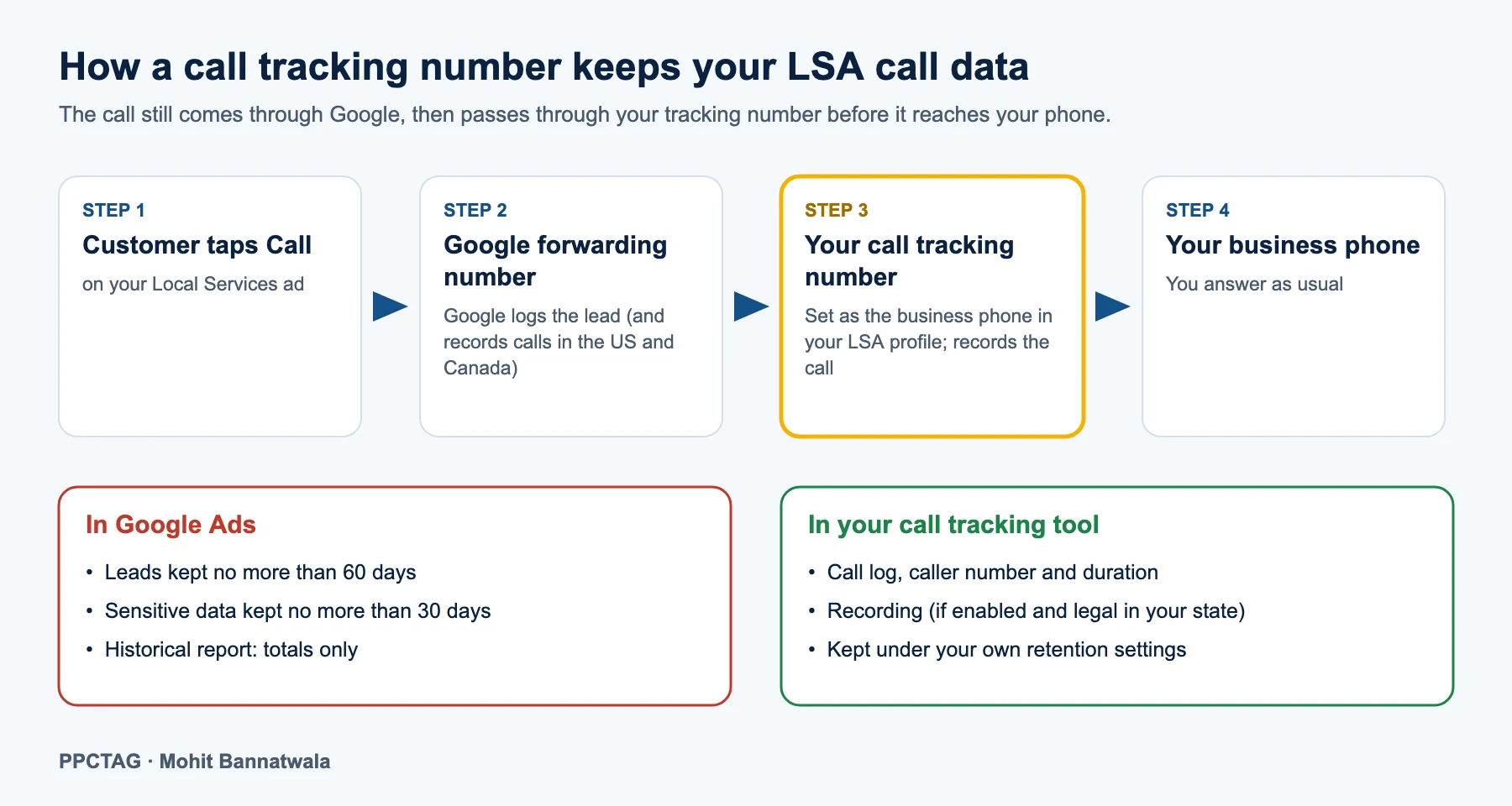
Your Local Services ad always shows a Google forwarding number, so website tricks like dynamic number insertion do not work here. What you can change is the number Google forwards to. Point it at a tracking number, and that number forwards to your real phone.
How to set it up
- Create a tracking number in your call tracking tool for Local Services Ads. CallRail and WhatConverts both have a dedicated LSA option or guide.
- Forward it to your real business phone and turn on call recording if you want recordings.
- Set it as the business phone in your LSA profile. In some accounts you can edit it yourself; in others Google support has to make the change, so allow a few days.
- Test it: search for your service, call the number on your ad from another phone, and check the call appears in your tracking tool.
- Connect it to Google Ads if your tool supports it, so call outcomes can be imported later.
What to watch out for
- Recording laws: some US states require every party to agree to recording. Turn on a recording announcement in your tool.
- The “Call from Google” message: Google notes you may not hear it if your business number uses call forwarding or VoIP. Your tracking tool will still tag the call as LSA.
- Message leads: when you reply to message leads by phone, call back using the number shown in the lead, not the customer’s raw number, so the conversation stays linked to the lead.
- Name, address and phone consistency: keep your main number on your Google Business Profile and website; the tracking number only needs to be in the LSA profile.
Best call tracking tools for Local Services Ads (rated)
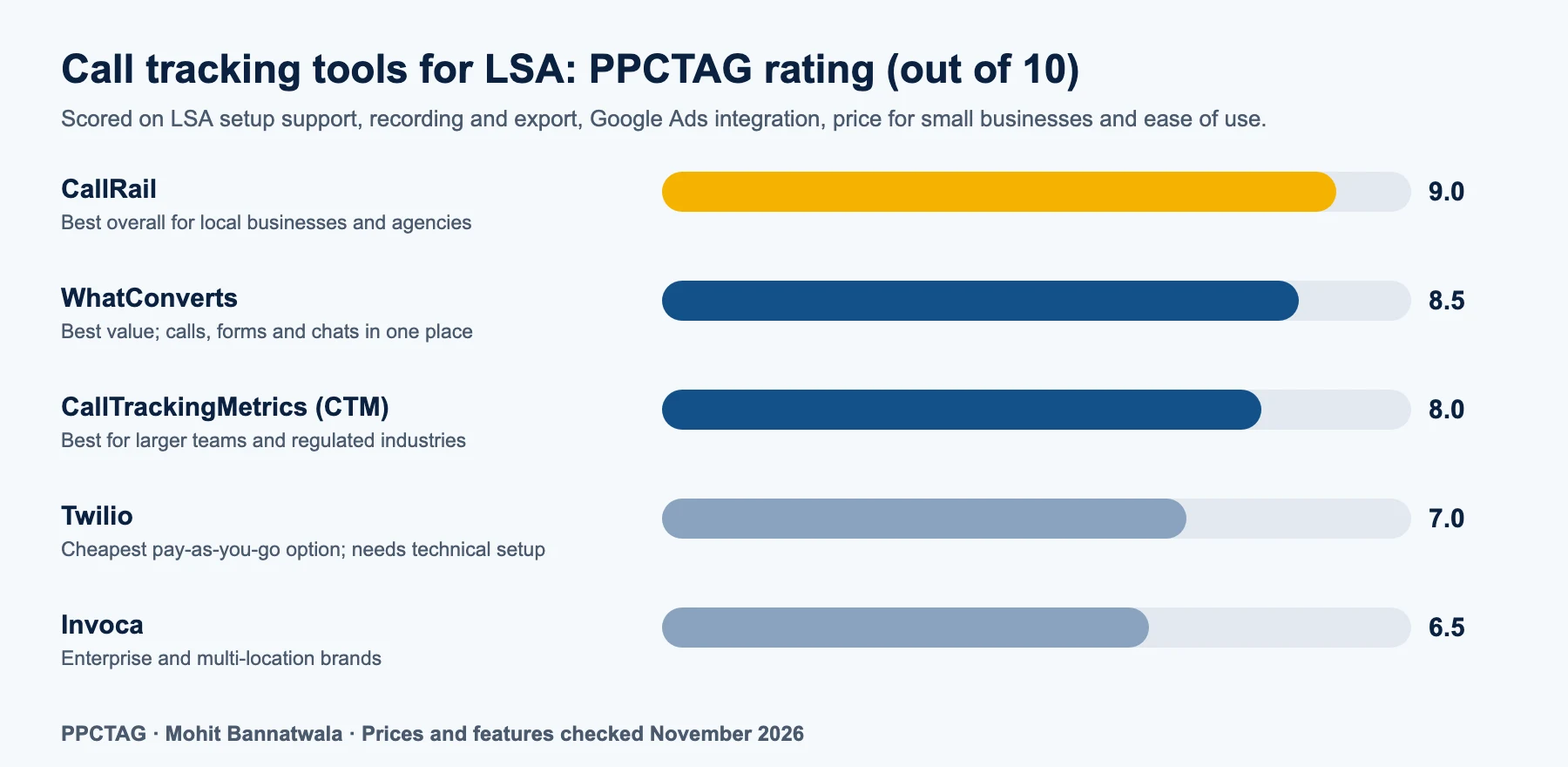
Quick answer: CallRail is our top pick for most local businesses and agencies, WhatConverts is the best value, and CallTrackingMetrics suits larger teams and regulated industries. Twilio is the cheapest option if you are comfortable building the call flow yourself, and Invoca is built for enterprise brands.
| Tool | Starting price* | LSA fit | Best for | PPCTAG rating |
|---|---|---|---|---|
| CallRail | About $50/month (annual billing), 5 numbers and 250 minutes | Dedicated LSA number option in setup | Most local businesses and agencies | 9.0 |
| WhatConverts | $30/month including $30 usage credit | Step-by-step LSA guide | Best value; tracks calls, forms and chats together | 8.5 |
| CallTrackingMetrics (CTM) | $79/month (Marketing Lite) | Works as your LSA business number | Larger teams, advanced routing, regulated industries | 8.0 |
| Twilio | Pay as you go: about $1.15/month per local number, $0.0085/min to receive, $0.014/min to forward, $0.0025/min to record | Works as your LSA business number once you build a forward-and-record call flow | Agencies or tech-savvy owners who want the lowest cost and full control | 7.0 |
| Invoca | Custom quote | Works as a forwarding number | Enterprise and multi-location brands | 6.5 |
*Prices as listed by vendors and review sites in November 2026; usage charges for extra minutes and numbers apply. Check each vendor’s pricing page before you buy.
How we scored them: LSA setup support, recording and export, Google Ads integration, price for a small business and ease of use. CallRail scores highest because its LSA setup is built in and it fits most local service accounts. WhatConverts is close behind on value. CTM is strong but more than most small businesses need. Twilio costs only a few dollars a month for most small accounts, but it is a developer platform: you set up the forwarding and recording yourself (for example with Twilio Studio) and get no ready-made marketing reports. Invoca is excellent for large call centres but priced for enterprise budgets.
What if you use no call tracking tool? Your LSA ad still shows Google’s forwarding number, and calls are logged on the Leads page in Google Ads. That costs nothing, but your only record of calls is inside Google Ads, under the storage notice described above. You can still export the lead rows with Download or Schedule.
If you already use a field service tool such as ServiceTitan or Housecall Pro, check whether it can import LSA leads too. For reporting, see our Google Ads and call tracking dashboard guide.
How to manage LSA leads from the Google Ads mobile app
Quick answer: Install the Google Ads app, sign in, turn on push notifications and open your pay-per-lead account to see new leads, reply to messages and call customers back. The app is for responding quickly; it shows the same leads as the Leads page, so do your exports and backups on desktop.
The Leads page in Google Ads now suggests managing leads on the go in the Google Ads mobile app. Fast replies matter for Local Services Ads, because your responsiveness affects how often your ad shows. To set it up:
- Install the Google Ads app on iPhone or Android and sign in with the Google account that has access to the LSA campaign.
- Turn on push notifications: on iPhone, tap More → Settings → Turn on notifications; on Android, allow notifications when asked.
- Open the account with your pay-per-lead campaign and go to its leads. Menu names can differ between app versions, so look for Leads under goals or conversions.
- Open a lead to see its details, reply to message leads and call the customer back.
- Rate leads and update their status after the job, so Google learns which leads are valid.
You can also receive new lead notifications by email and, in the US, by text message. Whichever you use, set a rule for your team: reply to every message lead within a few minutes during business hours.
Monthly LSA data checklist
- Download the historical LSA report once and store it safely
- Check your scheduled Leads export arrived (or download it from the Leads page)
- Check the daily backup sheet has new rows from every account
- Confirm calls are appearing in your call tracking tool
- Download or keep recordings of important calls (disputes, big jobs)
- Rate and update the status of last month’s leads
What it means for local service businesses
For home inspectors, plumbers, roofers, cleaners and other local businesses running Google Ads, LSA lead history is real business data: it shows which jobs came from Google, what each lead cost and how disputes were handled. With a 60-day storage notice on the Leads page, a business that only checks leads in Google Ads risks losing that history. For example, home inspection accounts that rely on realtor season need last year’s numbers to plan this year’s budget.
PPCTAG’s take
The historical download is useful, but do not treat it as a backup: it is a summary. The 60-day notice is the bigger change. In the accounts we manage, we now treat Google Ads as a place to receive leads, not to store them. Every LSA account should have a call tracking number in its profile and a daily backup running. Both take less than a day to set up and protect data you cannot get back later.
FAQs
Can I download historical Local Services Ads reports?
Yes. After your account moves into Google Ads, Google says you can download your historical Local Services Ads reports on the redirection page. The download includes your lead totals, but not impressions, clicks or other report data.
How long does Google Ads keep LSA leads?
The Leads page in Google Ads shows a notice that leads are stored for no more than 60 days and sensitive data for no more than 30 days. Use the Download or Schedule option on the Leads page to keep your own copy.
Will Google delete my LSA call recordings?
Google does not list every sensitive field, but you should assume recordings and message text may be removed after 30 days. Routing calls through your own call tracking number keeps recordings in your own account.
Can I use a call tracking number with Local Services Ads?
Yes. Create a tracking number in a tool such as CallRail or WhatConverts and set it as the business phone in your LSA profile. Customers still see Google’s forwarding number, which then forwards to your tracking number.
Which call tracking tool is best for Local Services Ads?
CallRail is our top pick for most local businesses and agencies, WhatConverts offers the best value, and CallTrackingMetrics suits larger or regulated businesses.
Can I manage LSA leads from my phone?
Yes. Use the Google Ads mobile app with push notifications turned on to see new leads, reply to messages and call customers back. Do your exports and backups from the Leads page on desktop.
Sources
- Google Ads Help: Local Services Ads transition to Performance Max campaigns with pay-per-lead goals
- Google Ads Help: Manage leads and jobs
- Google Local Services Help: How leads work
- Google Ads Help: Best practices for pay-per-lead goals
- Google Ads Help: Set up push notifications in the Google Ads mobile app
- Google Ads Help: About lead form assets (lead storage)