
If you run Local Services Ads (LSA), your lead history is about to live somewhere new. Google is moving LSA campaigns into Google Ads as Performance Max campaigns with pay-per-lead goals, and the old LSA dashboard closes for each account on its migration day. Past leads and messages move across. Most of the old performance reports do not.
In mid-November 2026, Google added a way to download historical Local Services Ads reports from the LSA redirection page. That covers lead spend and charged leads, but it isn’t a full backup. If you manage several LSA accounts, or you want every lead, call and message in a file you control, you need a second method: a bulk export to Google Sheets through the Google Ads API.
This guide covers both. First, what Google’s download includes and what it leaves out. Then the bulk backup we set up for a manager account with 21 LSA accounts, step by step, with screenshots from the real setup.
Key takeaways
- Google’s new historical LSA download gives you total lead spend and charged leads, split by phone, message and booking. It has no impressions, clicks or lead-by-lead detail.
- Past leads, messages and older call recordings move to Goals > Leads in Google Ads automatically.
- For a full, lead-level backup across many accounts, export
local_services_leadandlocal_services_lead_conversationfrom the Google Ads API into Google Sheets with Apps Script. - Google sunset Google Ads API developer tokens on September 9, 2026. Access now depends on your Google Cloud project’s access level. Explorer access (2,880 production operations a day) is enough for most agency backups.
- The API doesn’t return everything: healthcare-category leads aren’t available, contact details are removed for wiped-out leads, and some older calls come back without duration or recording details.
What’s changing with Local Services Ads data
Google began moving LSA accounts into Google Ads in August 2026, starting with select U.S. home and storefront service businesses. Service-area businesses and accounts with custom bidding or booking setups follow in late 2026, and non-U.S. accounts and remaining categories in 2027. Each account administrator gets an email 14 days before their migration date.
After migration, signing in to the LSA dashboard sends you to Google Ads. Here is what happens to each type of data, based on Google’s transition guide:
| Data | After migration |
|---|---|
| Past leads, contact details, message history, older call recordings | Moved to the Leads page in Google Ads |
| Campaign settings (locations, service types, budget, ad schedule, photos) | Moved to the new campaign automatically |
| Past impressions, clicks, weekly spend, ad-level reports | Not moved to Google Ads |
| Lead spend and charged lead totals | Available as a download on the LSA redirection page |
So nothing important disappears on day one. The risk is slower: reports you can no longer rebuild, lead data spread across separate accounts, and a Leads page that you have to open one business at a time.
Three ways to save your LSA data
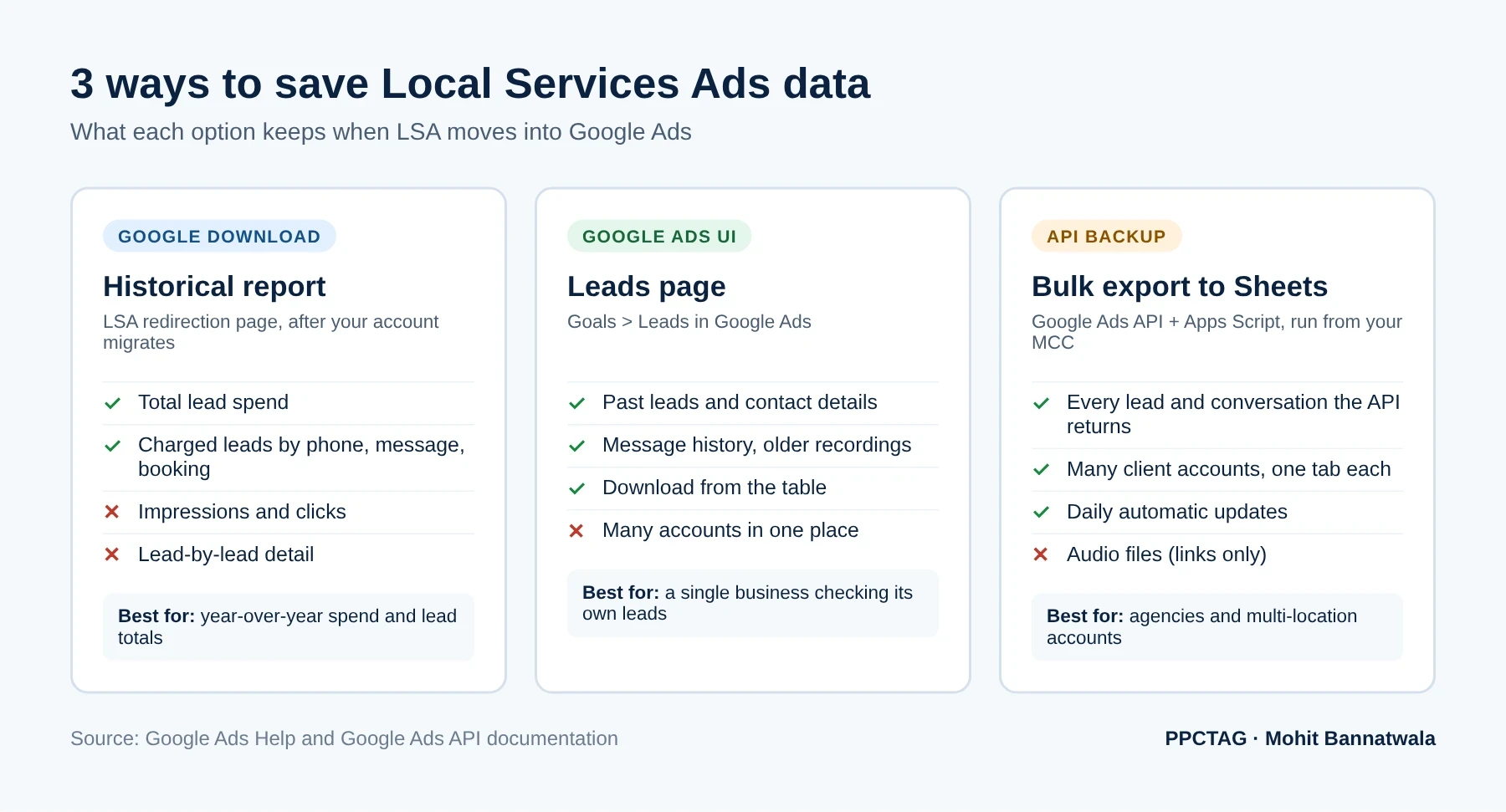
Which one you need depends on how many accounts you manage and what you want to do with the data:
- One business, simple reporting: Google’s historical download plus the Leads page is enough.
- An agency or a business with several locations: use the download for totals, and set up the bulk API backup for lead-level records across every account.
- Anyone who hasn’t migrated yet: also screenshot or export impressions, clicks and weekly spend from the LSA dashboard now, because neither method gives you those later.
Option 1: Download Google’s historical LSA report
This is the quickest option and needs no setup.
- Open the Local Services Ads redirection page. Google links to it at the top of its LSA transition help article. It’s also where you land if you try to sign in to the old LSA dashboard after migration.
- Sign in with the Google account that had access to the LSA profile.
- Download the historical report.
- Check the file covers the period you need and save it with the business name and migration date.
The file holds total lead spend and the number of charged leads, split by phone, message and booking. Google states that it does not include impressions, clicks or other report data. Parts of the same help article still say the download is “coming soon”, so if you don’t see it yet, it may still be reaching accounts. Google lists a dedicated support line for migrating LSA advertisers at the top of that article.
Option 2: Use the Leads page in Google Ads
In Google Ads, go to Goals > Leads. This page replaces the LSA lead inbox. Google says past customer lead history, including contact details, message history and older call recordings, transfers there automatically. You can review, reply to and download leads from the table.
It works well for a single business. For an agency it means opening each client account separately, and the export is a manual step you have to remember. That’s where the bulk backup helps. For a full tour of the Leads page, charge statuses and lead details, see our LSA migration walkthrough for home inspection accounts.
Option 3: Back up every LSA lead in bulk with Google Sheets
This method uses two Google APIs to pull data from every LSA account under your manager account (MCC) into one Google Sheet, then keeps it updated daily.
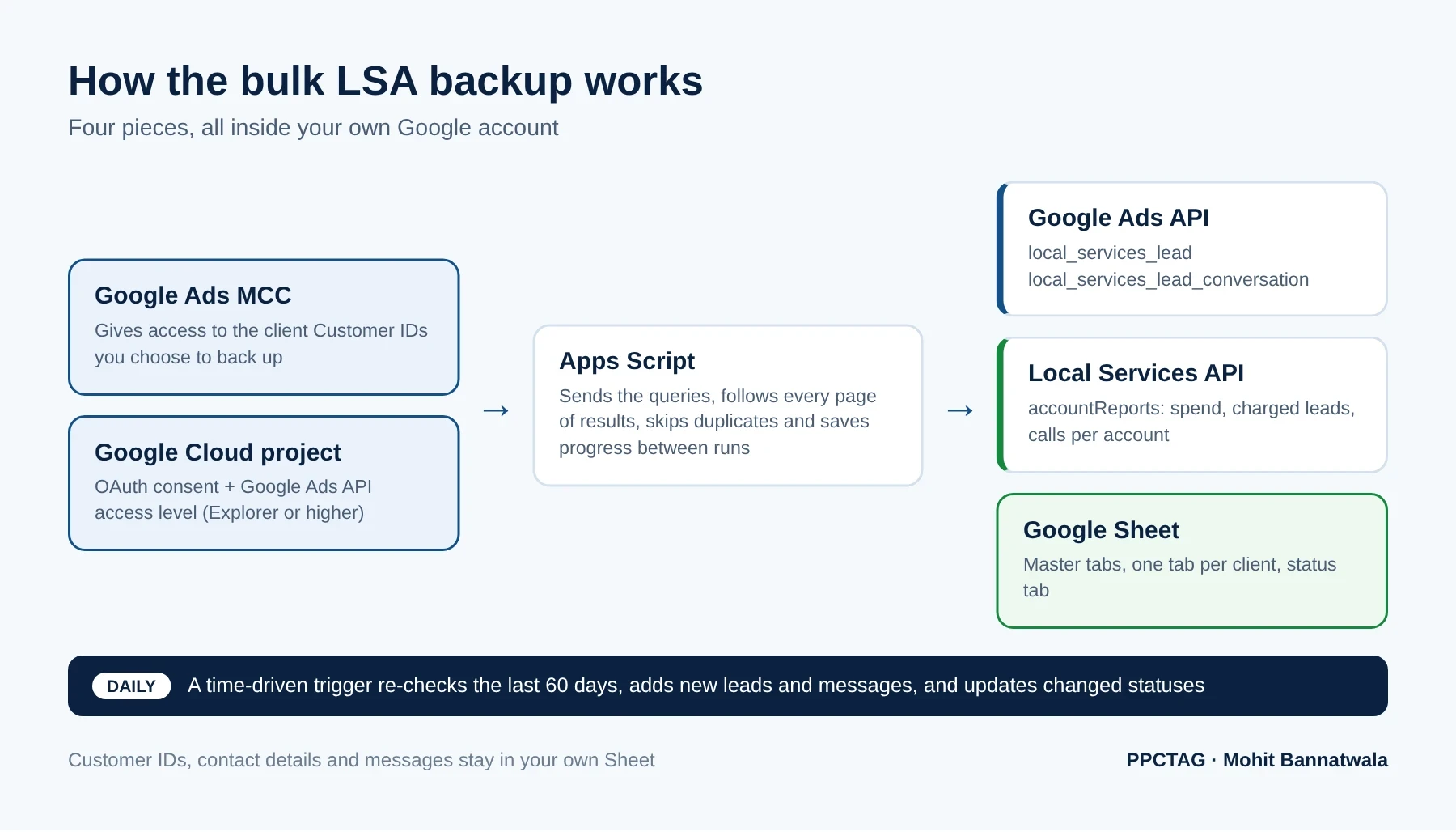
Each API returns different data, so you use both:
| Data | Where it comes from | Limit to know |
|---|---|---|
| Spend, charged leads, calls and connected calls per account | Local Services API: accountReports | Account totals for a date range, not a lead list. Defaults to the current month unless you set dates. |
| Lead ID, type, status, category, charge and credit status, contact details | Google Ads API: local_services_lead | Contact details are empty for wiped-out leads. Healthcare-category leads aren’t returned. |
| Calls, messages, call duration, message text, recording and attachment links | Google Ads API: local_services_lead_conversation | Links only, not the audio or attachment files. Some older calls have no call details. |
Google has deprecated the old Detailed Lead Reports endpoint in the Local Services API and points developers to the Google Ads API for leads and conversations, so don’t build a new backup on it.
What you need before you start
- A Google Ads manager account (MCC) with access to every LSA client you want to back up.
- The MCC Customer ID and a list of the client Customer IDs. These are 10-digit Google Ads IDs, not Cloud project numbers.
- A Google Cloud project you can configure, and permission to enable APIs in it.
- A Google Sheet stored somewhere private. It will hold customer names, phone numbers and messages.
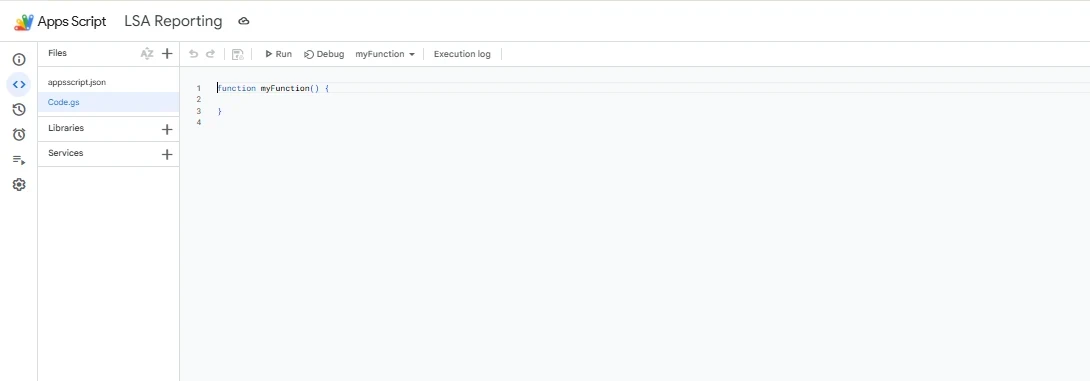
Step 1: Create the Sheet and Apps Script project
- Create a Google Sheet, for example “LSA Backup”.
- Go to Extensions > Apps Script. This creates a script attached to the Sheet.
- In Project Settings, tick Show “appsscript.json” manifest file in editor. You’ll need it in Step 4.
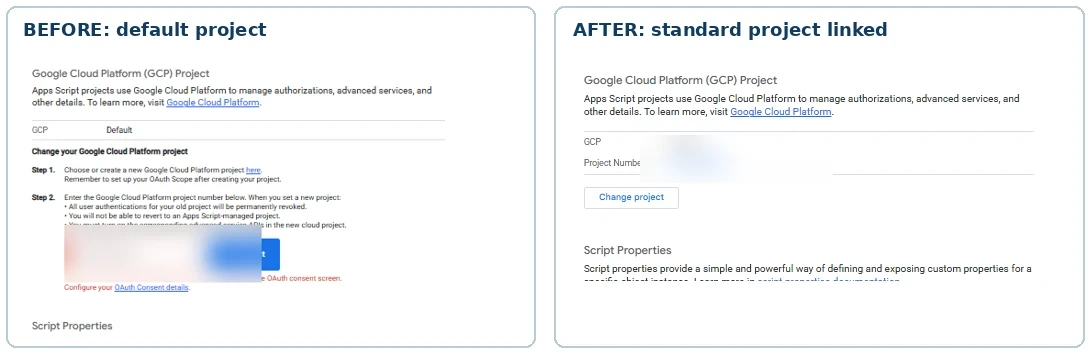
Step 2: Link a standard Google Cloud project
By default, Apps Script uses a hidden “default” Cloud project. To call the Google Ads API you need your own standard project.
- In the Google Cloud Console, create or choose a project for LSA reporting and note its project number.
- Set up the OAuth consent screen (Google Auth Platform). Choose Internal if your Google Workspace organisation allows it. Otherwise choose External and add your own account as a test user.
- Back in Apps Script, open Project Settings > Google Cloud Platform (GCP) Project, click Change project, enter the project number and click Set project.
If Apps Script shows a message asking you to configure the OAuth consent screen, finish that in the Cloud Console first and try again. When it works, the project shows a project number instead of “Default”.
Step 3: Enable both APIs and check your access level
- In APIs & Services, enable the Local Services API (for account reports).
- Enable the Google Ads API in the same project.
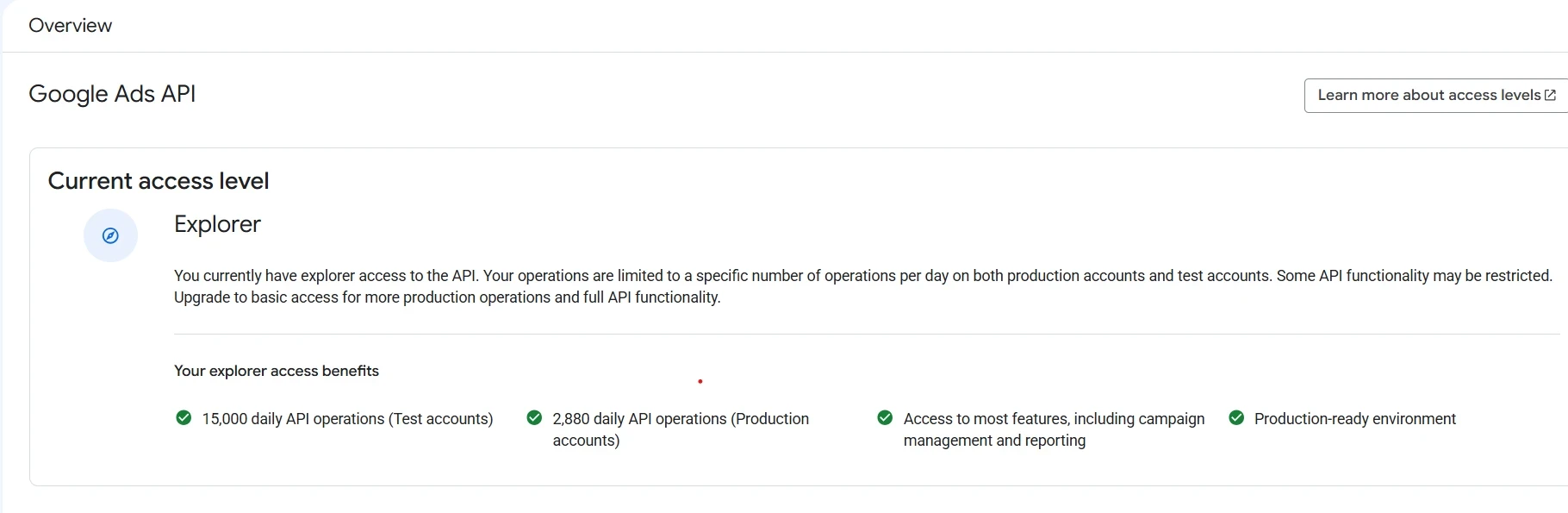
- Open the Google Ads API Overview page in the Cloud Console and check the current access level.
This step changed in September 2026. Google sunset Google Ads API developer tokens on September 9, 2026, and access levels now belong to the Cloud project that creates your OAuth credentials. A new project only gets Test access, which can’t read real client accounts. Apply for Explorer access from the same Overview page. Google says approval is usually automated.
| Access level | Production operations per day | How to get it |
|---|---|---|
| Test | None (test accounts only) | Automatic when you enable the API |
| Explorer | 2,880 | Apply on the Overview page, usually automated |
| Basic | 15,000 | Brand verification first, then apply |
| Standard | Unlimited | Manual review, about 10 business days |
Explorer was enough for our backup of 15 accounts. Each page of results counts as an operation, so 2,880 a day leaves plenty of room for a daily sync.
Step 4: Add the OAuth scopes
Open appsscript.json and add these scopes to the oauthScopes list. Keep any scopes already there.
"oauthScopes": [
  "https://www.googleapis.com/auth/spreadsheets.currentonly",
  "https://www.googleapis.com/auth/script.external_request",
  "https://www.googleapis.com/auth/adwords",
  "https://www.googleapis.com/auth/script.scriptapp"
]
The adwords scope covers both the Google Ads API and the Local Services API. script.scriptapp is only needed so the script can create its own daily trigger. Save, run any function once, and approve the permissions when Google asks.
The complete Apps Script (Code.gs)
Paste the whole script below into Code.gs, replacing everything in the file, then change two settings at the top:
MCC_ID: your 10-digit manager (MCC) account ID. Dashes are fine.LSA_SELECTED_IDS: the 10-digit Account IDs you want to back up. Leave the examples for now and fill this in after Step 5, using column B of the LSA_Report tab.
Click Save. The first time you run any function, Google asks you to approve the permissions from Step 4.
/**
 * PPCTAG - Local Services Ads lead backup for Google Sheets (Code.gs)
 * Guide: https://ppctag.com/back-up-local-services-ads-data/
 *
 * RUN ORDER (Apps Script editor > choose the function > Run):
 *  1. pullLSAReport                  - test access; lists every LSA account under your MCC
 *  2. testLSALeadDetails             - optional; tests lead + conversation access for one account
 *  3. Edit LSA_SELECTED_IDS below with the Account IDs you want to back up
 *  4. startSelectedLSABackup         - ONCE; backs up all history (resumes itself every 10 min)
 *  5. Check the LSA_Backup_Status tab until every row says Complete
 *  6. lsaDailySplitHistoricalBackup  - ONCE; one LSA_<accountID> tab per client
 *  7. lsaDailyInstall                - ONCE; installs the daily backup (about 3-4 AM)
 *  8. lsaDailyStart                  - once by hand to test; check LSA_Daily_Status
 *  Optional: checkOldCallDetails (diagnostics), lsaDailyStop (stop daily backups)
 */

// Your manager (MCC) account ID, 10 digits. Dashes are fine.
const MCC_ID = '123-456-7890';

function pullLSAReport() {
  const managerId = MCC_ID.replace(/\D/g, '');
  if (managerId.length !== 10) {
    throw new Error('Please enter your 10-digit MCC ID.');
  }
  const ss = SpreadsheetApp.getActiveSpreadsheet();
  if (!ss) {
    throw new Error('Open this script from Google Sheets > Extensions > Apps Script.');
  }
  const timezone = ss.getSpreadsheetTimeZone();
  const today = Utilities.formatDate(new Date(), timezone, 'yyyy-MM-dd');
  const [year, month, day] = today.split('-').map(Number);

  const params = {
    query: 'manager_customer_id:' + managerId,
    'startDate.year': year,
    'startDate.month': month,
    'startDate.day': 1,
    'endDate.year': year,
    'endDate.month': month,
    'endDate.day': day,
    pageSize: 1000
  };
  const endpoint = 'https://localservices.googleapis.com/v1/accountReports:search';
  let reports = [];
  let pageToken = '';

  do {
    const requestParams = Object.assign({}, params);
    if (pageToken) requestParams.pageToken = pageToken;
    const queryString = Object.keys(requestParams)
      .map(key => encodeURIComponent(key) + '=' + encodeURIComponent(requestParams[key]))
      .join('&');
    const response = UrlFetchApp.fetch(endpoint + '?' + queryString, {
      method: 'get',
      headers: { Authorization: 'Bearer ' + ScriptApp.getOAuthToken() },
      muteHttpExceptions: true
    });
    if (response.getResponseCode() !== 200) {
      throw new Error('API Error ' + response.getResponseCode() + ': ' + response.getContentText());
    }
    const data = JSON.parse(response.getContentText());
    reports = reports.concat(data.accountReports || []);
    pageToken = data.nextPageToken || '';
  } while (pageToken);

  const headers = [
    'Business Name', 'Account ID', 'Charged Leads', 'LSA Spend', 'Cost Per Lead',
    'Total Calls', 'Connected Calls', 'Weekly Budget', 'Previous Leads',
    'Previous Spend', 'Rating', 'Reviews', 'Currency'
  ];
  const rows = reports.map(r => {
    const leads = Number(r.currentPeriodChargedLeads || 0);
    const spend = Number(r.currentPeriodTotalCost || 0);
    return [
      r.businessName || '',
      String(r.accountId || ''),
      leads,
      spend,
      leads ? spend / leads : '',
      Number(r.currentPeriodPhoneCalls || 0),
      Number(r.currentPeriodConnectedPhoneCalls || 0),
      Number(r.averageWeeklyBudget || 0),
      Number(r.previousPeriodChargedLeads || 0),
      Number(r.previousPeriodTotalCost || 0),
      Number(r.averageFiveStarRating || 0),
      Number(r.totalReview || 0),
      r.currencyCode || ''
    ];
  });

  const sheet = ss.getSheetByName('LSA_Report') || ss.insertSheet('LSA_Report');
  sheet.clearContents();
  sheet.getRange('B:B').setNumberFormat('@');
  sheet.getRange(1, 1, 1, headers.length).setValues([headers]);
  if (rows.length > 0) {
    sheet.getRange(2, 1, rows.length, headers.length).setValues(rows);
    sheet.getRange(2, 4, rows.length, 2).setNumberFormat('#,##0.00');
  }
  sheet.setFrozenRows(1);
  sheet.getRange(1, 1, 1, headers.length).setFontWeight('bold');
  sheet.autoResizeColumns(1, headers.length);
  Logger.log('LSA accounts imported: ' + reports.length);
}

function testLSALeadDetails() {
  const ss = SpreadsheetApp.getActiveSpreadsheet();
  const reportSheet = ss.getSheetByName('LSA_Report');
  if (!reportSheet || reportSheet.getLastRow() < 2) {
    throw new Error('Run pullLSAReport first.');
  }
  // First client from your LSA_Report tab
  const customerId = String(reportSheet.getRange('B2').getDisplayValue()).replace(/\D/g, '');
  const managerId = MCC_ID.replace(/\D/g, '');
  if (customerId.length !== 10 || managerId.length !== 10) {
    throw new Error('Check the client ID and MCC ID.');
  }

  function searchAds(query) {
    const url = 'https://googleads.googleapis.com/v26/customers/' + customerId + '/googleAds:search';
    const response = UrlFetchApp.fetch(url, {
      method: 'post',
      contentType: 'application/json',
      headers: {
        Authorization: 'Bearer ' + ScriptApp.getOAuthToken(),
        'login-customer-id': managerId
      },
      payload: JSON.stringify({ query: query }),
      muteHttpExceptions: true
    });
    const data = JSON.parse(response.getContentText());
    if (response.getResponseCode() !== 200) {
      throw new Error('Google Ads API error: ' + JSON.stringify(data.error || data).slice(0, 1200));
    }
    return data.results || [];
  }

  const leadQuery = `
    SELECT
      local_services_lead.id,
      local_services_lead.creation_date_time,
      local_services_lead.contact_details,
      local_services_lead.lead_type,
      local_services_lead.lead_status,
      local_services_lead.lead_charged,
      local_services_lead.category_id
    FROM local_services_lead
    ORDER BY local_services_lead.creation_date_time DESC
    LIMIT 50
  `;
  const conversationQuery = `
    SELECT
      local_services_lead_conversation.id,
      local_services_lead_conversation.lead,
      local_services_lead_conversation.event_date_time,
      local_services_lead_conversation.conversation_channel,
      local_services_lead_conversation.participant_type,
      local_services_lead_conversation.message_details.text,
      local_services_lead_conversation.phone_call_details.call_duration_millis,
      local_services_lead_conversation.phone_call_details.call_recording_url
    FROM local_services_lead_conversation
    ORDER BY local_services_lead_conversation.event_date_time DESC
    LIMIT 50
  `;

  const leads = searchAds(leadQuery);
  const conversations = searchAds(conversationQuery);

  function writeTestSheet(name, headers, rows) {
    const sheet = ss.getSheetByName(name) || ss.insertSheet(name);
    sheet.clearContents();
    const allRows = [headers].concat(rows.map(row => row.map(value => {
      const text = String(value == null ? '' : value);
      return /^[=+\-@]/.test(text) ? "'" + text : text;
    })));
    const range = sheet.getRange(1, 1, allRows.length, headers.length);
    range.setNumberFormat('@');
    range.setValues(allRows);
    sheet.setFrozenRows(1);
  }

  writeTestSheet('LSA_Leads_Test', [
    'Account ID', 'Lead ID', 'Date', 'Customer Name', 'Phone Number', 'Extension',
    'Lead Type', 'Lead Status', 'Charged', 'Category'
  ], leads.map(row => {
    const l = row.localServicesLead || {};
    const c = l.contactDetails || {};
    return [customerId, l.id, l.creationDateTime, c.consumerName, c.phoneNumber,
      c.phoneNumberExtension, l.leadType, l.leadStatus, l.leadCharged, l.categoryId];
  }));

  writeTestSheet('LSA_Conversations_Test', [
    'Account ID', 'Conversation ID', 'Lead Resource', 'Date', 'Channel', 'Participant',
    'Message Text', 'Call Duration (MM:SS)', 'Recording URL'
  ], conversations.map(row => {
    const c = row.localServicesLeadConversation || {};
    return [customerId, c.id, c.lead, c.eventDateTime, c.conversationChannel, c.participantType,
      (c.messageDetails || {}).text,
      formatCallDuration((c.phoneCallDetails || {}).callDurationMillis),
      (c.phoneCallDetails || {}).callRecordingUrl];
  }));

  Logger.log('Lead test completed successfully.');
  Logger.log('Leads returned: ' + leads.length);
  Logger.log('Conversations returned: ' + conversations.length);
}

function formatCallDuration(milliseconds) {
  if (milliseconds === null || milliseconds === undefined || milliseconds === '') return '';
  const totalSeconds = Math.floor(Number(milliseconds) / 1000);
  if (!Number.isFinite(totalSeconds)) return '';
  const hours = Math.floor(totalSeconds / 3600);
  const minutes = Math.floor((totalSeconds % 3600) / 60);
  const seconds = totalSeconds % 60;
  if (hours > 0) {
    return hours + ':' + String(minutes).padStart(2, '0') + ':' + String(seconds).padStart(2, '0');
  }
  return minutes + ':' + String(seconds).padStart(2, '0');
}

// ---------------------------------------------------------------------------
// HISTORICAL BACKUP
// Copy the 10-digit Account IDs you want to back up from column B of LSA_Report.
// ---------------------------------------------------------------------------
const LSA_SELECTED_IDS = [
  '1111111111',
  '2222222222'
];

const LSA_BACKUP_TASK_PROPERTY = 'LSA_SELECTED_TASK_INDEX';
const LSA_BACKUP_PAGE_PROPERTY = 'LSA_SELECTED_PAGE_TOKEN';
const LSA_BACKUP_API_VERSION = 'v26';

const LSA_BACKUP_LEAD_HEADERS = [
  'Account ID', 'Business Name', 'Lead ID', 'Lead Date (Account TZ)',
  'Customer Name', 'Phone Number', 'Phone Extension', 'Lead Type',
  'Lead Status', 'Charged', 'Category', 'Service', 'Lead Note',
  'Credit State', 'Lead Resource'
];
const LSA_BACKUP_CONV_HEADERS = [
  'Account ID', 'Business Name', 'Conversation ID', 'Lead Resource',
  'Event Date (Account TZ)', 'Channel', 'Participant', 'Message Text',
  'Call Duration (MM:SS)', 'Call Recording URL', 'Attachment URLs',
  'Conversation Resource'
];

// Deliberately NO date restriction or LIMIT: retrieve all available history.
const LSA_BACKUP_LEAD_QUERY = `
  SELECT
    local_services_lead.id,
    local_services_lead.resource_name,
    local_services_lead.creation_date_time,
    local_services_lead.contact_details,
    local_services_lead.lead_type,
    local_services_lead.lead_status,
    local_services_lead.lead_charged,
    local_services_lead.category_id,
    local_services_lead.service_id,
    local_services_lead.note.description,
    local_services_lead.credit_details.credit_state
  FROM local_services_lead
  ORDER BY local_services_lead.creation_date_time ASC
`;
const LSA_BACKUP_CONV_QUERY = `
  SELECT
    local_services_lead_conversation.id,
    local_services_lead_conversation.resource_name,
    local_services_lead_conversation.lead,
    local_services_lead_conversation.event_date_time,
    local_services_lead_conversation.conversation_channel,
    local_services_lead_conversation.participant_type,
    local_services_lead_conversation.message_details.text,
    local_services_lead_conversation.message_details.attachment_urls,
    local_services_lead_conversation.phone_call_details.call_duration_millis,
    local_services_lead_conversation.phone_call_details.call_recording_url
  FROM local_services_lead_conversation
  ORDER BY local_services_lead_conversation.event_date_time ASC
`;

function startSelectedLSABackup() {
  const ss = SpreadsheetApp.getActiveSpreadsheet();
  if (!ss) throw new Error('Open this script from your Google Sheet.');
  if (String(MCC_ID).replace(/\D/g, '').length !== 10) {
    throw new Error('MCC_ID must be your 10-digit manager account ID.');
  }
  lsaBackupGetSheet_(ss, 'LSA_Leads_All', LSA_BACKUP_LEAD_HEADERS);
  lsaBackupGetSheet_(ss, 'LSA_Conversations_All', LSA_BACKUP_CONV_HEADERS);

  const businessNames = lsaBackupBusinessNames_(ss);
  const statusHeaders = ['Account ID', 'Business Name', 'Dataset', 'Status',
    'Rows Added This Run', 'Updated At', 'Error'];
  const status = ss.getSheetByName('LSA_Backup_Status') || ss.insertSheet('LSA_Backup_Status');
  status.clearContents();
  const statusRows = [statusHeaders];
  LSA_SELECTED_IDS.forEach(id => {
    ['Leads', 'Conversations'].forEach(type => {
      statusRows.push([id, businessNames[id] || '', type, 'Pending', 0, '', '']);
    });
  });
  status.getRange(1, 1, statusRows.length, statusHeaders.length)
    .setNumberFormat('@').setValues(statusRows);
  status.setFrozenRows(1);
  status.getRange(1, 1, 1, statusHeaders.length).setFontWeight('bold');

  const props = PropertiesService.getScriptProperties();
  props.setProperty(LSA_BACKUP_TASK_PROPERTY, '0');
  props.deleteProperty(LSA_BACKUP_PAGE_PROPERTY);

  // A temporary 10-minute trigger resumes across Apps Script time limits.
  lsaBackupInstallTrigger_();
  continueSelectedLSABackup();
}

function continueSelectedLSABackup() {
  const lock = LockService.getScriptLock();
  if (!lock.tryLock(1000)) {
    Logger.log('Another backup execution is running; skipping this trigger.');
    return;
  }
  try {
    const props = PropertiesService.getScriptProperties();
    if (props.getProperty(LSA_BACKUP_TASK_PROPERTY) === null) {
      throw new Error('First run startSelectedLSABackup.');
    }
    const ss = SpreadsheetApp.getActiveSpreadsheet();
    if (!ss) throw new Error('Cannot find the attached Google Sheet.');
    const leadSheet = lsaBackupGetSheet_(ss, 'LSA_Leads_All', LSA_BACKUP_LEAD_HEADERS);
    const convSheet = lsaBackupGetSheet_(ss, 'LSA_Conversations_All', LSA_BACKUP_CONV_HEADERS);
    const names = lsaBackupBusinessNames_(ss);
    const leadKeys = lsaBackupReadKeys_(leadSheet);
    const convKeys = lsaBackupReadKeys_(convSheet);

    const tasks = [];
    LSA_SELECTED_IDS.forEach(id => {
      tasks.push({ id: id, kind: 'Leads' });
      tasks.push({ id: id, kind: 'Conversations' });
    });

    const deadline = Date.now() + 4 * 60 * 1000;
    let index = Number(props.getProperty(LSA_BACKUP_TASK_PROPERTY));

    while (index < tasks.length && Date.now() < deadline) {
      const task = tasks[index];
      const pageToken = props.getProperty(LSA_BACKUP_PAGE_PROPERTY) || '';
      try {
        const query = task.kind === 'Leads' ? LSA_BACKUP_LEAD_QUERY : LSA_BACKUP_CONV_QUERY;
        const result = lsaBackupSearch_(task.id, query, pageToken);
        const keySet = task.kind === 'Leads' ? leadKeys : convKeys;
        const rows = [];
        (result.results || []).forEach(item => {
          const obj = task.kind === 'Leads'
            ? (item.localServicesLead || {})
            : (item.localServicesLeadConversation || {});
          const key = task.id + '|' + String(obj.id || '');
          if (!obj.id || keySet.has(key)) return;
          keySet.add(key);
          rows.push(task.kind === 'Leads'
            ? lsaBackupLeadRow_(task.id, names[task.id] || '', obj)
            : lsaBackupConvRow_(task.id, names[task.id] || '', obj));
        });
        lsaBackupAppend_(task.kind === 'Leads' ? leadSheet : convSheet, rows);
        lsaBackupUpdateStatus_(ss, index, 'Running', rows.length, '');

        if (result.nextPageToken) {
          props.setProperty(LSA_BACKUP_PAGE_PROPERTY, result.nextPageToken);
        } else {
          lsaBackupUpdateStatus_(ss, index, 'Complete', 0, '');
          index++;
          props.setProperty(LSA_BACKUP_TASK_PROPERTY, String(index));
          props.deleteProperty(LSA_BACKUP_PAGE_PROPERTY);
        }
      } catch (err) {
        const message = String(err.message || err);
        if (pageToken && /PAGE_TOKEN|page token/i.test(message)) {
          // Cached Google Ads page tokens expire after roughly two hours.
          // Restart this dataset; already saved rows will be deduplicated.
          props.deleteProperty(LSA_BACKUP_PAGE_PROPERTY);
          Logger.log('Restarting expired page token for ' + task.id);
          continue;
        }
        lsaBackupUpdateStatus_(ss, index, 'ERROR', 0, message.slice(0, 450));
        Logger.log('Error for ' + task.id + ' / ' + task.kind + ': ' + message);
        index++;
        props.setProperty(LSA_BACKUP_TASK_PROPERTY, String(index));
        props.deleteProperty(LSA_BACKUP_PAGE_PROPERTY);
      }
    }

    if (index >= tasks.length) {
      lsaBackupRemoveTriggers_();
      Logger.log('Finished the historical backup. Check LSA_Backup_Status for errors.');
    } else {
      Logger.log('Progress saved at task ' + (index + 1) + '/' + tasks.length +
        '. The 10-minute trigger will resume automatically.');
    }
  } finally {
    lock.releaseLock();
  }
}

function lsaBackupSearch_(accountId, query, pageToken) {
  const url = 'https://googleads.googleapis.com/' + LSA_BACKUP_API_VERSION +
    '/customers/' + accountId + '/googleAds:search';
  const payload = { query: query };
  if (pageToken) payload.pageToken = pageToken;

  for (let attempt = 0; attempt < 3; attempt++) {
    const response = UrlFetchApp.fetch(url, {
      method: 'post',
      contentType: 'application/json',
      headers: {
        Authorization: 'Bearer ' + ScriptApp.getOAuthToken(),
        'login-customer-id': String(MCC_ID).replace(/\D/g, '')
      },
      payload: JSON.stringify(payload),
      muteHttpExceptions: true
    });
    const code = response.getResponseCode();
    if (code === 200) return JSON.parse(response.getContentText());
    if ([429, 500, 502, 503, 504].indexOf(code) >= 0 && attempt < 2) {
      Utilities.sleep((attempt + 1) * 1500);
      continue;
    }
    throw new Error('Google Ads API HTTP ' + code + ': ' + response.getContentText().slice(0, 650));
  }
}

function lsaBackupLeadRow_(id, businessName, lead) {
  const contact = lead.contactDetails || {};
  return [
    id, businessName, lead.id, lead.creationDateTime,
    contact.consumerName, contact.phoneNumber, contact.phoneNumberExtension,
    lead.leadType, lead.leadStatus, lead.leadCharged,
    lead.categoryId, lead.serviceId,
    (lead.note || {}).description,
    (lead.creditDetails || {}).creditState,
    lead.resourceName
  ];
}

function lsaBackupConvRow_(id, businessName, conv) {
  const call = conv.phoneCallDetails || {};
  return [
    id, businessName, conv.id, conv.lead, conv.eventDateTime,
    conv.conversationChannel, conv.participantType,
    (conv.messageDetails || {}).text,
    lsaBackupDuration_(call.callDurationMillis),
    call.callRecordingUrl,
    (conv.messageDetails || {}).attachmentUrls
      ? (conv.messageDetails.attachmentUrls || []).join(' | ') : '',
    conv.resourceName
  ];
}

function lsaBackupDuration_(milliseconds) {
  if (milliseconds === null || milliseconds === undefined || milliseconds === '') return '';
  const seconds = Math.floor(Number(milliseconds) / 1000);
  if (!Number.isFinite(seconds)) return '';
  const h = Math.floor(seconds / 3600);
  const m = Math.floor((seconds % 3600) / 60);
  const s = String(seconds % 60).padStart(2, '0');
  return h ? h + ':' + String(m).padStart(2, '0') + ':' + s : m + ':' + s;
}

function lsaBackupGetSheet_(ss, name, headers) {
  let sheet = ss.getSheetByName(name);
  if (!sheet) sheet = ss.insertSheet(name);
  if (sheet.getLastRow() === 0) {
    sheet.getRange(1, 1, 1, headers.length).setNumberFormat('@').setValues([headers]);
    sheet.getRange(1, 1, 1, headers.length).setFontWeight('bold');
    sheet.setFrozenRows(1);
  } else {
    const actual = sheet.getRange(1, 1, 1, headers.length).getDisplayValues()[0];
    if (actual.join('|') !== headers.join('|')) {
      throw new Error('Unexpected headings in ' + name + '; no data was overwritten.');
    }
  }
  return sheet;
}

function lsaBackupReadKeys_(sheet) {
  const count = sheet.getLastRow() - 1;
  if (!count) return new Set();
  return new Set(sheet.getRange(2, 1, count, 3).getDisplayValues()
    .map(row => row[0] + '|' + row[2]));
}

function lsaBackupAppend_(sheet, rows) {
  const width = sheet.getLastColumn();
  for (let start = 0; start < rows.length; start += 400) {
    const batch = rows.slice(start, start + 400).map(row => row.map(value => {
      if (value === null || value === undefined) return '';
      const text = String(value);
      // Keep customer-provided messages from being interpreted as formulas.
      return /^[=+\-@]/.test(text) ? "'" + text : text;
    }));
    const target = sheet.getRange(sheet.getLastRow() + 1, 1, batch.length, width);
    target.setNumberFormat('@');
    target.setValues(batch);
  }
}

function lsaBackupBusinessNames_(ss) {
  const report = ss.getSheetByName('LSA_Report');
  if (!report || report.getLastRow() < 2) return {};
  const result = {};
  report.getRange(2, 1, report.getLastRow() - 1, 2).getDisplayValues().forEach(row => {
    const id = String(row[1]).replace(/\D/g, '');
    if (id) result[id] = row[0];
  });
  return result;
}

function lsaBackupUpdateStatus_(ss, taskIndex, state, newRows, errorMessage) {
  const sheet = ss.getSheetByName('LSA_Backup_Status');
  const row = taskIndex + 2;
  const previous = Number(sheet.getRange(row, 5).getValue() || 0);
  sheet.getRange(row, 4, 1, 4).setValues([[
    state, previous + newRows,
    Utilities.formatDate(new Date(), Session.getScriptTimeZone(), 'yyyy-MM-dd HH:mm:ss'),
    errorMessage
  ]]);
}

function lsaBackupInstallTrigger_() {
  const name = 'continueSelectedLSABackup';
  if (!ScriptApp.getProjectTriggers().some(t => t.getHandlerFunction() === name)) {
    ScriptApp.newTrigger(name).timeBased().everyMinutes(10).create();
  }
}

function lsaBackupRemoveTriggers_() {
  ScriptApp.getProjectTriggers().forEach(trigger => {
    if (trigger.getHandlerFunction() === 'continueSelectedLSABackup') {
      ScriptApp.deleteTrigger(trigger);
    }
  });
}

/**
 * Optional diagnostics: compare an old call with recent calls to see whether
 * duration and recording details are still returned for older conversations.
 * Use an Account ID and an old Conversation ID from your LSA_Conversations_All tab.
 */
function checkOldCallDetails() {
  const accountId = '1111111111';
  const oldConversationId = '1234567890';
  const fields = `
    SELECT
      local_services_lead_conversation.id,
      local_services_lead_conversation.event_date_time,
      local_services_lead_conversation.conversation_channel,
      local_services_lead_conversation.phone_call_details.call_duration_millis,
      local_services_lead_conversation.phone_call_details.call_recording_url
    FROM local_services_lead_conversation
  `;
  const oldQuery = fields + ' WHERE local_services_lead_conversation.id = ' + oldConversationId;
  const recentQuery = fields + `
    WHERE local_services_lead_conversation.conversation_channel = 'PHONE_CALL'
    ORDER BY local_services_lead_conversation.event_date_time DESC
    LIMIT 5
  `;

  [{ name: 'OLD CALL', query: oldQuery }, { name: 'RECENT CALLS', query: recentQuery }]
    .forEach(test => {
      const response = lsaBackupSearch_(accountId, test.query, '');
      Logger.log('--- ' + test.name + ' ---');
      (response.results || []).forEach(row => {
        const c = row.localServicesLeadConversation || {};
        const details = c.phoneCallDetails || {};
        Logger.log(JSON.stringify({
          date: c.eventDateTime,
          channel: c.conversationChannel,
          phoneDetailsReturned: !!c.phoneCallDetails,
          durationAvailable: details.callDurationMillis !== undefined && details.callDurationMillis !== null,
          durationMs: details.callDurationMillis ?? null,
          recordingAvailable: !!details.callRecordingUrl
        }));
      });
    });
}

// ---------------------------------------------------------------------------
// DAILY BACKUP (one LSA_<accountID> tab per selected account)
// 1. Run lsaDailySplitHistoricalBackup() ONCE after the historical backup finishes.
// 2. Run lsaDailyInstall() ONCE to install the daily trigger.
// 3. Run lsaDailyStart() once to test, then check LSA_Daily_Status.
// One row per lead or conversation event (Record Type tells them apart).
// Recordings are NOT downloaded: recording URLs are references only.
// ---------------------------------------------------------------------------
const LSA_DAILY_HEADERS = [
  'Account ID', 'Business Name', 'Record Type', 'Record ID',
  'Lead Resource', 'Date / Time (Account TZ)', 'Customer Name',
  'Phone Number', 'Phone Extension', 'Lead Type', 'Lead Status',
  'Charged', 'Category', 'Service', 'Lead Note', 'Credit State',
  'Channel', 'Participant', 'Message Text', 'Call Duration (MM:SS)',
  'Call Recording URL', 'Attachment URLs', 'Record Resource',
  'Last Changed (Script TZ)'
];
const LSA_DAILY_TASK_KEY = 'LSA_DAILY_TASK_INDEX';
const LSA_DAILY_TOKEN_KEY = 'LSA_DAILY_PAGE_TOKEN';
const LSA_DAILY_SINCE_KEY = 'LSA_DAILY_SINCE';
const LSA_DAILY_LOOKBACK_DAYS = 60;

/** Import already backed-up historical records into individual account tabs. */
function lsaDailySplitHistoricalBackup() {
  const lock = LockService.getScriptLock();
  if (!lock.tryLock(1000)) throw new Error('Another backup is running. Try later.');
  try {
    const ss = SpreadsheetApp.getActiveSpreadsheet();
    if (!ss) throw new Error('Open Apps Script from your Google Sheet.');
    const names = lsaBackupBusinessNames_(ss);
    const allowed = new Set(LSA_SELECTED_IDS);
    const batches = {};
    LSA_SELECTED_IDS.forEach(id => { batches[id] = []; });

    [['LSA_Leads_All', 'LEAD', 15], ['LSA_Conversations_All', 'CONVERSATION', 12]]
      .forEach(source => {
        const sheet = ss.getSheetByName(source[0]);
        if (!sheet || sheet.getLastRow() < 2) return;
        const last = sheet.getLastRow();
        for (let from = 2; from <= last; from += 500) {
          const n = Math.min(500, last - from + 1);
          const vals = sheet.getRange(from, 1, n, source[2]).getDisplayValues();
          vals.forEach(row => {
            const id = String(row[0]).replace(/\D/g, '');
            if (allowed.has(id) && row[2]) {
              batches[id].push(lsaDailyFromMaster_(row, source[1], names[id] || row[1]));
            }
          });
        }
      });

    let totalAdded = 0;
    LSA_SELECTED_IDS.forEach(id => {
      const sheet = lsaDailyAccountSheet_(ss, id);
      const outcome = lsaDailyUpsert_(sheet, batches[id]);
      totalAdded += outcome.added;
      Logger.log(id + ': historical records added=' + outcome.added + ', updated=' + outcome.updated);
    });
    Logger.log('Historical split complete. Newly added rows: ' + totalAdded);
  } finally {
    lock.releaseLock();
  }
}

/** Install exactly one daily trigger for the selected accounts. */
function lsaDailyInstall() {
  const ss = SpreadsheetApp.getActiveSpreadsheet();
  if (!ss) throw new Error('Open Apps Script from your Google Sheet.');
  LSA_SELECTED_IDS.forEach(id => lsaDailyAccountSheet_(ss, id));
  const exists = ScriptApp.getProjectTriggers().some(t => t.getHandlerFunction() === 'lsaDailyStart');
  if (!exists) {
    // Google picks the exact time within the 3-4 AM window.
    ScriptApp.newTrigger('lsaDailyStart')
      .timeBased()
      .atHour(3)
      .everyDays(1)
      .inTimezone(Session.getScriptTimeZone())
      .create();
  }
  Logger.log('Daily backup installed, approximately 3-4 AM (' + Session.getScriptTimeZone() + ').');
  Logger.log('Run lsaDailyStart manually once to verify successful imports.');
}

/** Start or resume a daily run. Never destroys historical tabs. */
function lsaDailyStart() {
  const lock = LockService.getScriptLock();
  if (!lock.tryLock(1000)) {
    Logger.log('Another backup execution is running; skipping.');
    return;
  }
  try {
    const props = PropertiesService.getScriptProperties();
    if (props.getProperty(LSA_DAILY_TASK_KEY) === null) {
      const ss = SpreadsheetApp.getActiveSpreadsheet();
      if (!ss) throw new Error('Open Apps Script from your Google Sheet.');
      LSA_SELECTED_IDS.forEach(id => lsaDailyAccountSheet_(ss, id));
      lsaDailyInitStatus_(ss);
      const since = Utilities.formatDate(
        new Date(Date.now() - LSA_DAILY_LOOKBACK_DAYS * 86400000), 'UTC', 'yyyy-MM-dd');
      props.setProperty(LSA_DAILY_TASK_KEY, '0');
      props.setProperty(LSA_DAILY_SINCE_KEY, since);
      props.deleteProperty(LSA_DAILY_TOKEN_KEY);
      Logger.log('Starting daily sync since ' + since + '.');
    } else {
      Logger.log('Resuming incomplete daily sync.');
    }
    lsaDailyInstallContinuation_();
  } finally {
    lock.releaseLock();
  }
  lsaDailyContinue();
}

/** Resume where the previous execution ended, including paginated queries. */
function lsaDailyContinue() {
  const lock = LockService.getScriptLock();
  if (!lock.tryLock(1000)) return;
  try {
    const props = PropertiesService.getScriptProperties();
    if (props.getProperty(LSA_DAILY_TASK_KEY) === null) {
      lsaDailyRemoveContinuation_();
      return;
    }
    const ss = SpreadsheetApp.getActiveSpreadsheet();
    if (!ss) throw new Error('Cannot find the bound Google Sheet.');
    const names = lsaBackupBusinessNames_(ss);
    const since = props.getProperty(LSA_DAILY_SINCE_KEY);
    const deadline = Date.now() + 4 * 60 * 1000;
    let index = Number(props.getProperty(LSA_DAILY_TASK_KEY));

    while (index < LSA_SELECTED_IDS.length * 2 && Date.now() < deadline) {
      const id = LSA_SELECTED_IDS[Math.floor(index / 2)];
      const kind = index % 2 === 0 ? 'Leads' : 'Conversations';
      const token = props.getProperty(LSA_DAILY_TOKEN_KEY) || '';
      try {
        const result = lsaBackupSearch_(id, lsaDailyQuery_(kind, since), token);
        const records = (result.results || []).map(item => {
          if (kind === 'Leads') {
            const lead = item.localServicesLead || {};
            if (!lead.id) return null;
            return lsaDailyFromMaster_(lsaBackupLeadRow_(id, names[id] || '', lead), 'LEAD', names[id] || '');
          }
          const conv = item.localServicesLeadConversation || {};
          if (!conv.id) return null;
          return lsaDailyFromMaster_(lsaBackupConvRow_(id, names[id] || '', conv), 'CONVERSATION', names[id] || '');
        }).filter(Boolean);

        const sheet = lsaDailyAccountSheet_(ss, id);
        const change = lsaDailyUpsert_(sheet, records);
        lsaDailyStatus_(ss, index, 'Running', change.added, change.updated, '');

        if (result.nextPageToken) {
          props.setProperty(LSA_DAILY_TOKEN_KEY, result.nextPageToken);
        } else {
          lsaDailyStatus_(ss, index, 'Complete', 0, 0, '');
          index++;
          props.setProperty(LSA_DAILY_TASK_KEY, String(index));
          props.deleteProperty(LSA_DAILY_TOKEN_KEY);
        }
      } catch (error) {
        const msg = String(error.message || error);
        if (token && /PAGE_TOKEN|page token/i.test(msg)) {
          props.deleteProperty(LSA_DAILY_TOKEN_KEY);
          Logger.log('Expired page token; restarting task for ' + id);
          continue;
        }
        lsaDailyStatus_(ss, index, 'ERROR', 0, 0, msg.slice(0, 350));
        Logger.log('ERROR in ' + id + ' / ' + kind + ': ' + msg);
        index++;
        props.setProperty(LSA_DAILY_TASK_KEY, String(index));
        props.deleteProperty(LSA_DAILY_TOKEN_KEY);
      }
    }

    if (index >= LSA_SELECTED_IDS.length * 2) {
      props.deleteProperty(LSA_DAILY_TASK_KEY);
      props.deleteProperty(LSA_DAILY_SINCE_KEY);
      props.deleteProperty(LSA_DAILY_TOKEN_KEY);
      lsaDailyRemoveContinuation_();
      Logger.log('Daily sync finished. Check LSA_Daily_Status for errors.');
    } else {
      Logger.log('Daily sync progress: ' + index + ' / ' + (LSA_SELECTED_IDS.length * 2) +
        ' tasks; continuing automatically.');
    }
  } finally {
    lock.releaseLock();
  }
}

/** Use an overlapping recent window to capture late messages and status changes. */
function lsaDailyQuery_(kind, since) {
  const base = kind === 'Leads' ? LSA_BACKUP_LEAD_QUERY : LSA_BACKUP_CONV_QUERY;
  const field = kind === 'Leads' ? 'local_services_lead.creation_date_time'
    : 'local_services_lead_conversation.event_date_time';
  const pos = base.toUpperCase().lastIndexOf('ORDER BY');
  if (pos < 0) throw new Error('Could not locate ORDER BY in query.');
  return base.substring(0, pos) + "WHERE " + field + " >= '" + since + "'\n" + base.substring(pos);
}

function lsaDailyAccountSheet_(ss, accountId) {
  const name = 'LSA_' + accountId;
  let sheet = ss.getSheetByName(name);
  if (!sheet) sheet = ss.insertSheet(name);
  if (sheet.getLastRow() === 0) {
    sheet.getRange(1, 1, 1, LSA_DAILY_HEADERS.length).setNumberFormat('@').setValues([LSA_DAILY_HEADERS]);
    sheet.setFrozenRows(1);
    sheet.getRange(1, 1, 1, LSA_DAILY_HEADERS.length).setFontWeight('bold');
  } else {
    const actual = sheet.getRange(1, 1, 1, LSA_DAILY_HEADERS.length).getDisplayValues()[0];
    if (actual.join('|') !== LSA_DAILY_HEADERS.join('|')) {
      throw new Error(name + ' has different headers; existing data was not modified.');
    }
  }
  return sheet;
}

function lsaDailyFromMaster_(r, kind, name) {
  const now = Utilities.formatDate(new Date(), Session.getScriptTimeZone(), 'yyyy-MM-dd HH:mm:ss');
  if (kind === 'LEAD') {
    return [
      r[0], name || r[1], kind, r[2], r[14], r[3], r[4], r[5], r[6],
      r[7], r[8], r[9], r[10], r[11], r[12], r[13],
      '', '', '', '', '', '', r[14], now
    ];
  }
  return [
    r[0], name || r[1], kind, r[2], r[3], r[4], '', '', '',
    '', '', '', '', '', '', '', r[5], r[6], r[7], r[8],
    r[9], r[10], r[11], now
  ];
}

/** Updates known records when new non-empty details appear; never blanks old values. */
function lsaDailyUpsert_(sheet, records) {
  if (!records.length) return { added: 0, updated: 0 };
  const width = LSA_DAILY_HEADERS.length;
  const count = Math.max(0, sheet.getLastRow() - 1);
  const values = count ? sheet.getRange(2, 1, count, width).getDisplayValues() : [];
  const byKey = new Map();
  values.forEach((r, i) => { if (r[2] && r[3]) byKey.set(r[2] + '|' + r[3], i); });
  const append = [];
  const changed = new Set();
  let added = 0;

  records.forEach(raw => {
    if (!raw[2] || !raw[3]) return;
    const fresh = raw.map(lsaDailyCell_);
    if (fresh[2] === 'LEAD' && fresh[10] === 'WIPED_OUT') {
      [6, 7, 8, 14].forEach(col => { fresh[col] = ''; });
    }
    const key = fresh[2] + '|' + fresh[3];
    if (!byKey.has(key)) {
      append.push(fresh);
      byKey.set(key, values.length + append.length - 1);
      added++;
      return;
    }
    const idx = byKey.get(key);
    if (idx >= values.length) {
      // Another record with this ID was appended in this API page.
      const dest = append[idx - values.length];
      for (let col = 0; col < width - 1; col++) {
        if (fresh[col] !== '') dest[col] = fresh[col];
      }
      return;
    }
    const old = values[idx];
    let isChanged = false;
    // A WIPED_OUT lead may reflect an intentional privacy erasure:
    // do not keep removed personal contact data in that case.
    if (fresh[2] === 'LEAD' && fresh[10] === 'WIPED_OUT') {
      [6, 7, 8, 14].forEach(col => {
        if (old[col] !== '') { old[col] = ''; isChanged = true; }
      });
    }
    for (let col = 0; col < width - 1; col++) {
      if (fresh[col] !== '' && fresh[col] !== old[col]) {
        old[col] = fresh[col];
        isChanged = true;
      }
    }
    if (isChanged) {
      old[width - 1] = fresh[width - 1];
      changed.add(idx);
    }
  });

  const indexes = Array.from(changed).sort((a, b) => a - b);
  let i = 0;
  while (i < indexes.length) {
    const first = indexes[i];
    let end = i;
    while (end + 1 < indexes.length && indexes[end + 1] === indexes[end] + 1) end++;
    const block = values.slice(first, indexes[end] + 1);
    const target = sheet.getRange(first + 2, 1, block.length, width);
    target.setNumberFormat('@');
    target.setValues(block);
    i = end + 1;
  }
  for (let j = 0; j < append.length; j += 400) {
    const rows = append.slice(j, j + 400);
    const target = sheet.getRange(sheet.getLastRow() + 1, 1, rows.length, width);
    target.setNumberFormat('@');
    target.setValues(rows);
  }
  return { added: added, updated: changed.size };
}

function lsaDailyCell_(value) {
  if (value === undefined || value === null) return '';
  const valueText = String(value);
  // Prevent spreadsheet formula injection from customer-supplied text.
  return /^[=+\-@]/.test(valueText) ? "'" + valueText : valueText;
}

function lsaDailyInitStatus_(ss) {
  const headers = ['Account ID', 'Business Name', 'Dataset', 'Status',
    'Records Added', 'Records Updated', 'Last Attempt (Script TZ)', 'Error'];
  const sheet = ss.getSheetByName('LSA_Daily_Status') || ss.insertSheet('LSA_Daily_Status');
  const names = lsaBackupBusinessNames_(ss);
  const rows = [headers];
  LSA_SELECTED_IDS.forEach(id => {
    ['Leads', 'Conversations'].forEach(kind => rows.push([id, names[id] || '', kind, 'Pending', 0, 0, '', '']));
  });
  sheet.clearContents();
  sheet.getRange(1, 1, rows.length, headers.length).setNumberFormat('@').setValues(rows);
  sheet.setFrozenRows(1);
  sheet.getRange(1, 1, 1, headers.length).setFontWeight('bold');
}

function lsaDailyStatus_(ss, index, status, added, updated, error) {
  const sheet = ss.getSheetByName('LSA_Daily_Status');
  const row = index + 2;
  const prev = sheet.getRange(row, 5, 1, 2).getValues()[0];
  const timestamp = Utilities.formatDate(new Date(), Session.getScriptTimeZone(), 'yyyy-MM-dd HH:mm:ss');
  sheet.getRange(row, 4, 1, 5).setValues([[
    status, Number(prev[0] || 0) + added, Number(prev[1] || 0) + updated, timestamp, error
  ]]);
}

function lsaDailyInstallContinuation_() {
  if (!ScriptApp.getProjectTriggers().some(t => t.getHandlerFunction() === 'lsaDailyContinue')) {
    ScriptApp.newTrigger('lsaDailyContinue').timeBased().everyMinutes(10).create();
  }
}

function lsaDailyRemoveContinuation_() {
  ScriptApp.getProjectTriggers().forEach(t => {
    if (t.getHandlerFunction() === 'lsaDailyContinue') ScriptApp.deleteTrigger(t);
  });
}

/** Optional: stop future daily backups. Saved data is never deleted. */
function lsaDailyStop() {
  ScriptApp.getProjectTriggers().forEach(t => {
    if (['lsaDailyStart', 'lsaDailyContinue'].includes(t.getHandlerFunction())) {
      ScriptApp.deleteTrigger(t);
    }
  });
  Logger.log('Daily backup triggers removed. Existing backup data is preserved.');
}
Which function to run, and when
In the Apps Script editor, choose the function in the drop-down next to Run, then click Run. Use this order:
| # | Function | When to run it | What it does |
|---|---|---|---|
| 1 | pullLSAReport | First, once (any time later for a monthly summary) | Tests access and lists every LSA account under your MCC, with its Account ID, in the LSA_Report tab |
| 2 | testLSALeadDetails | Optional, after step 1 | Pulls the latest 50 leads and conversations for the first account into test tabs, to confirm lead access works |
| 3 | Edit LSA_SELECTED_IDS | After step 1 | Copy the Account IDs you want to back up from LSA_Report column B, then Save |
| 4 | startSelectedLSABackup | Once | Backs up all available lead and conversation history into LSA_Leads_All and LSA_Conversations_All. It installs a 10-minute trigger that resumes the work automatically |
| 5 | (no run) watch LSA_Backup_Status | Until every row says Complete | Shows progress and any errors per account. continueSelectedLSABackup runs by itself every 10 minutes and removes its trigger when done |
| 6 | checkOldCallDetails | Optional | Compares an old call with recent calls to check whether duration and recording details are still returned |
| 7 | lsaDailySplitHistoricalBackup | Once, after step 5 is complete | Copies the backup into one tab per client, named LSA_<accountID> |
| 8 | lsaDailyInstall | Once | Installs the daily backup, which Google runs at about 3 to 4 AM in the script time zone |
| 9 | lsaDailyStart | Once by hand, to test | Pulls the last 60 days, adds new leads and updates changed ones; check LSA_Daily_Status. After this, it runs daily by itself |
| – | lsaDailyStop | Only if you want to stop | Removes the daily triggers. Saved data is kept |
Do not run startSelectedLSABackup again while a backup is in progress: it resets the progress counter. Rows already saved are skipped, but it starts reading every account again. You only need to run continueSelectedLSABackup or lsaDailyContinue by hand if the status tab has not changed for over 30 minutes.
Need help with the backup?
Stuck setting up the LSA backup script?
I can help you set up the Google Cloud project, API access, OAuth scopes and the daily backup for your MCC. Send me a message with what you have tried and where it stopped.
Step 5: Test access with an account report
Run: Run pullLSAReport, then optionally testLSALeadDetails.
Before you export personal data, check the connection with something harmless: one account report for your whole MCC. The script sends a GET request to the Local Services API’s accountReports:search endpoint with query=manager_customer_id:<your MCC ID> and writes one row per linked account: business name, account ID, charged leads, total cost, phone calls and connected calls.
Set startDate and endDate yourself. Without them the report only covers the current month to date. To keep monthly history, run it once per month you need and save each month on its own row.
In our test, the first run imported 21 LSA account reports in four seconds. That confirms OAuth, the Cloud project link and API access all work.

Step 6: Export all historical leads and conversations
Run: Run startSelectedLSABackup once. It then resumes itself every 10 minutes through continueSelectedLSABackup.
Now the main backfill. For each client Customer ID, the script runs two Google Ads Query Language (GAQL) queries through the googleAds:search method, with your MCC ID in the login-customer-id header. Leave out any date filter so you get everything the API still holds.
SELECT
  local_services_lead.id,
  local_services_lead.creation_date_time,
  local_services_lead.lead_type,
  local_services_lead.lead_status,
  local_services_lead.category_id,
  local_services_lead.service_id,
  local_services_lead.contact_details,
  local_services_lead.lead_charged,
  local_services_lead.credit_details.credit_state
FROM local_services_lead

SELECT
  local_services_lead_conversation.id,
  local_services_lead_conversation.lead,
  local_services_lead_conversation.event_date_time,
  local_services_lead_conversation.conversation_channel,
  local_services_lead_conversation.participant_type,
  local_services_lead_conversation.message_details.text,
  local_services_lead_conversation.message_details.attachment_urls,
  local_services_lead_conversation.phone_call_details.call_duration_millis,
  local_services_lead_conversation.phone_call_details.call_recording_url
FROM local_services_lead_conversation
The core of the request in Apps Script looks like this. Developer tokens are no longer needed, so only the OAuth token and the MCC header go in:
function searchAds(customerId, query, pageToken) {
  var url = 'https://googleads.googleapis.com/v26/customers/' + customerId + '/googleAds:search';
  var res = UrlFetchApp.fetch(url, {
    method: 'post',
    contentType: 'application/json',
    headers: {
      Authorization: 'Bearer ' + ScriptApp.getOAuthToken(),
      'login-customer-id': MCC_ID  // digits only, no dashes
    },
    payload: JSON.stringify({ query: query, pageToken: pageToken || '' }),
    muteHttpExceptions: true
  });
  return JSON.parse(res.getContentText()); // { results: [...], nextPageToken: '...' }
}
Three things make the backfill reliable:
- Follow every page. Each response returns up to 10,000 rows. Keep calling with
nextPageTokenuntil it’s empty, or you’ll only save the first page. - Save progress. Apps Script stops any run after 6 minutes. Store which account and page you reached in Script Properties, so a second function, for example
continueSelectedLSABackup(), can pick up where the first one stopped. - Use a fixed list of accounts. We backed up 15 chosen Customer IDs rather than everything under the MCC. That keeps old or paused clients out and makes it easy to check coverage.
Write leads to a master tab such as LSA_Leads_All and conversations to LSA_Conversations_All. Keep the lead ID on every conversation row so you can match each call or message to its lead later.
Step 7: Check the backfill actually finished
Run: Nothing to run: watch the LSA_Backup_Status tab. Optional: checkOldCallDetails.
“Execution completed” only means the last run didn’t crash. It doesn’t prove every account was exported. Add a status tab, for example LSA_Backup_Status, with one row per account and dataset.
- With 15 accounts and 2 datasets each, you should see 30 rows marked Complete and none marked ERROR.
- Check that every Customer ID on your list has at least some rows in the master tabs.
- If an account is missing, confirm your MCC still has access to it, then rerun just that account.
Step 8: Give each client its own tab
Run: Run lsaDailySplitHistoricalBackup once, after every row in LSA_Backup_Status says Complete.
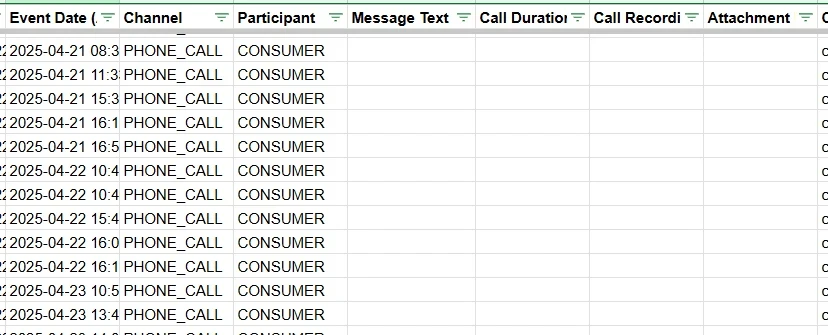
A master tab with thousands of rows is hard to review with a client. Split it into one tab per account, for example LSA_1234567890, with leads and conversations together and a “Record type” column to tell them apart. Leave the master tabs untouched as your source of truth.
Store Customer IDs and lead IDs as text, not numbers. Google Sheets will otherwise turn long IDs into scientific notation or round them, and you’ll lose the link between leads and conversations.
Step 9: Schedule the daily backup
Run: Run lsaDailyInstall once, then lsaDailyStart once to test. Use lsaDailyStop to stop.
A one-time export goes out of date the same day. New calls and messages arrive, and lead statuses and credits change. Set up a daily time-driven trigger:
- Write an install function that creates one daily trigger with
ScriptApp.newTrigger('dailySync').timeBased().everyDays(1).atHour(3).create(). Run it once only, or you’ll create duplicate triggers. - Have
dailySyncre-query the last 60 days of leads and conversations, update rows whose IDs already exist and append new ones. The overlap catches late messages and status changes. - Run
dailySynconce by hand and check a separateLSA_Daily_Statustab before you rely on it.
Google runs an “at 3 AM” trigger at some point between 3 and 4 AM in the script’s time zone. Make sure the daily sync and the historical backfill never run at the same time, as they write to the same tabs.
What we found: older calls come back without details
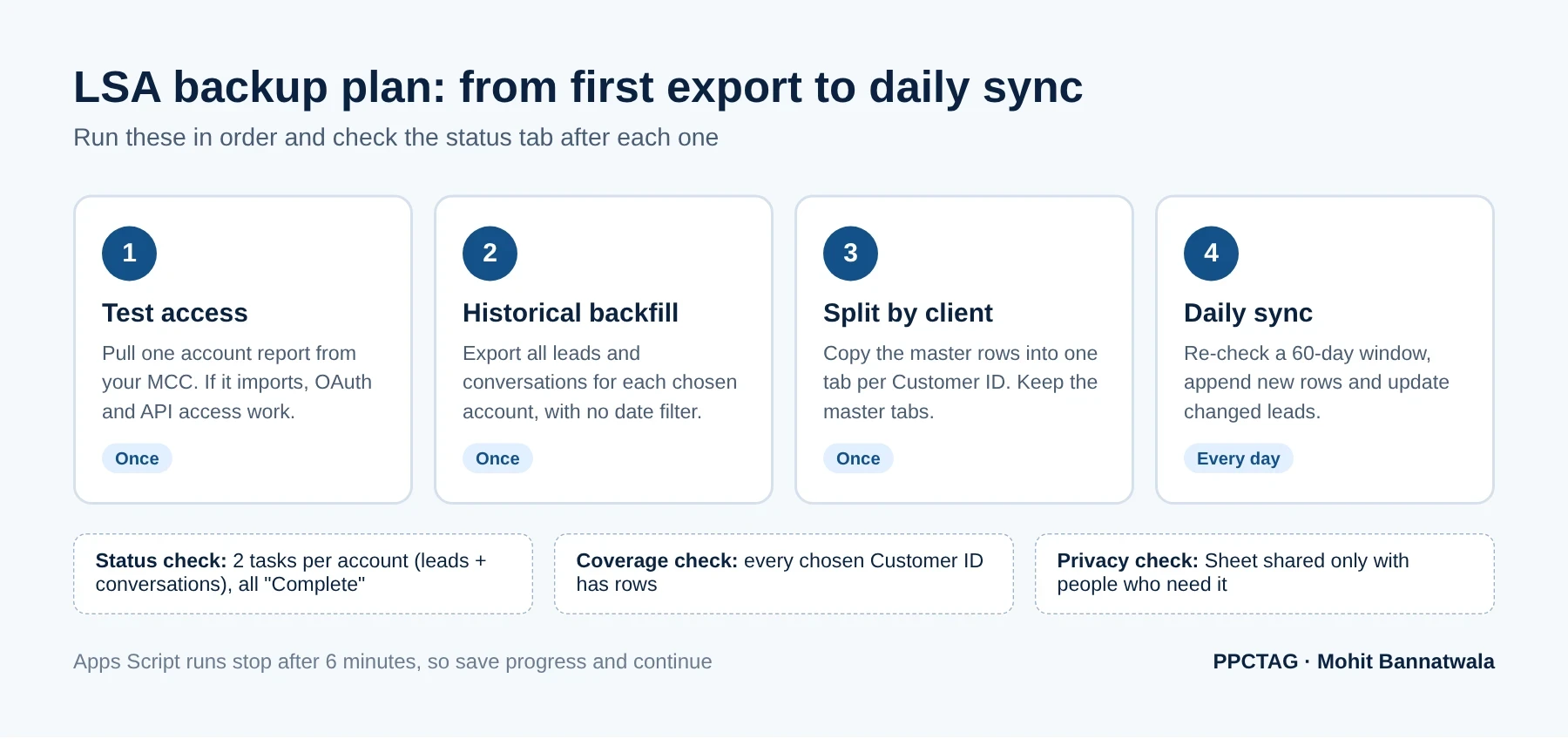
When we checked the exported conversations, older phone calls had empty duration and recording columns. To rule out a script bug, we queried the API directly for one account. A call from April 21, 2025 came back as a PHONE_CALL with its date, but with no phone call details at all. Calls from October 2026 in the same account returned the duration and a recording link.
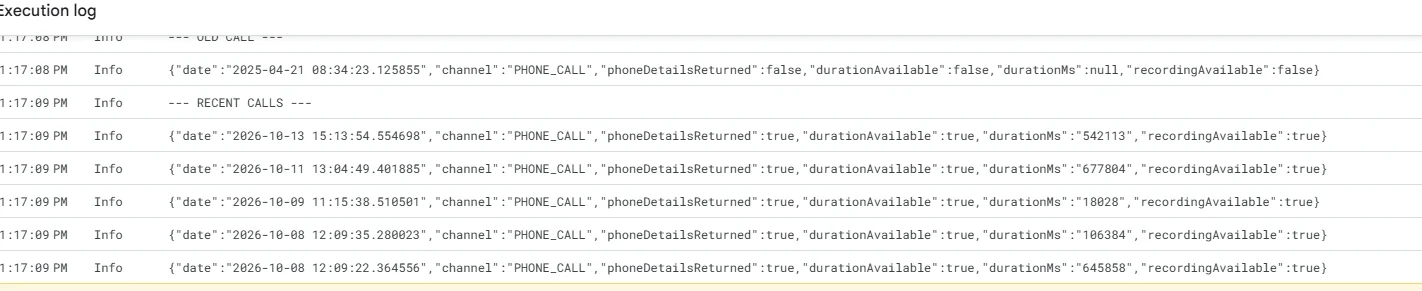
This is one account, so it doesn’t prove a fixed cut-off date. But it does show that a backup can only save what the API still returns. If call length and recordings matter to you, for coaching staff or settling disputes with a client, start backing them up now rather than later.
Limits and privacy: what a backup can’t do
- Healthcare leads aren’t available. Google’s API documentation says leads in healthcare categories aren’t returned. Dental and medical practices will need the Leads page and the historical download instead.
- Wiped-out leads have no contact details. When a lead’s status is
WIPED_OUT, its contact details come back empty. Since API version 25, the contact details no longer include an email address. - Recording links aren’t recordings. The Sheet stores a URL. The link only works for someone signed in with at least read-only access to that client account. Saving the audio itself needs a separate download process.
- It’s personal data. Names, phone numbers and messages belong to your clients’ customers. Share the Sheet only with people who need it, agree how long you keep the data, and delete it when a client leaves.
- Sheets has limits. Very large accounts can reach the 10 million cell limit. For long-term storage, export dated snapshots to a controlled folder.
Common errors and fixes
| Problem | What to check |
|---|---|
| “Configure the OAuth consent screen” in Apps Script | Finish OAuth consent setup in the Cloud Console, then link the project number again. |
CLOUD_PROJECT_NOT_APPROVED_FOR_PRODUCTION | Your Cloud project only has Test access. Apply for Explorer access on the Google Ads API Overview page. |
PERMISSION_DENIED (403) | Check the signed-in account can open the MCC, the login-customer-id is the MCC ID without dashes, and the client is linked to that MCC. |
| Only the first rows exported | Follow nextPageToken until it’s empty. |
| Script stops part-way | The 6-minute limit. Save progress and continue with a second function or trigger. |
| A client has no lead rows | Check it has an LSA or pay-per-lead Performance Max campaign and isn’t in a healthcare category. |
| Account report shows only this month | Set startDate and endDate in the request. |
What it means for local service businesses
- Home services (plumbing, HVAC, roofing, pest control): you were in the first migration wave. Download Google’s historical report now, then use it to compare monthly charged leads and cost per lead against your new Performance Max campaign.
- Agencies: the bulk backup gives you one place to answer “how many leads did we get last spring?” for every client. Pair it with call outcomes to report cost per booked job, as in our Google Ads and call tracking dashboard guide.
- Dental and medical practices: the API won’t return healthcare-category leads, so rely on Google’s download and the Leads page, and download leads from Google Ads regularly.
- Budget planning: your weekly LSA budget becomes a daily one (weekly ÷ 7), and Google says monthly spend won’t exceed that daily budget × 30.4. Use your historical lead spend to sanity-check it, or start with our Google Ads budget estimator.
PPCTAG’s take
Google’s download is a good safety net, and every LSA advertiser should grab it. But for agencies it’s not a backup. It’s a summary. The data that actually helps you manage accounts, such as which leads booked, which calls were missed and what customers asked in messages, sits at lead level.
The API setup takes an afternoon, and Explorer access is free. Once the daily trigger runs, you stop depending on one interface and you can answer client questions in seconds. My advice:
- Download Google’s historical report for every migrated account this week.
- If you manage more than three LSA accounts, set up the bulk backup and run the historical export now, while older call details are still available.
- Check the status tab after the first daily run, then once a week.
- Write down who can open the Sheet and how long you keep the data. Clients will ask.
Need help with the backup?
Want me to set up the backup for you?
If you manage several LSA accounts and would rather not do this yourself, contact me and I will help you get every account backed up before your data is gone.
FAQs
Can I download historical Local Services Ads reports after migration?
Yes. Google lets you download historical LSA reports from the Local Services Ads redirection page. The file includes total lead spend and charged leads split by phone, message and booking, but no impressions, clicks or lead-level detail.
Do my old LSA leads move to Google Ads?
Yes. Google says past leads, contact details, message history and older call recordings transfer automatically to the Leads page under Goals in Google Ads.
How can I back up all LSA leads for many accounts at once?
Use Apps Script in a Google Sheet to query the Google Ads API resources local_services_lead and local_services_lead_conversation for each client Customer ID under your manager account, then schedule a daily trigger to keep it updated.
Do I still need a Google Ads API developer token?
No. Google sunset developer tokens on September 9, 2026. API access now depends on the access level of the Google Cloud project that creates your OAuth credentials. Explorer access allows 2,880 production operations a day.
Why are some LSA leads or call details missing from my backup?
The API doesn’t return healthcare-category leads, removes contact details for wiped-out leads, and may return older calls without duration or recording details. A backup can only save what the API still provides.
Does the backup save call recordings?
No. It saves recording links, which only work for users with access to the client account. Keeping the audio files needs a separate download process.
Sources
- Google Ads Help: Local Services Ads transition to Performance Max campaigns with pay-per-lead goals
- Local Services API: Reporting (account reports)
- Google Ads API: Local Services campaigns, leads and conversations
- Google Ads API v26: local_services_lead fields
- Google Ads API v26: local_services_lead_conversation fields
- Google Ads API: Access levels and operation limits
- Google Ads Developer Blog: A new onboarding experience for Google Ads API developers
- Apps Script: Google Cloud projects
- Apps Script: Installable triggers
- Apps Script: Quotas and limits