
If you are looking for a Google Ads optimization process, your account is probably not performing the way you want. But “optimize my account” is not a plan. Before you change keywords, bids or ads, find out what exactly is wrong: no clicks, poor CTR, no conversions, expensive conversions or leads that never turn into customers. Each problem has a different cause and a different fix.
This guide gives you a diagnosis table for the 8 most common problems, a step-by-step fix for each one, and a 13-point checklist to review in every account. It is written for local service businesses and agencies, based on real account work.
Step 1: Diagnose the real problem before you optimize
Quick answer: Look at your last 30 days and decide which problem you actually have: no impressions, low CTR, no conversions, high cost per conversion, or conversions that are not real customers. Then follow the fix for that problem only. Changing everything at once makes it impossible to know what worked.
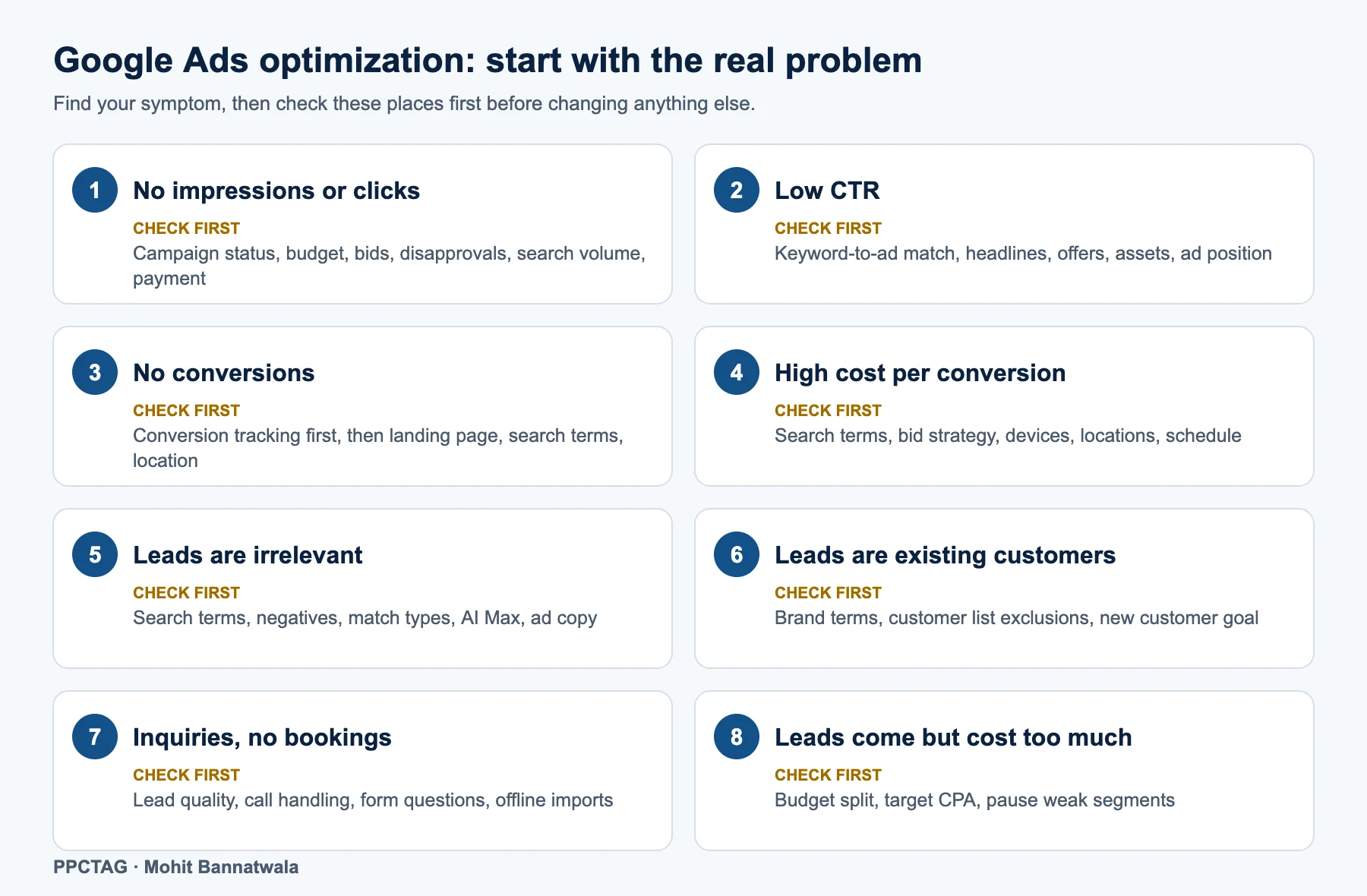
| Your symptom | Most likely causes | Where to look in Google Ads |
|---|---|---|
| 1. No impressions or clicks | Campaign not eligible, budget or bids too low, ads disapproved, keywords with low search volume, payment problem | Campaign status, Diagnostics, Ads status, Keywords status, Billing |
| 2. Low CTR | Ads do not match the keyword, weak headlines, no offer, few assets, low ad position | Ads and assets, Search terms, Quality Score columns |
| 3. No conversions | Tracking broken or missing, weak landing page, wrong searches, wrong location | Goals → Conversions, Search terms, Landing pages, Locations report |
| 4. High cost per conversion | Wasted search terms, wrong bid strategy, poor devices, locations or hours | Search terms, Bid strategy report, Devices, Locations, Ad schedule |
| 5. Irrelevant leads | Broad match or AI expansion, missing negatives, unclear ad copy | Search terms, Negative keywords, AI Max settings |
| 6. Leads from existing customers | Brand searches, past customers clicking ads to call you | Search terms (brand), Audience segments, Customer acquisition settings |
| 7. Inquiries but no bookings | Price shoppers, poor call handling, no qualifying in ads or forms | Call recordings, CRM, Conversion values |
| 8. Leads come but cost too much | Budget spread thin, aggressive targets, weak segments still running | Campaigns, Bid strategy, Segments by device, location and time |
Problem 1: No impressions or clicks
Quick answer: Check that the campaign is eligible to run (status, ad approvals, billing), then budget and bids, then keyword search volume and match types. Most “no impressions” problems are settings or approvals, not strategy.
- Status: hover over the campaign status. Look for “Eligible (limited)”, “Limited by budget”, paused ad groups or ended dates.
- Ads: check every ad is approved. Disapproved or “Eligible (limited)” ads may not show at all.
- Billing: a declined card stops all ads.
- Budget and bids: a budget that buys only 2 or 3 clicks a day, or a low max CPC or target CPA, keeps you out of most auctions. Estimate a realistic budget with our Google Ads budget calculator.
- Keywords: look for “Low search volume” and very narrow exact match keywords. Add phrase match versions of your main services.
- Targeting: a tiny radius, a strict ad schedule or many negatives can leave too few searches.
Problem 2: Low CTR
Quick answer: Low CTR usually means your ad does not match what people searched for. Tighten ad groups so each one has closely related keywords, put the keyword and your location in the headline, add an offer and proof, and use every relevant asset.
- Match the search: if the search is “emergency AC repair”, the headline should say emergency AC repair, not “HVAC services”.
- Show why you: reviews, years in business, licensed and insured, same-day service, free estimates (only if true).
- Use all the space: responsive search ads take up to 15 headlines and 4 descriptions; add sitelinks, callouts, call and location assets so your ad is bigger.
- Check Quality Score: its three parts (expected CTR, ad relevance and landing page experience) tell you which part to fix.
- Remove irrelevant searches that get impressions but never clicks; they drag CTR down.
Problem 3: Clicks but no conversions
Quick answer: First prove tracking works by making a test call and a test form submission and checking they appear in Google Ads. If tracking is fine, the problem is usually the landing page or the searches you are paying for.
- Test every conversion: form, call from ads, call from website, chat and booking. Check each shows as Recording conversions in Goals → Conversions.
- Primary vs secondary: only real leads (calls, forms, bookings) should be Primary. Page views or button clicks should be Secondary, or bidding will chase them.
- Landing page: clear headline matching the ad, click-to-call button, short form, reviews, photos of real work, service details and a strong call to action above the fold. It must load fast on mobile.
- Search terms: if you are paying for “how to”, “DIY” or job searches, no landing page will convert them.
- Location: check the Locations report for clicks from places you do not serve.
Need help with tracking? See our Google Ads and call tracking dashboard guide.
Problem 4: Conversions are coming, but cost per conversion is high
Quick answer: Cut waste before you change bidding: remove poor search terms, then compare devices, locations and hours. Once you have steady conversions (around 30 a month), move from Maximize Conversions to a realistic target CPA.
- Search terms: sort by cost; add negatives for anything that spends without converting.
- Keywords: pause expensive keywords with no conversions after enough spend (for example, two to three times your target cost per lead).
- Segments: compare cost per conversion by device, location and hour. With Smart Bidding, exclude clearly bad segments instead of using bid adjustments (see point 12 below).
- Bid strategy: set a target CPA close to your recent actual cost per conversion, then lower it in small steps every one to two weeks.
- Landing page conversion rate: a better page lowers cost per lead without touching bids.
Problem 5: Conversions are coming, but leads are irrelevant
Quick answer: Irrelevant leads come from irrelevant searches. Review search terms weekly, add negative keywords, tighten match types, and control AI Max search term matching if it brings poor searches. Make your ads state what you do and do not offer.
- Negative keyword lists: build shared lists (jobs, DIY, free, wrong services, wrong locations) and apply them to all campaigns.
- Match types: if broad match brings unrelated searches, test phrase and exact match for your core services.
- AI Max for Search: if it is on and bringing poor searches, you can turn off search term matching for an ad group while keeping your keywords. Learn more in our AI Max for Search guide and track which clicks it brings with search_term_matchtype.
- Qualify in the ad: mention service area, minimum job size or “residential only” if that is true, so the wrong people do not click.
- Lead form questions: add one or two questions (service needed, ZIP code) to filter poor leads.
Problem 6: Conversions are coming, but leads are existing customers
Quick answer: Separate brand searches into their own campaign, exclude customer lists from prospecting campaigns, and consider the new customer acquisition goal, which Google recommends in “new customer only” mode for lead generation goals.
- Check brand searches: if many conversions come from people searching your business name, they would likely have found you anyway. Run brand in a separate campaign with a small budget.
- Exclude existing customers: upload a customer list (Customer Match) and exclude it from non-brand campaigns.
- New customer acquisition goal: available in Search and Performance Max; use it to bid only for new customers.
- Track it: ask on every call “Have you used us before?” and record the answer in your CRM.
Problem 7: Conversions are coming, but they are inquiries, not bookings
Quick answer: Find out why inquiries do not book: listen to calls and check response time first. Then qualify leads in your ads and forms, and import booked jobs into Google Ads so bidding learns which searches bring real customers.
- Listen to calls: missed calls, slow callbacks and poor scripts lose more bookings than bad keywords.
- Answer fast: reply to forms and messages within minutes during business hours.
- Qualify: show starting prices or “free estimate” in ads, and ask service and timing in forms.
- Import bookings: use enhanced conversions for leads or offline conversion imports to send booked jobs (and values) back to Google Ads.
- Bid on bookings: once enough bookings are imported, make them the main conversion goal.
Problem 8: Leads are coming, but cost per lead is too high
Quick answer: Know your maximum affordable cost per lead first (job value × close rate × the share of revenue you can spend on ads). Then move budget to the campaigns and services that beat it, set a realistic target CPA, and pause segments that never reach it.
- Work out your ceiling: for example, a $1,000 job, 30% close rate and 15% ad budget means you can afford about $45 per lead.
- Shift budget: give more to services and areas with the lowest cost per booked job.
- Target CPA: lower it gradually; big cuts can stop delivery.
- Compare channels: for eligible businesses, Local Services Ads can deliver leads at a lower cost than Search for some services.
$10 Audit Report
Not sure which problem your account has?
I review your search terms, tracking, settings and bidding, and send a clear list of what to fix first. No contract.
The 13-point checklist for every Google Ads account
Quick answer: Whatever your problem, check these 13 things: keywords, ad groups, ad copy, landing pages, conversion tracking, bid strategy, negatives, location targeting, campaign settings, assets, ad schedule, device and bid controls, and audiences.
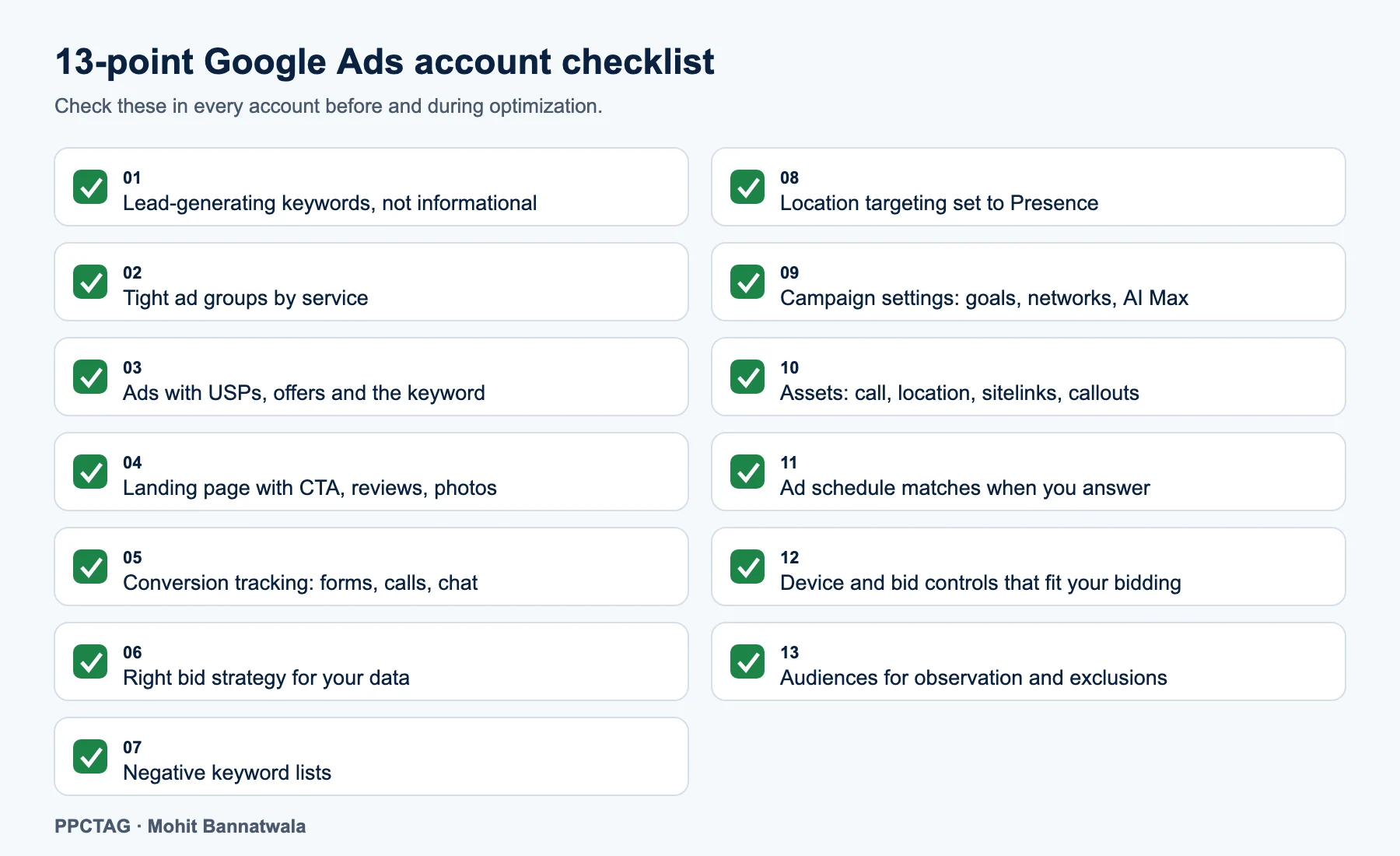
- Lead-generating keywords, not informational ones: Target searches that show intent to hire (“plumber near me”, “water heater replacement”), not research (“how to fix a leaking tap”).
- Right ad group structure: One ad group per service, with closely related keywords, so each ad and landing page can match the search.
- Ads with USPs, offers and the target keyword: Put the service and location in headlines, add proof (reviews, licensed, years) and a clear offer.
- A targeted landing page: A page per main service with a clear call to action, click-to-call, short form, testimonials, reviews, service details, photos and videos of real work.
- Proper conversion tracking: Track forms, calls from ads, calls from the website, chat and bookings. Keep only real leads as Primary conversions.
- The right bid strategy: Start with Maximize Conversions or Manual CPC on new accounts; move to target CPA once you have about 30 conversions a month.
- Negative keyword lists: Shared lists for jobs, DIY, free, wrong services and wrong areas, reviewed weekly from search terms.
- Right location targeting: Target your real service area and use “Presence: people in or regularly in your targeted locations”, not the default “Presence or interest”.
- Correct campaign settings: Check the conversion goals section, location options, networks (turn off Search partners and Display Network for lead-gen Search campaigns unless they prove themselves) and AI Max (turn off search term matching where it brings poor searches).
- The right assets (ad extensions): Call, location, sitelinks, callouts, structured snippets, images and, where relevant, price or promotion assets.
- Ad schedule that matches when you answer: Only run call-focused ads when someone can answer; adjust hours from your conversion data.
- Device and bid controls that fit your bidding: Bid adjustments for device, location and schedule work with Manual CPC. With Smart Bidding most are ignored; a -100% device adjustment (excluding a device) still works, and device adjustments change the target for Target CPA.
- The right audiences: Add relevant audience segments in Observation to learn, and exclude existing customers or employees where needed.
Also worth checking
- Search terms review every week for new accounts, every two weeks for mature ones.
- Ad strength and Quality Score as signals, not goals.
- Landing page speed on mobile.
- Lead response time and missed calls.
- Budget pacing: campaigns “Limited by budget” with good results deserve more budget.
- Change history: note every change so you can see what worked.
A simple weekly and monthly optimization routine
| When | What to do |
|---|---|
| Weekly | Search terms and negatives; check conversions are recording; check budgets and disapprovals; listen to a sample of calls |
| Every two weeks | Ad and asset performance; adjust bids or targets in small steps |
| Monthly | Devices, locations and schedule; landing page conversion rate; cost per booked job by campaign; import offline bookings |
| Quarterly | Account structure, new services or areas, competitor review, full audit |
For industry-specific setups, see our Google Ads guides for local businesses.
FAQs
What is the Google Ads optimization process?
Diagnose the real problem first (no clicks, low CTR, no conversions, high cost or poor-quality leads), fix that specific problem, then review the 13 core areas: keywords, ad groups, ads, landing pages, tracking, bidding, negatives, locations, settings, assets, schedule, bid controls and audiences.
How often should I optimize Google Ads?
Check search terms and tracking weekly, ads and bids every two weeks, and devices, locations, schedule and landing pages monthly. Avoid big changes every few days, because Smart Bidding needs time to learn.
Why am I getting clicks but no conversions?
Usually broken conversion tracking, a weak landing page, or paying for irrelevant searches. Test your tracking first, then review search terms and the landing page.
Do bid adjustments work with Smart Bidding?
Mostly no. Smart Bidding ignores most bid adjustments, but a -100% device adjustment still excludes a device, and device adjustments change the target for Target CPA.
Should I turn off Search partners and the Display Network?
For lead generation Search campaigns, start with both off and test them later. Google includes search partners by default when you create a Search campaign.
How do I stop getting leads from existing customers?
Run brand searches in a separate campaign, exclude customer lists from prospecting campaigns, and test the new customer acquisition goal.
Need help?
Want me to optimize your account?
Tell me which problem you are seeing and I will tell you where to start.