
Google Local Services Ads (LSA) are the ads with the “Google Verified” badge that appear at the very top of Google for searches like “plumber near me” or “house cleaning”. You don’t pay per click. You pay only when a customer calls, messages or books you through the ad.
This guide covers everything about Local Services Ads in 2026: what they cost (with a calculator), how they now work inside Google Ads, how ranking works, how to set them up, and how to get more leads for less. It is based on Google’s own help pages and on real LSA accounts I manage for home service and professional businesses.
Quick answer: Local Services Ads cost between about $25 and $110 per lead for most home services, and $100 to $400+ for lawyers. You set a budget and pay only for valid leads (calls, messages or bookings). In 2026 Google is moving LSA into Google Ads as Performance Max campaigns with pay-per-lead goals, but you still pay per lead, not per click.
Local Services Ads cost calculator
Pick any of the 100 Local Services Ads categories and estimate your cost per lead, monthly leads and booked jobs. Uses the same benchmarks as the PPCTAG Budget Estimator.
Disclaimer: This calculator uses combined data from industry benchmark reports. Results are estimates and may vary based on your actual target locations, services, competition, season, reviews and responsiveness. Use them for planning, not as a guarantee of results. You pay only for valid leads, and Google may credit low-quality leads.
Key takeaways
- Pay per lead: you're charged for valid phone calls, messages and bookings, not clicks or impressions.
- Typical cost: about $27-$90 per lead for most home services in our benchmarks; lawyers pay far more.
- Big 2026 change: LSA is moving into Google Ads as Performance Max with pay-per-lead goals. Manual bidding and manual disputes are going away.
- Ranking is earned: reviews, answering calls, business hours and proximity matter as much as budget.
- Best results: run LSA and Google Search ads together, and track which leads become paying jobs.
In this guide
- What are Google Local Services Ads?
- How Local Services Ads work in 2026 (the move into Google Ads)
- How much do Local Services Ads cost?
- LSA cost per lead by industry
- How LSA budgets work
- What you are charged for (and lead credits)
- LSA bidding options
- How Local Services Ads ranking works
- Eligibility, all 100 categories and Google Verified
- How to set up Local Services Ads
- How to optimize Local Services Ads: 12 tips
- Local Services Ads reviews
- LSA booking leads
- Local Services Ads vs Google Ads
- Leads, reports and metrics
- Local Services Ads login: where to sign in now
- Common LSA problems and fixes
- LSA guides by industry
- FAQs
1. What are Google Local Services Ads?
Quick answer: Local Services Ads are pay-per-lead ads for local service businesses. They show at the top of Google Search and on Google Maps with your business name, star rating, reviews, hours and a Google Verified badge. Customers can call, message or book you directly from the ad.
Unlike normal Google Search ads, there are no keywords, ad copy or landing pages. Google matches your ad to searches using your service categories, job types and service area. Your ad links to a Google profile page built from your Google Business Profile and reviews.
LSA is available for home services (plumbers, electricians, HVAC, cleaners, roofers, pest control and many more) and professional services (lawyers, accountants, real estate agents, financial planners). Some categories are limited to certain US states or need extra verification.
2. How Local Services Ads work in 2026: the move into Google Ads
Quick answer: Since August 2026 Google has been moving Local Services Ads into Google Ads as a special Performance Max campaign with pay-per-lead goals. Your ads still show in the same places on Search and Maps, you still pay per lead, and verified businesses keep their badge. What changes is where you manage it and how bidding works.
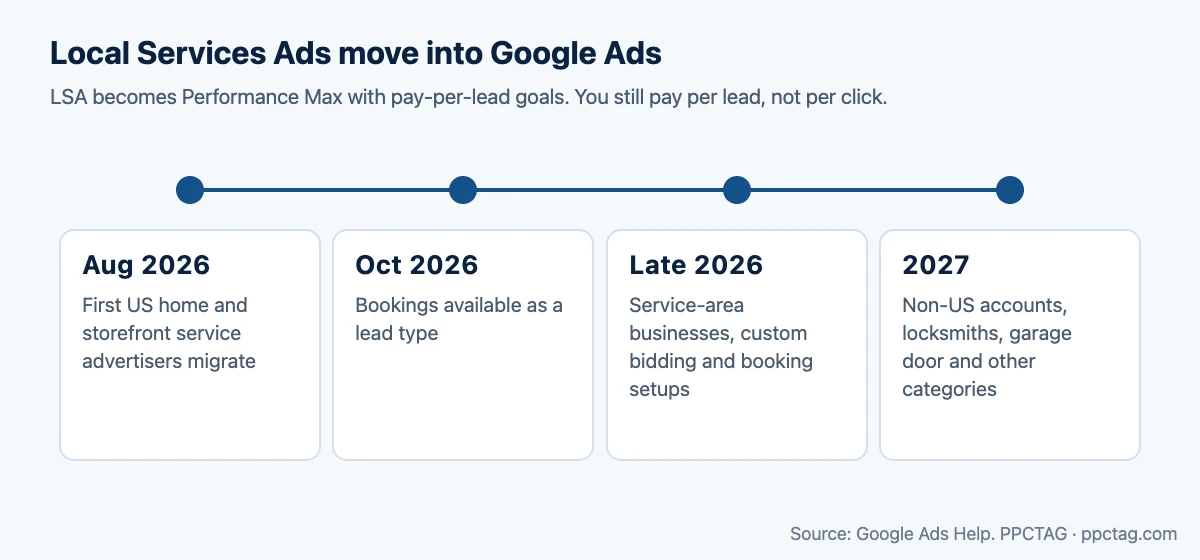
Migration timeline (from Google): the first US home and storefront service advertisers moved in August 2026. Service-area businesses and accounts with custom bidding or booking setups follow in late 2026. Non-US accounts and remaining categories, including locksmiths and garage door companies, move in 2027. Account admins get emails 14 and 7 days before their migration.
| What stays the same | What changes |
|---|---|
| You pay per valid lead, not per click | Managed inside Google Ads, not the old LSA dashboard |
| Same ad positions on Google Search and Maps | Weekly budget becomes a daily average (weekly / 7) |
| No keywords: categories and service areas | Manual "max per lead" bidding is no longer supported |
| Google Verified badge stays | One campaign-level target instead of one per category |
| Lead history and call recordings transfer | Manual lead disputes are no longer supported |
| Business details come from Google Business Profile | Old performance reports do not transfer, so download them first |
After migration, leads live in Google Ads under Goals > Conversions > Leads. Want separate targets for different services? Create a separate campaign for each. I covered the full change, and what to do before your account moves, in LSA to Performance Max migration. Download your old reports first: how to download LSA historical reports and how to back up your LSA data.
3. How much do Local Services Ads cost?
Quick answer: There is no fixed price. You pay a cost per lead set by an auction, usually about $25 to $110 for home services and $100 to $400+ for lawyers. A small business typically needs $1,000 to $3,000 per month to get steady leads. Use the calculator above for your industry and city.
Your cost per lead depends on:
- Industry and job type: a roof replacement or personal injury case costs far more per lead than a carpet clean.
- Location: big competitive cities cost more than small towns.
- Lead type: Google says message leads are usually priced lower than phone leads.
- Competition and bidding: how many businesses bid in your area, and your bid strategy.
- Your ranking signals: strong reviews and fast responses help you win leads without overpaying.
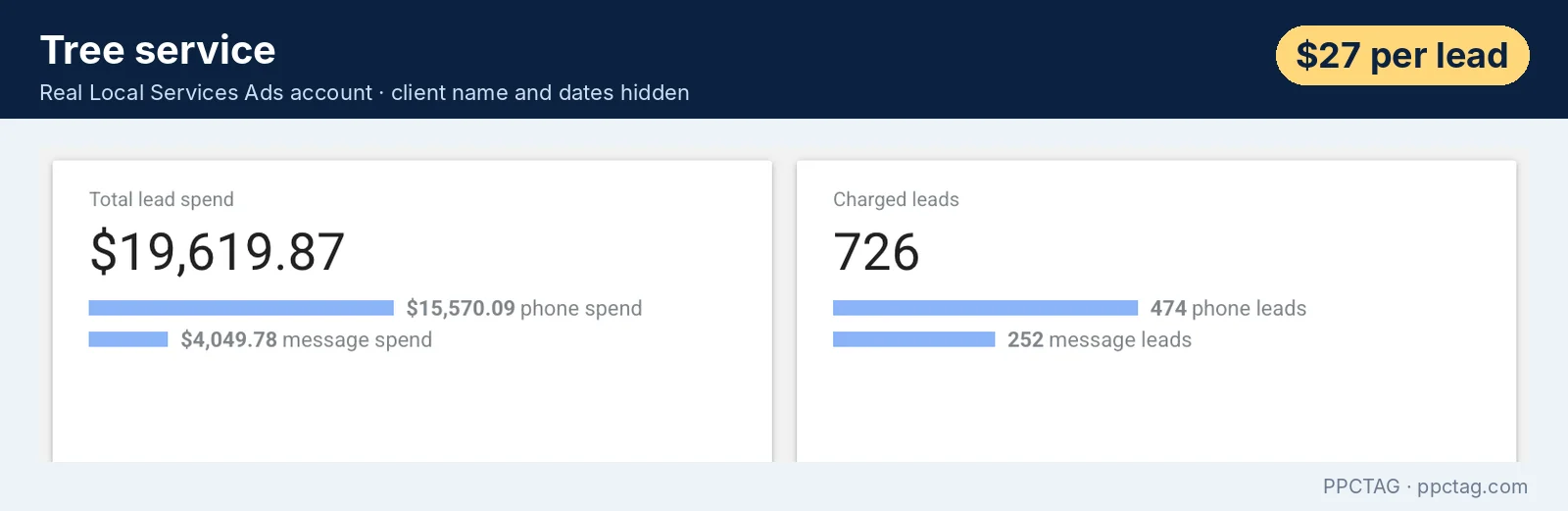
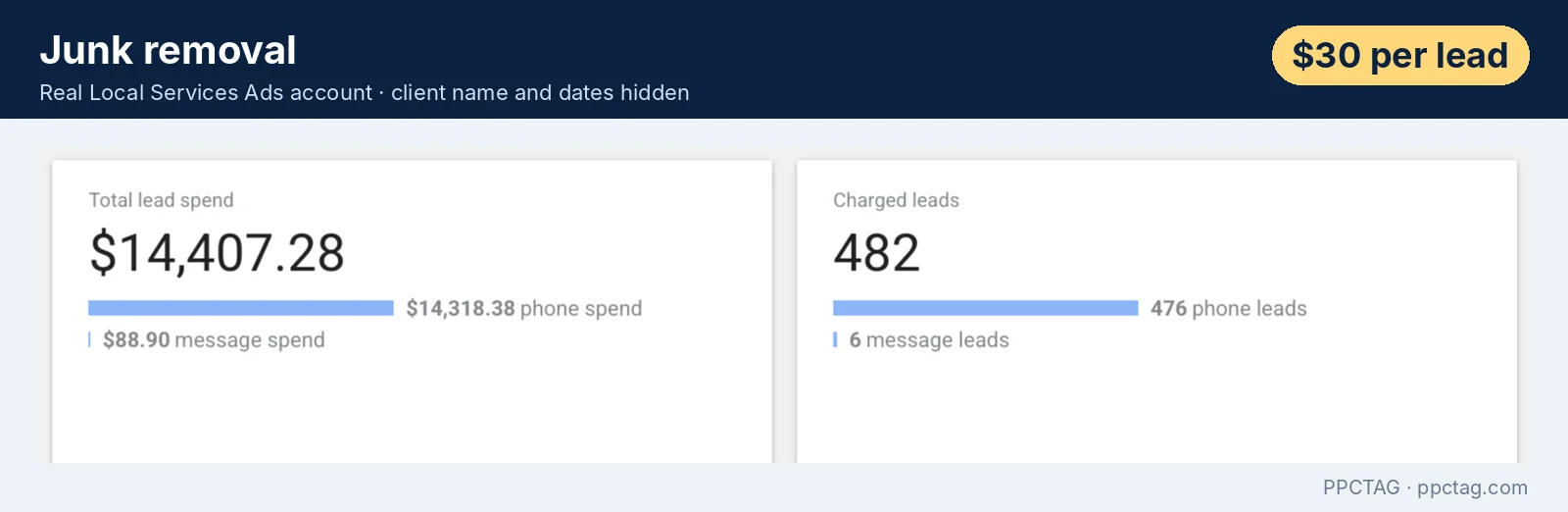
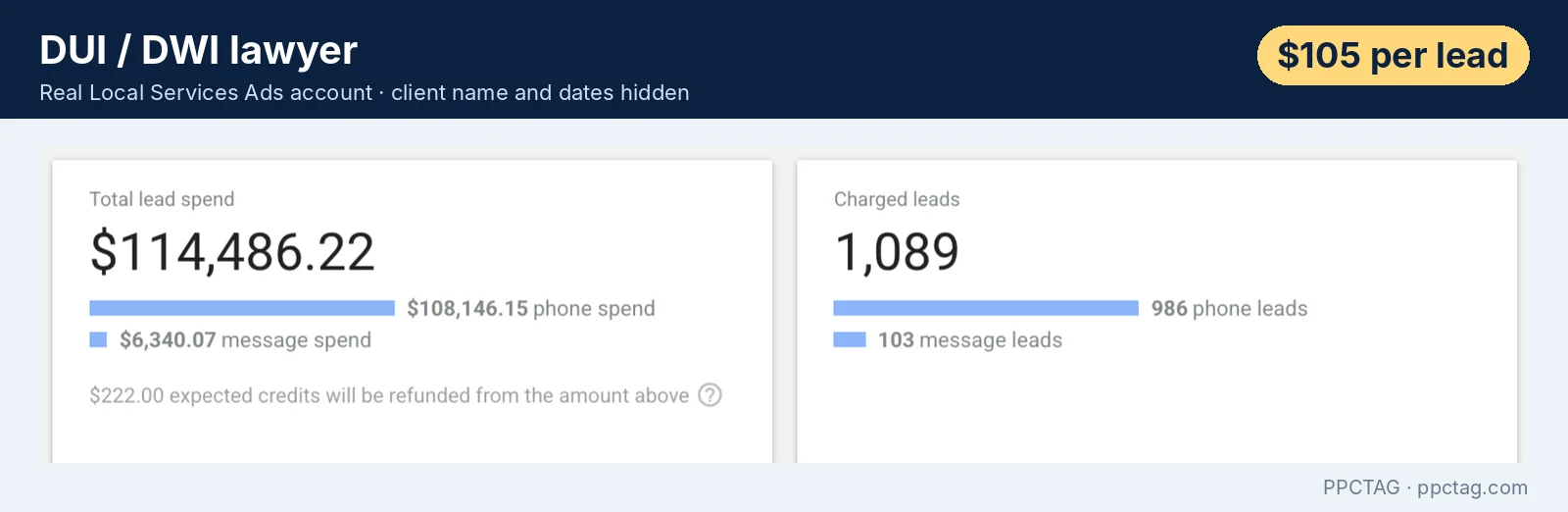
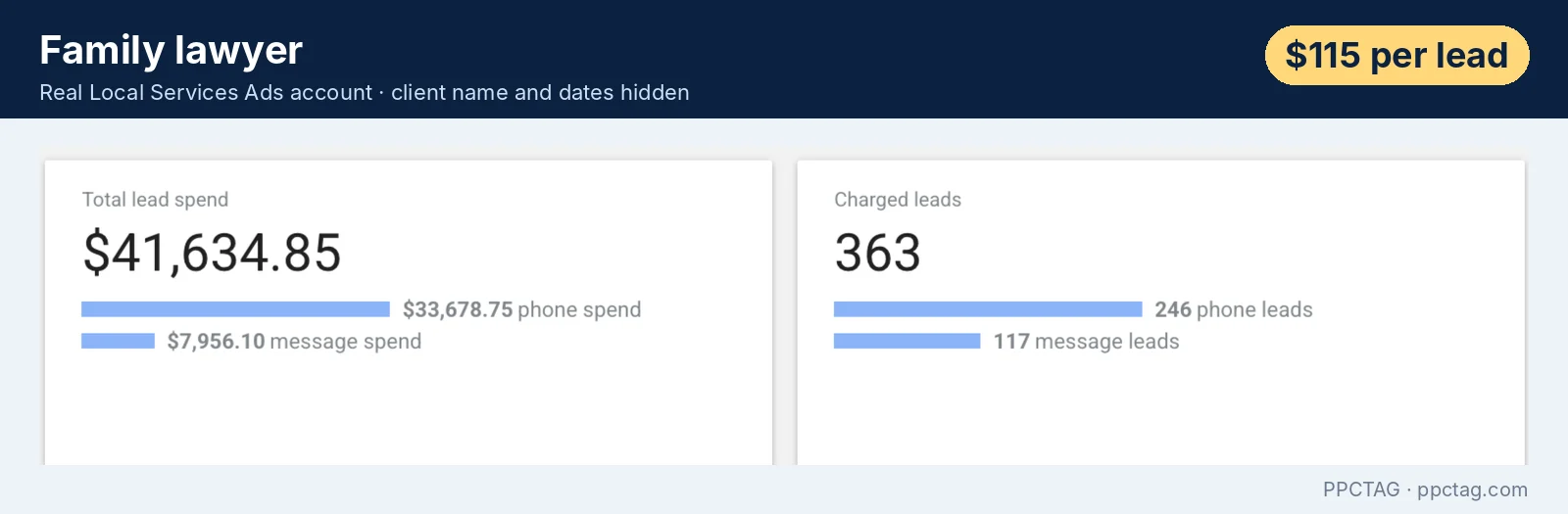
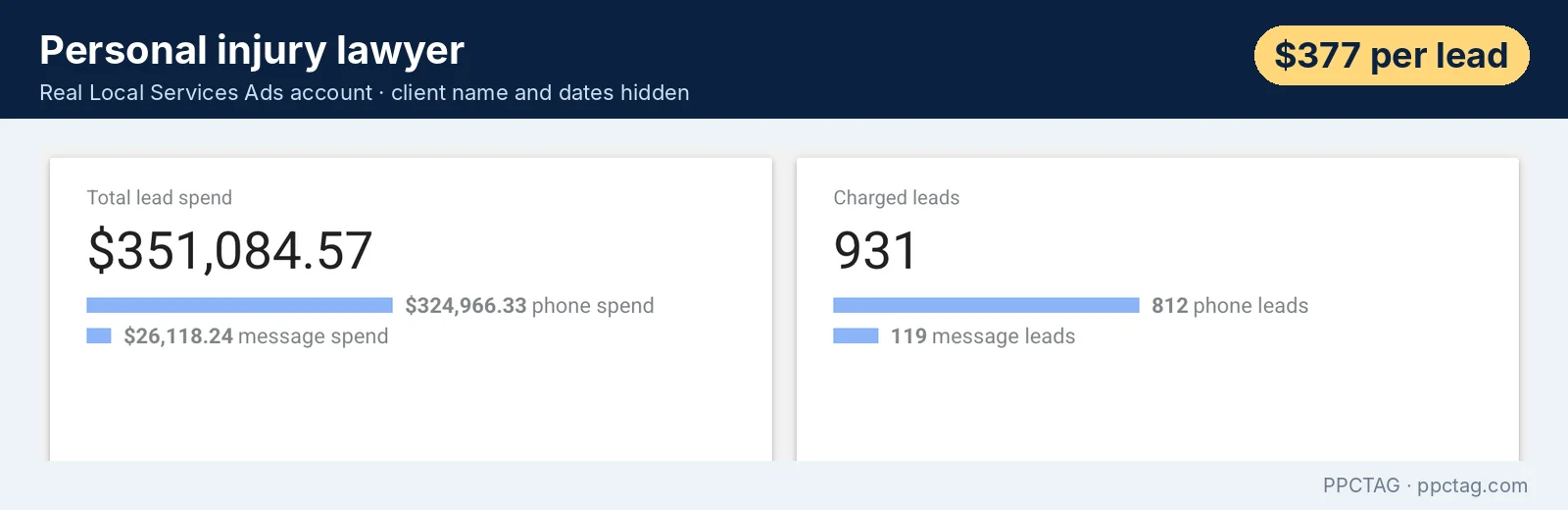
Real account examples: Local Services Ads results from 9 accounts I manage, sorted from the lowest to the highest cost per lead (client names and dates hidden). Swipe or use the arrows; click a slide to read that industry guide.
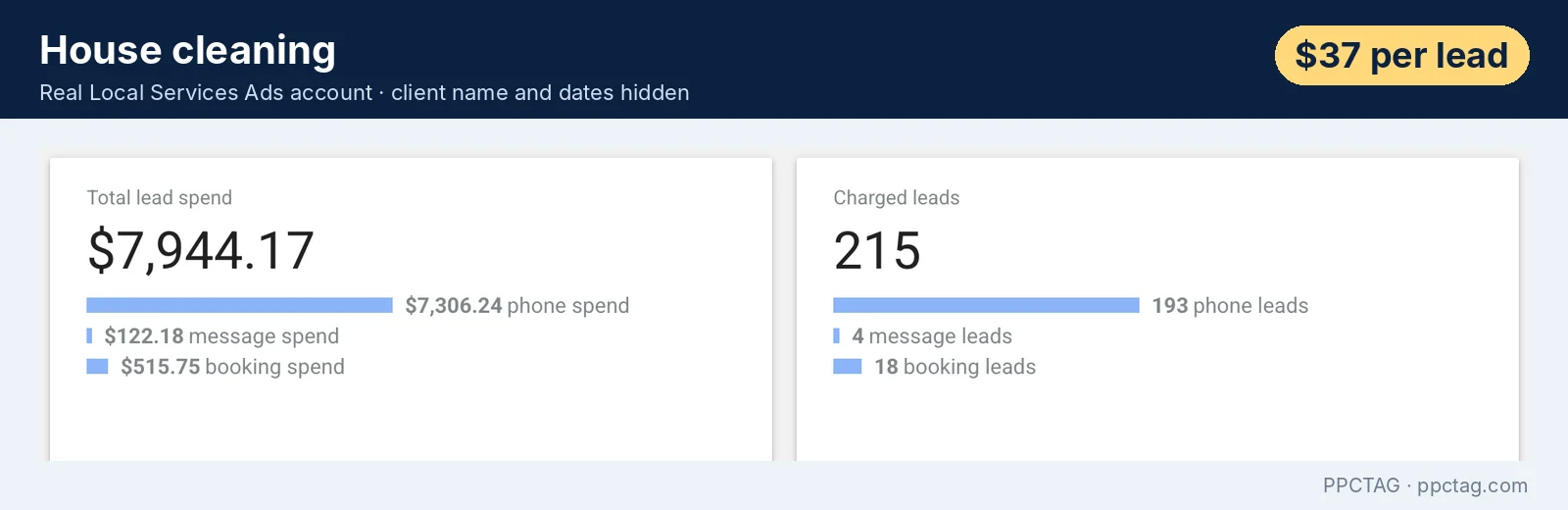
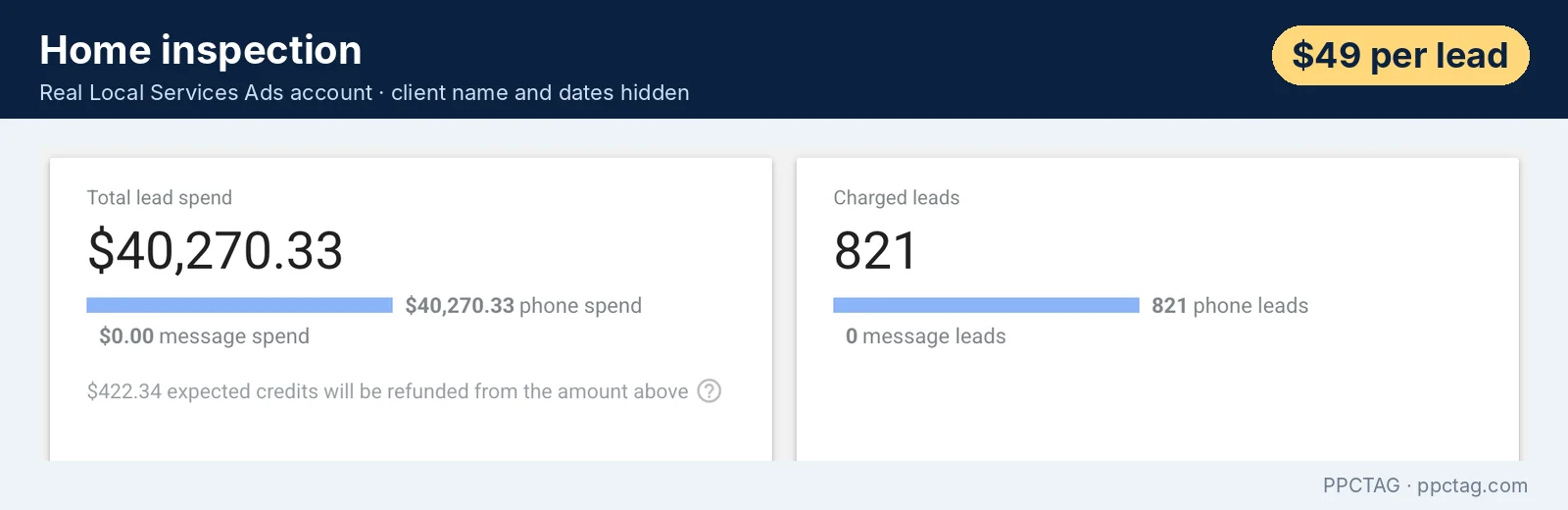
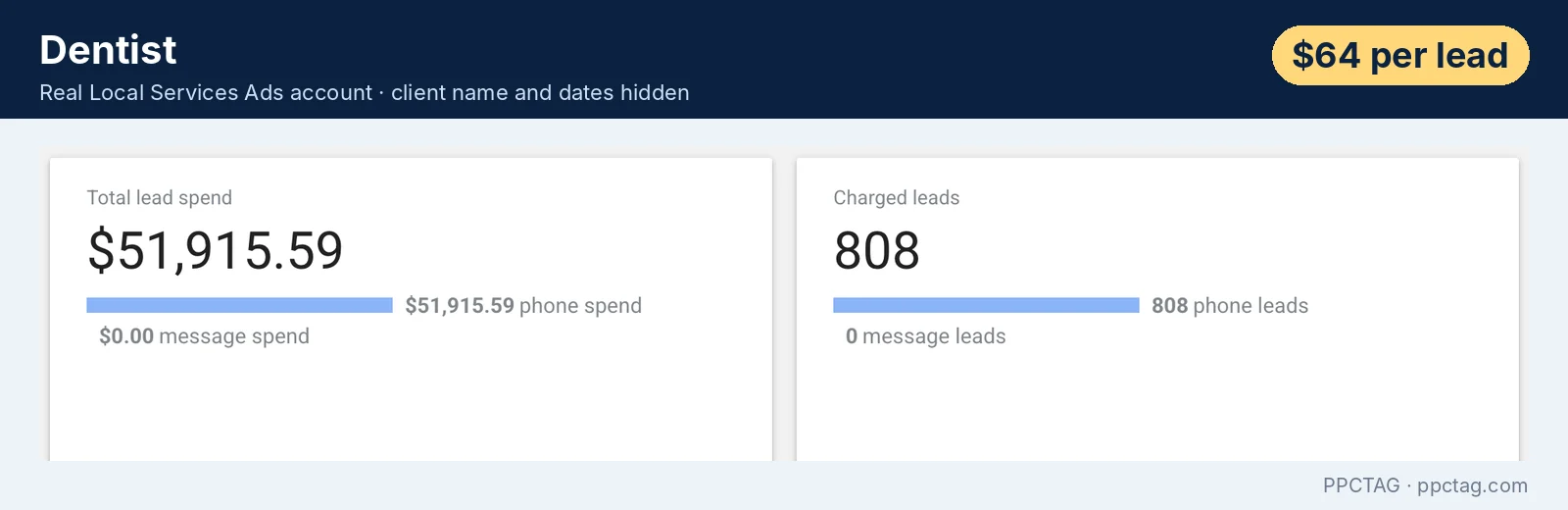
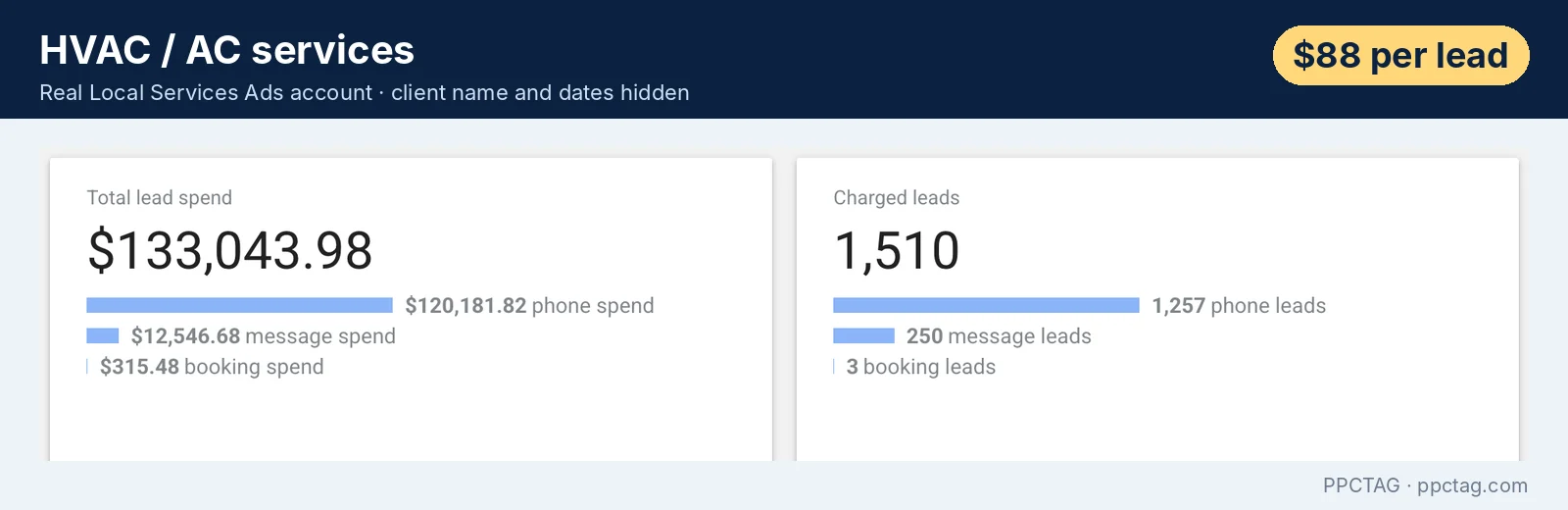
| Industry | Lead spend | Charged leads | Real cost per lead |
|---|---|---|---|
| Tree service | $19,620 | 726 | $27 |
| Junk removal | $14,407 | 482 | $30 |
| House cleaning | $7,944 | 215 | $37 |
| Home inspection | $40,270 | 821 | $49 |
| Dentist | $51,916 | 808 | $64 |
| HVAC / AC services | $133,044 | 1,510 | $88 |
| DUI / DWI lawyer | $114,486 | 1,089 | $105 |
| Family lawyer | $41,635 | 363 | $115 |
| Personal injury lawyer | $351,085 | 931 | $377 |
Lead costs range from under $30 for tree service and junk removal to almost $400 for personal injury, which is why one "average LSA cost" is not very useful. The calculator benchmarks above are based on real account data like this.
4. LSA cost per lead by industry
These are PPCTAG benchmark estimates for the US, the same numbers used in the calculator. Real prices vary by city and season, so use them as a starting point.
| Industry | Typical LSA cost per lead | Guide |
|---|---|---|
| Tree service | $22 - $32 | Tree service |
| Junk removal | $24 - $36 | Junk removal |
| Pest control | $28 - $42 | Pest control |
| Cleaning services | $30 - $44 | Cleaning companies |
| Electrician | $32 - $48 | Electricians |
| Plumber | $36 - $54 | Plumbers |
| Home inspection | $39 - $59 | Home inspectors |
| Dentist | $51 - $77 | Dentists |
| HVAC | $70 - $106 | HVAC |
| Roofing | $72 - $108 | Roofing |
| DUI / criminal defense lawyer | $84 - $126 | Criminal defense |
| Family lawyer | $96 - $144 | Family law |
| Personal injury lawyer | $300 - $450+ | Personal injury |
Planning both LSA and Search ads? The Google Ads budget estimator compares cost per lead for both.
5. How LSA budgets work
Quick answer: In the classic LSA dashboard you set an average weekly budget, and Google never spends more than your monthly max (weekly budget × 30.4 ÷ 7). After the move into Google Ads, your weekly budget is turned into a daily average (weekly ÷ 7) with the same monthly cap.
- Some weeks you spend more, some less. Google delivers more leads when demand is high, but stays under the monthly max.
- Raising your budget mid-month makes you eligible to spend more for the remaining days right away.
- Minimum budget: Google's bidding help recommends a budget for at least 10 leads per week. Below that, ads show less and results swing a lot.
- Give changes time: Google says it takes about 2 weeks for bidding to learn after a change.
Example: a plumber with a $45 cost per lead who wants 10 leads a week needs about $450 a week, or about $1,950 a month.
6. What you are charged for (and lead credits)
Quick answer: You pay for valid leads related to your business: phone calls (answered, voicemails and some missed calls), messages, and bookings if you turn them on. Google filters spam and duplicates automatically and credits low-quality leads with automated lead credits.
- Phone calls: charged only if valid and long enough to count. A missed call can still be charged, which is why answering every call matters. See LSA missed call charges.
- Messages: usually cheaper than calls. In Performance Max with pay-per-lead goals, texts and emails only count if you choose them as lead types.
- Bookings: optional lead type from October 2026.
- Not charged: spam, solicitation, wrong location, a service you don't offer, and repeat contacts from the same customer.
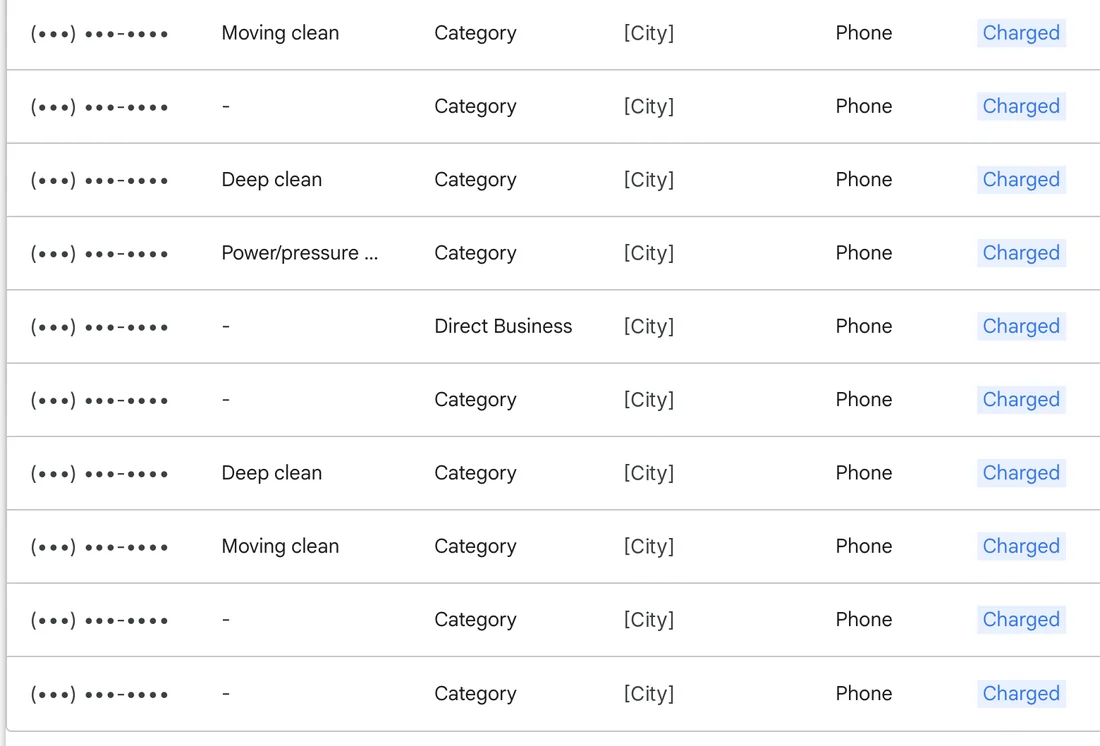
Lead credits: since 2024 Google reviews leads automatically and credits invalid ones. Each lead shows a status such as Charged, Not charged, In review or Credited, and Google keeps reviewing lead quality for 30 days. After migration to Google Ads, manual disputes are not supported, so rating each lead and keeping notes is the best way to help Google learn.
7. LSA bidding options
| Bid strategy | How it works | Use it when |
|---|---|---|
| Maximize leads (recommended) | Google sets bids to get the most leads for your budget | Most businesses. Google says it usually gets more leads at equal quality and budget |
| Target cost per lead | You set an average cost per lead and Google aims for it | You know your profitable cost per lead and have steady volume |
| Max per lead (manual) | You set the most you'll pay per lead | Legacy only: not supported after the move into Google Ads |
My approach: start on Maximize leads for 2-4 weeks, then add a target cost per lead only if leads are too expensive and volume is high enough.
8. How Local Services Ads ranking works
Quick answer: LSA ranks businesses in an auction, but the highest bid doesn't automatically win. Google looks at how likely your ad is to get a lead: how close you are, your reviews, how fast you respond, your business hours, and any serious complaints, plus your bid and remaining budget.
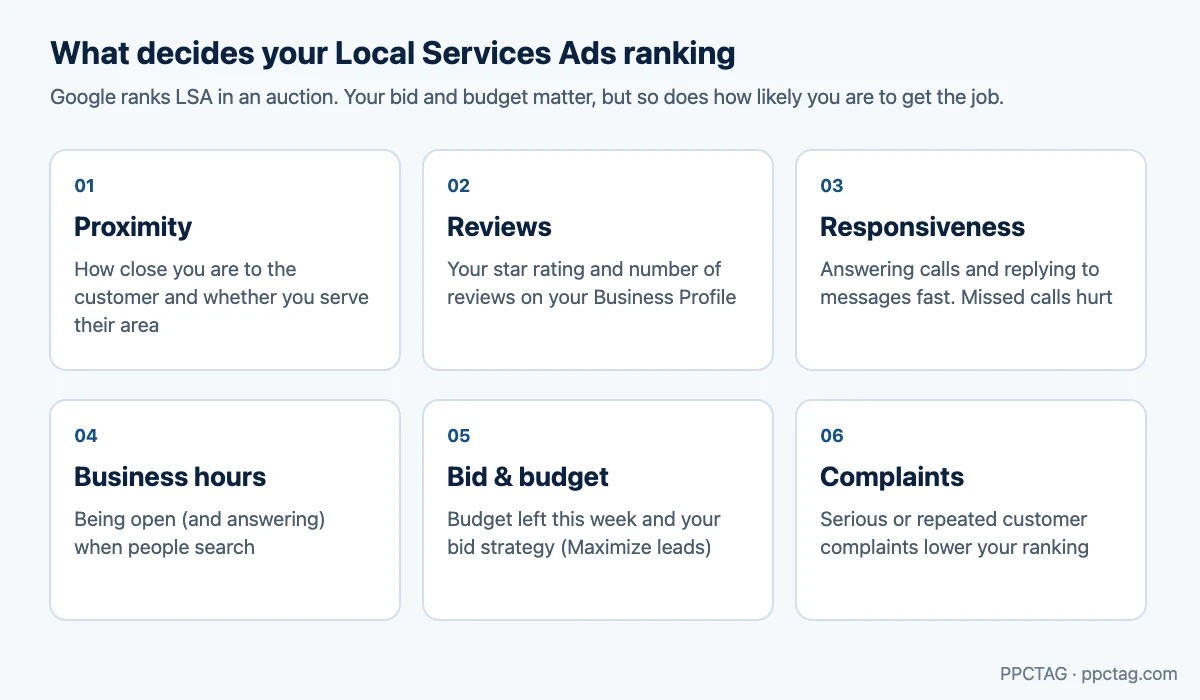
Two points people often miss: missed calls hurt your responsiveness score, and if you have several locations serving the same area, Google shows only your highest-ranked one.
9. Eligibility, categories and Google Verified
Quick answer: You need a business in an eligible category and area, a verified Google Business Profile, and to pass Google's screening (business checks and, for many categories, license, insurance and background checks). Businesses that pass get the Google Verified badge, which replaced Google Guaranteed and Google Screened.
- Home services: background checks of owners and field workers, plus license and insurance where required.
- Professional services: license checks (lawyers, accountants, financial planners, real estate).
- Advanced verification: locksmiths and garage door companies have stricter checks and migrate later.
- Pre-badge ads: some categories can start getting leads after the first checks while the rest finishes.
All Local Services Ads categories (US)
Google lists these business categories as eligible for Local Services Ads and the Google Verified badge in the US. Some categories are only available in certain states or cities, so check your ZIP code on the sign-up page. Categories in blue have a dedicated PPCTAG guide.
Home services
37Legal, financial and business services
22All lawyer guides: Google Ads for lawyers
Health services
11Learning services
7Care services
8Wellness services
5Beauty services
5Automotive services
5Source: Google Local Services Ads (eligible categories, US).
Not every category gets the same features: for example, booking leads and lead credits aren't available for healthcare.
More detail, including the old Google Guarantee and what changed: Google Verified badge explained. Home inspectors had a specific 2026 change: LSA update for home inspection.
10. How to set up Local Services Ads
- Check eligibility. Go to the Local Services Ads sign-up page and enter your category and ZIP code.
- Verify your Google Business Profile. Name, address, phone, hours and categories must match your license and insurance.
- Choose job types and service areas. Only pick jobs you actually want. Each job type you turn on can bring leads you pay for.
- Complete screening. Upload license and insurance documents and complete background checks.
- Set budget and bidding. Start with Maximize leads and a budget for at least 10 leads per week.
- Set hours you can answer. Ads run when you can pick up the phone, so be honest with your hours.
- Turn on lead notifications. Make sure at least one person gets lead emails and alerts.
- Track every lead. Rate leads, mark booked jobs, and connect call tracking where you can.
Note from Google: new pay-per-lead campaigns can't yet be created inside Google Ads, so new advertisers still start from the Local Services Ads page.
11. How to optimize Local Services Ads: 12 tips
- Answer every call. Missed calls hurt ranking and can still be charged. Use call forwarding or an answering service.
- Reply to messages within minutes. Speed is part of your responsiveness score.
- Get more 5-star reviews. Ask every happy customer, every week. Reviews move ranking and clicks.
- Turn off job types you don't want. Each unprofitable job type wastes lead budget.
- Tighten your service area. Remove ZIP codes that are too far or don't book.
- Keep the budget steady. Big daily swings reset learning. Change by 10-20% at a time.
- Use Maximize leads before trying a target cost per lead.
- Set realistic hours. Run 24/7 only if someone really answers at night.
- Rate and note every lead. This helps Google's quality systems and gives you clean data.
- Add photos and complete your profile. A full Business Profile builds trust on your LSA profile page.
- Turn on bookings if you use a supported scheduling partner.
- Measure cost per booked job, not cost per lead. A $60 lead that closes at 60% beats a $30 lead that closes at 15%.
Running Search ads too? Follow the weekly routine in the Google Ads optimization process.
12. Local Services Ads reviews
Quick answer: Your LSA ad shows reviews from your Google Business Profile. Google says star rating and number of reviews affect your LSA ranking, and businesses with more and better reviews typically book more jobs. Reviews are managed in Google Business Profile, not in your LSA account.
- Send your Google review link by text right after the job, while the customer is happy.
- Reply to every review, good or bad, politely and quickly.
- Never buy or gate reviews. Fake reviews can get your profile and ads suspended.
- Aim for a steady flow (a few new reviews every week) rather than a burst.
13. LSA booking leads
With booking turned on, customers can book a time from your ad instead of calling. Bookings are managed in your scheduling partner (for example ServiceTitan or Workiz). This is US-only and not available for healthcare. In Performance Max with pay-per-lead goals, bookings are an optional lead type from October 2026. More in new Google Ads features in 2026.
14. Local Services Ads vs Google Ads
| Local Services Ads | Google Search Ads | |
|---|---|---|
| You pay for | Leads (calls, messages, bookings) | Clicks |
| Position | Very top, above Search ads | Below LSA |
| Targeting | Categories, job types, service area | Keywords you choose |
| Needs a website | No | Yes, a landing page |
| Control | Low: few settings | High: keywords, ads, bids, negatives |
| Badge and reviews | Google Verified badge and stars | Only via assets |
| Best for | Fast, trusted calls for core services | Scale, specific services, high-value jobs |
My advice: most local service businesses should run both. Start with LSA for affordable, high-intent calls, then add Search ads for the services and areas LSA doesn't cover. See a real comparison with Performance Max in LSA vs Google Ads vs Performance Max for cleaning companies.
15. Leads, reports and metrics
Metrics worth watching every week: charged leads, cost per lead, lead spend, impressions, top-3 impression rate, answered call rate, and booked jobs. After migration, leads and call recordings are in Google Ads under Goals > Conversions > Leads. Old LSA performance reports don't transfer, so download your historical reports first. For call tracking across LSA and Search, see the Google Ads call tracking dashboard.
16. Local Services Ads login: where to sign in now
Quick answer: If your account hasn't migrated yet, sign in to the Local Services Ads dashboard with the same Google account you use for Google Ads. If it has migrated, the old dashboard redirects you to Google Ads, where your LSA campaign appears as a Performance Max campaign with pay-per-lead goals.
- Can't find your leads? In Google Ads go to Goals > Conversions > Leads.
- Not getting lead emails? Check Admin > Notifications and make sure at least one user is opted in.
- Need access for a team member or agency? Add them in Google Ads under Admin > Access and security.
- Migration help: Google lists a dedicated support line, +1-844-205-0011 (Mon-Fri, 9 AM-8 PM ET).
17. Common LSA problems and fixes
| Problem | Likely cause | Fix |
|---|---|---|
| No or very few leads | Budget too low, few reviews, limited hours, small area | Budget for 10+ leads per week, widen hours and area, get reviews |
| Leads too expensive | Competitive city, expensive job types turned on | Turn off unprofitable job types, try a target cost per lead |
| Spam or wrong-service leads | Job types or areas too broad | Narrow job types, rate leads, check credited leads |
| Ad not showing | Paused, outside hours, monthly max reached, profile under review | Check status, hours and budget; fix Business Profile issues |
| Charged for missed calls | Calls not answered | Answer or forward every call, return calls fast |
| Campaign paused after changes | Name or address change triggered review | Edit details in Google Business Profile; reviews take 24-48 hours |
18. LSA guides by industry
Each guide covers LSA and Google Ads for that industry, with keywords, budgets and setup steps:
- Cleaning companies (with LSA for cleaning)
- Plumbers
- Electricians
- HVAC
- Roofing companies
- Pest control
- Tree service
- Junk removal
- Garage door companies
- Pressure washing
- Painting contractors
- Home inspectors
- Lawyers
- Dentists
All industries: Google Ads for local businesses.
Want LSA managed for you?
I set up and manage Local Services Ads for home service and professional businesses: profile and verification, job types, budgets, lead rating and weekly reporting. You keep full ownership of your account.
Request a free LSA quote Already running LSA? Get a free audit
FAQs
How much does Google Local Services Ads cost?
You pay per lead, not per click. Most home services pay about $25 to $110 per lead and lawyers $100 to $400 or more. Most small businesses need $1,000 to $3,000 per month for steady leads. The calculator on this page estimates your cost by industry and city.
Is there a Google Local Services Ads cost calculator?
Google doesn't offer one publicly. The calculator on this page estimates your cost per lead, monthly leads, booked jobs and daily budget using PPCTAG benchmarks for US industries and cities.
Do you pay for every call from Local Services Ads?
No. You pay for valid leads related to your business. Spam, solicitation, wrong-area and duplicate contacts should not be charged, and Google automatically credits leads it finds invalid. Missed calls can still be charged, so answer every call.
Are Local Services Ads being replaced?
They are moving into Google Ads as Performance Max campaigns with pay-per-lead goals, starting in August 2026 for some US businesses and continuing into 2027. Ads still appear in the same places, and you still pay per lead.
Is LSA better than Google Ads?
Neither is always better. LSA is simpler, shows at the very top and charges per lead. Google Search ads give more control and scale. Most local service businesses get the best results running both.
How do I rank higher in Local Services Ads?
Get more good reviews, answer every call and message quickly, keep business hours open when people search, serve the right area, and keep enough budget. Using Maximize leads bidding also helps.
What is the minimum budget for Local Services Ads?
There's no fixed minimum, but Google recommends a budget for at least 10 leads per week. At a $40 cost per lead that is about $400 per week or $1,740 per month.
How long does Local Services Ads verification take?
It depends on the category and how fast you upload documents and complete background checks. Simple cases can take a few days; categories with license and background checks often take a few weeks.
Sources
- PPCTAG: LSA to Performance Max migration
- PPCTAG: Google Verified badge explained
- PPCTAG: LSA missed call charges
- Google Ads Help: Local Services Ads transition to Performance Max with pay-per-lead goals
- Google Ads Help: About pay-per-lead goals for Performance Max
- Local Services Ads Help: How leads work
- Local Services Ads Help: How to edit your budget
- Local Services Ads Help: How bidding works
- Local Services Ads Help: About ad rankings
- Local Services Ads Help: Automated lead credits
- Local Services Ads Help: Reviews and ratings
- Google: Local Services Ads (eligible categories)
- Local Services Ads Help: Booking leads