
Google Ads now lets you decide which channels get your budget first. With Google Ads channel prioritization, you mark Google Search, Search partners, the Google Display Network or “Google channels” as High priority or Low priority. A second control, budget allocation, lets you put a percentage cap on how much of your daily budget a Low priority channel can use.
Google announced both controls on October 14, 2026 and began rolling them out on October 15 across Search, Shopping, Performance Max and Demand Gen campaigns. There is also a deadline attached: from February 2027, Search campaigns with the Display Network turned on move to this new model automatically, and the old Display Expansion spend split goes away.
For local service businesses, this replaces an old all-or-nothing choice. Until now you either kept Search partners and Display switched on and hoped for the best, or turned them off completely. This explainer covers how the controls work, when they actually change your spend, how to set them up, and the settings we suggest for lead-gen accounts.
Key takeaways
- Every channel is High priority by default. High priority channels are funded first; Low priority channels get what is left.
- Budget allocation is an optional, best-effort daily cap on Low priority channels, set as a percentage of the campaign’s average daily budget. 0% means no spend on that channel.
- With Target CPA or Target ROAS and no budget limit, priority alone generally changes nothing. The budget cap is the control that matters there.
- From February 2027, Search campaigns with Display turned on switch to the new model. To keep today’s behaviour, set Display to Low priority with a 50% allocation.
- Settings can be made at account level, campaign level or for a shared budget, but not from a manager account.
What is Google Ads channel prioritization?
Channel prioritization is a setting that tells Google AI the order in which to spend your budget across the places your ads can show. Google describes it as a way to steer spend without fully opting out of a network. There are two parts:
- Priority tiers. Each channel or channel grouping is set to High priority or Low priority. Google aims to spend on High priority channels first (within your target if you use Target CPA or Target ROAS), and only then sends remaining budget to Low priority channels.
- Budget allocation. For any Low priority channel, you can enter a maximum percentage of the average daily budget. Google aims to keep that channel’s daily spend at or below the cap.
What you can rank depends on the campaign type. In Search campaigns, the three channels are Google Search, Search partners and the Google Display Network. In Performance Max and Demand Gen, Google’s own surfaces (Search, YouTube, Maps, Gmail and Discover) are grouped together as one setting called “Google channels”. You can’t rank Maps above YouTube inside Performance Max with this feature.
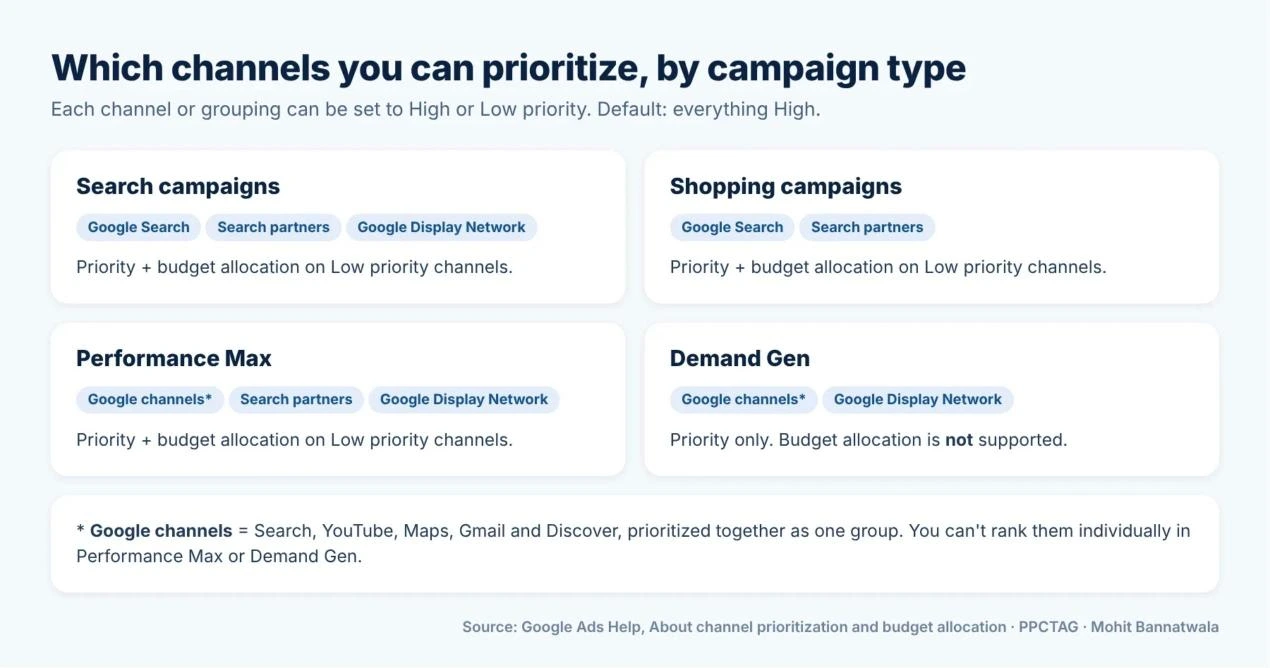
| Campaign type | Channels you can set | Budget allocation on Low priority? |
|---|---|---|
| Search | Google Search, Search partners, Google Display Network | Yes |
| Shopping | Google Search, Search partners | Yes |
| Performance Max | Google channels, Search partners, Google Display Network | Yes |
| Demand Gen | Google channels, Google Display Network | No (priority only) |
What changed and when
- October 14, 2026: Google announced channel prioritization and budget allocation on the Google Ads & Commerce Blog.
- October 15, 2026: the controls began rolling out progressively. Google says availability may vary by campaign type and timing, so you may not see them in every account yet.
- November 2026: Google Ads Editor version 2.14 added support for channel prioritization and budget caps, so you can now change them in bulk.
- February 2027: Search campaigns with Display Expansion (the Display Network setting) turned on migrate to the new model. The current backend setup, which Google says applied a 50% budget allocation to Display, goes away. Google also says the Display Network will no longer serve on Search campaigns that use the Target Impression Share bid strategy.
If you set channel priorities on a Search campaign before February 2027, Google says the new settings take effect straight away and replace the old Display Expansion behaviour for that campaign.
Does channel priority actually change your spend?
This is the part most people get wrong. Whether priority makes a difference depends on your bid strategy and whether the campaign is limited by budget.
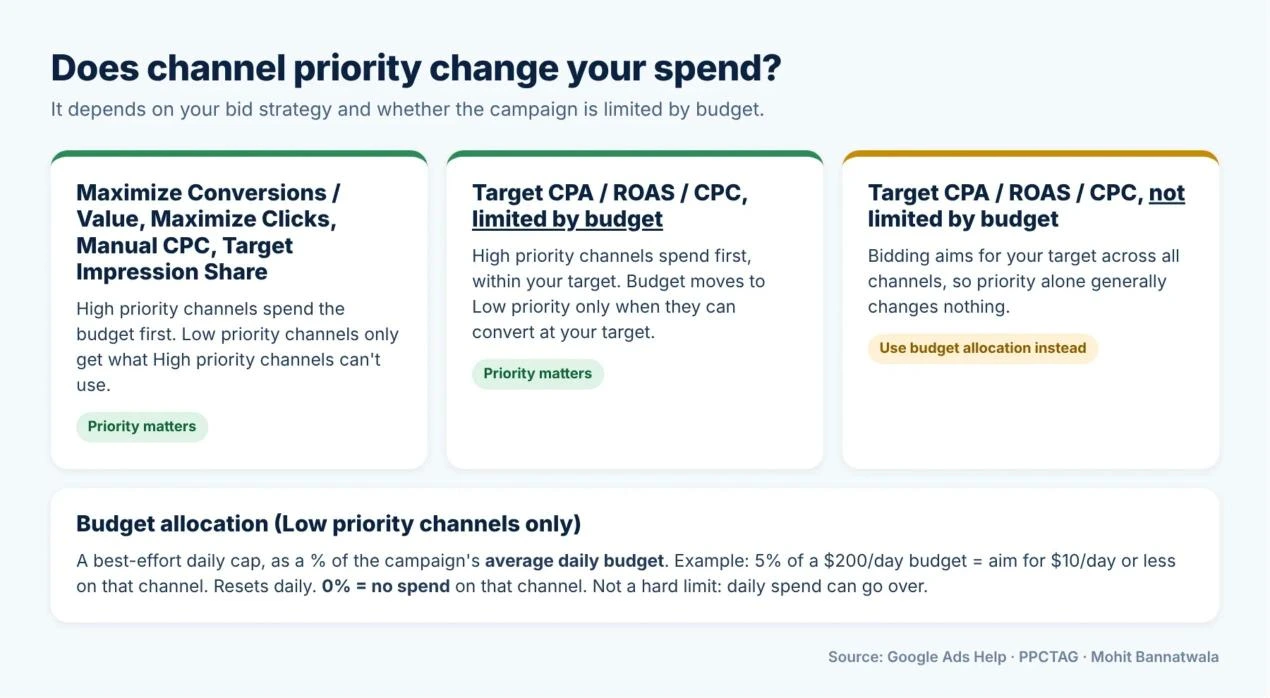
| Bid strategy | What High / Low priority does |
|---|---|
| Maximize Conversions, Maximize Conversion Value | High priority channels spend first. Low priority channels only get budget the High priority channels can’t use, for example because of limited eligible traffic. |
| Maximize Clicks, Manual CPC, Target Impression Share | Same: High priority first, the remainder to Low priority. |
| Target CPA, Target ROAS, Target CPC, limited by budget | High priority channels spend first within your target. If more High priority spend would miss the target, budget moves to Low priority channels that can convert at your target. |
| Target CPA, Target ROAS, Target CPC, not limited by budget | Bidding aims for your target across all channels, so priority generally doesn’t change how spend is split. Any budget allocation you set still applies. |
In plain terms: if you run Target CPA and your campaign isn’t capped by budget, setting Search partners to Low priority on its own will do very little. If you want to limit partner spend in that situation, you need a budget allocation percentage.
How the budget allocation cap works
- It is a percentage of the campaign’s average daily budget, not of what the campaign actually spends. A 5% cap on a $200 a day budget means Google aims to keep that channel at about $10 a day or less.
- It is best effort. Google says daily spend on the channel can occasionally go over, including on days when the campaign spends more than its average daily budget.
- It resets every day. Unspent or overspent amounts don’t carry over.
- 0% stops spend on that channel, while keeping it in the campaign setup.
- Because it is a share of the budget, the cap moves with the budget. Double the budget and the dollar amount allowed on the Low priority channel doubles too.
- For a shared budget, the cap applies to the whole shared pool across all campaigns using it.
How to set channel priorities
You can set defaults once for the whole account, then override them for a single campaign or shared budget where needed.
At account level
- In Google Ads, open Admin > Account settings.
- Find the Channel prioritization card.
- Choose the campaign type: Search, Shopping, Performance Max or Demand Gen.
- Set each channel to High priority or Low priority.
- Optional: for Low priority channels, enter a budget allocation percentage (not available for Demand Gen).
- Click Save. The default applies to every eligible campaign of that type that doesn’t have its own setting.
At campaign level
- Go to Campaigns, open the campaign and click Settings.
- Expand the Channel prioritization card.
- Select Customize for this campaign (the default option is Use account settings). If the campaign uses a shared budget, the change applies to every campaign on that budget.
- Set the priority tiers and any budget allocation, then click Save. You can switch back to the account default at any time.
The Display Network still needs to be included in the campaign’s Networks settings for a Search campaign to show there. Channel prioritization only controls how budget flows between channels that are switched on.
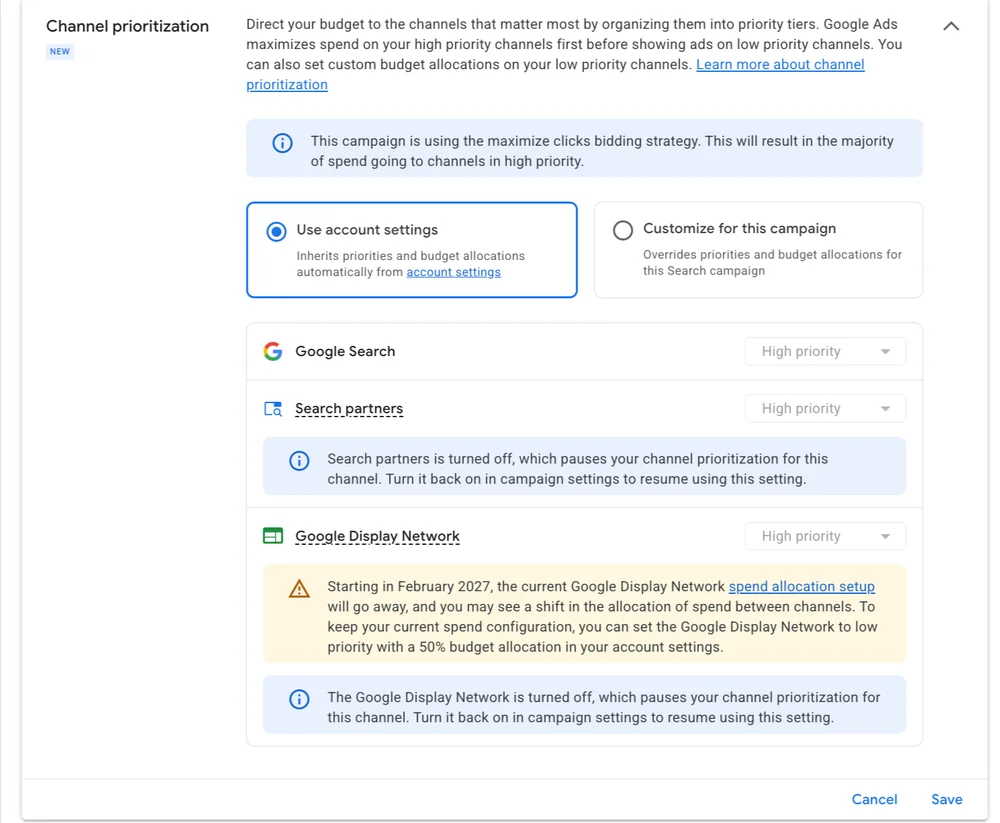
This is what the card looks like inside a real Search campaign. Notice the notes under Search partners and the Display Network: when a channel is switched off in the campaign’s network settings, its priority is simply paused. You will also see the February 2027 Display Network warning here.
Limits to know
- No manager account setup. You can’t set channel prioritization from an MCC. Set it in each client account.
- Shared budgets only work with these controls when every campaign on the budget is the same type (all Search, or all Shopping).
- Campaign total budgets support channel prioritization only in Demand Gen. Other campaign types using a total budget ignore the setting.
- Experiments. You can test the settings in custom experiments. Multi-campaign shared budgets aren’t supported there, and all channels in such experiments are treated as the same tier.
How to check the results
For Search campaigns, add the Network (with search partners) segment in your Campaigns table to compare cost, conversions and cost per conversion for Google Search, Search partners and the Display Network. For Performance Max, use the Channel performance report under Insights and reports, which breaks results down by Search, YouTube, Display, Discover, Gmail, Maps and Search partners.
Judge each channel on real leads, not just conversions. Partner and Display traffic can produce form fills and short calls that never book. If you import booked jobs or track calls outside Google Ads, as in our Google Ads and call tracking dashboard guide, compare cost per booked job by network before you raise any cap.
Performance Max Partners (Alpha): switch off Search partners and Display
Channel prioritization decides which channels get the budget first. Google is also testing a second, simpler control for Performance Max: a Partners setting, labelled Alpha, that lets you include or exclude Search partners and the Google Display Network for a single Performance Max campaign.
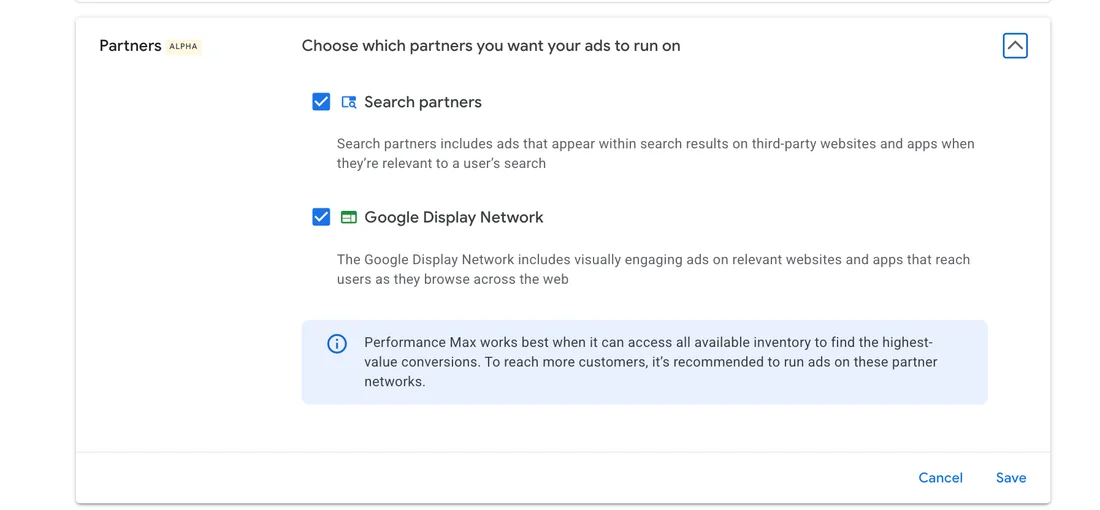
- Where to find it: open the Performance Max campaign, go to Settings and look for the Partners card. Both boxes are ticked by default.
- Who has it: it is still a test, so many accounts don’t see it yet. If you don’t have it, use channel prioritization instead: set Search partners and the Display Network to Low priority with a small budget allocation.
- What Google says: the setting itself carries a note that Performance Max works best with access to all inventory. That is true for reach, but not always for lead quality.
Partners or prioritization? Unticking a partner network is all-or-nothing: no spend goes there at all. Low priority plus a budget cap keeps a small, controlled test running. For a local service business with a tight budget, switching them off (or capping them at 5 to 10%) is usually the safer start.
What it means for local service businesses
Most local lead-gen accounts we audit fall into one of two camps: Search partners and Display left on by default and quietly wasting money, or both switched off years ago and never tested again. Channel prioritization gives a middle option.
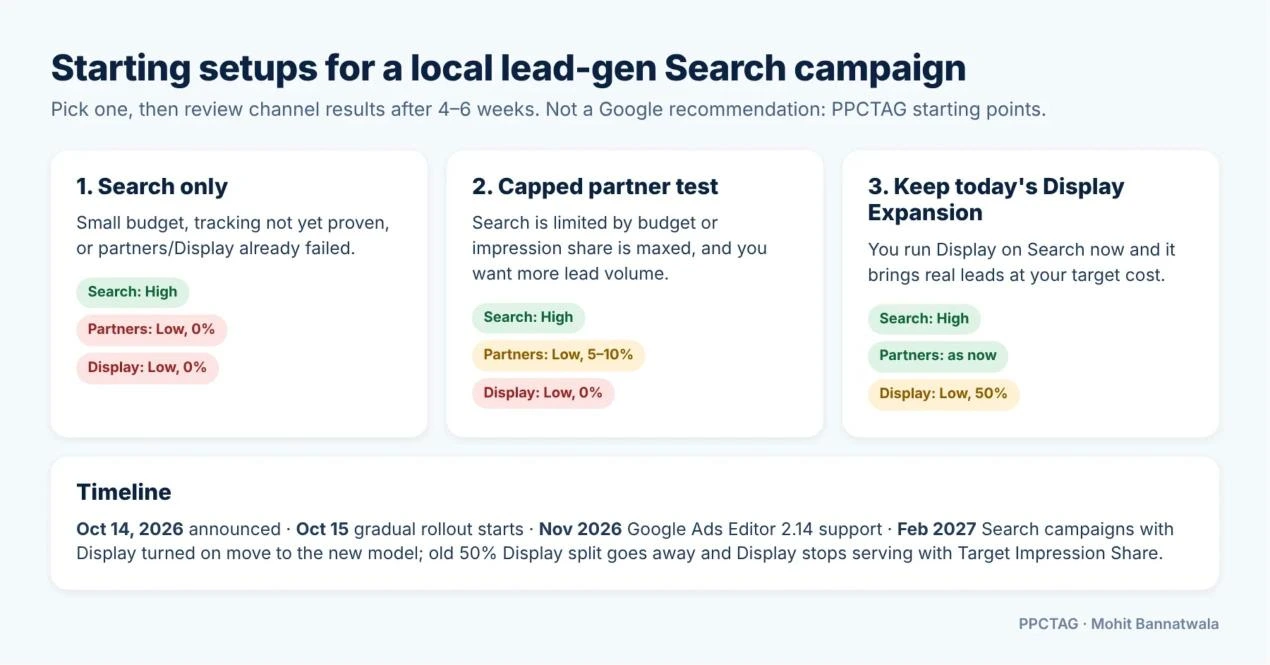
- Dentists and medical practices: Display traffic can be cheap but low intent. If you have Display on in a Search campaign today, decide before February 2027 whether to keep it at Low priority with 50%, or set it to 0%. See our Google Ads guide for dentists.
- HVAC, plumbers and roofers: in peak season, Search is often limited by budget. Setting Google Search to High priority and partners to Low with a small cap keeps money on the auctions that bring emergency calls. See Google Ads for HVAC.
- Law firms: clicks are expensive, so a 5% partner cap on a large budget is still real money. Start at 0% or a very small cap and check search terms from partners first.
- Local Services Ads on Performance Max: pay-per-lead campaigns that moved from LSA run only on Search and Maps, so these controls aren’t something to manage there. See our LSA to Performance Max guide.
If you want to see how much budget a realistic Search-only setup needs in your area, start with our Google Ads budget estimator.
PPCTAG’s take
This is a genuinely useful control, and one of the few recent changes that gives advertisers more say rather than less. But it is easy to set it and assume the job is done. Our approach:
- Use budget allocation, not just priority. Most mature local accounts run Target CPA without a budget limit. In those campaigns, priority alone does nothing. The cap is what protects you.
- Don’t wait for February 2027. Find every Search campaign with the Display Network on and make a deliberate choice now: 50% to keep today’s behaviour, 0% to stop it, or something in between.
- Test partners with a cap instead of a switch. If Search is limited by budget or you have run out of impression share, try Search partners at Low priority with 5 to 10% for four to six weeks, then compare cost per booked job by network.
- Remember it is best effort. Check actual channel spend weekly for the first month. If a channel regularly goes well over its cap and the leads are poor, drop it to 0%.
- Keep it in your audit checklist. Networks and channel settings sit alongside location options and conversion goals in our Google Ads optimization process.
FAQs
What is channel prioritization in Google Ads?
It is a setting that lets you mark channels such as Google Search, Search partners and the Google Display Network as High or Low priority. Google spends on High priority channels first and sends any remaining budget to Low priority channels.
Is budget allocation a hard spending cap?
No. Google applies it on a best-effort basis, as a percentage of the campaign’s average daily budget. Daily spend on that channel can occasionally go over the cap. Setting it to 0% stops spend on the channel.
Why didn’t changing priority affect my Target CPA campaign?
When a Target CPA or Target ROAS campaign isn’t limited by budget, bidding aims for your target across all channels, so priority generally doesn’t change how spend is split. Use a budget allocation percentage on the Low priority channel instead.
What happens to Display Expansion on Search campaigns in February 2027?
Search campaigns with the Display Network turned on move to channel prioritization and the old spend split goes away. To keep the current setup, set the Display Network to Low priority with a 50% budget allocation. Display will also stop serving on Search campaigns using Target Impression Share.
Can I set channel prioritization from my manager account?
No. Google says you can’t set it from a manager account. Set it in each client account, either as an account default or for individual campaigns and shared budgets.
Can I prioritize YouTube or Maps separately in Performance Max?
No. In Performance Max and Demand Gen, Search, YouTube, Maps, Gmail and Discover are grouped as “Google channels” and share one priority setting. Search partners and the Display Network can be set separately.
Can I turn off the Display Network in Performance Max?
Only if your account has the Partners (Alpha) setting, which lets you untick Search partners and the Google Display Network in a Performance Max campaign. If you don’t see it, set those channels to Low priority in channel prioritization and give them a small budget allocation.
Not sure where your budget is really going across Search, partners and Display? We’ll review your network settings, channel spend and lead quality.
Sources
- Google Ads & Commerce Blog: Guide your campaign spending with new priority and allocation features
- Google Ads Help: About channel prioritization and budget allocation
- Google Ads Help: About Display Expansion on Search campaigns
- Google Ads Help: About the channel performance report for Performance Max