
Google Ads changed a lot in 2026. Many of the new Google Ads features sit quietly behind a “Beta” or “Alpha” label, so most local business owners never notice them. Some save hours of reporting. Others decide where your budget goes, so they are worth checking even if you never asked for them.
This guide covers the 8 new features I have found in real accounts this year. For each one: what it does, where to find it, whether a local service business should use it, and Google’s own page for more detail. All screenshots are from live accounts, with client names, IDs, cities and dates hidden.
Key takeaways
- Reporting got faster: AI Dashboards build charts from a plain-English prompt, and Asset activity gives weekly creative ideas.
- Budget decisions got clearer: Missed opportunities estimates the clicks and leads you lost to low budgets or bids. Treat the numbers as estimates.
- You now control where ads show: channel prioritization and the Performance Max “Partners” setting let you limit Display and Search partners.
- Lead quality matters more: lead journey mapping lets you tell Google which leads became real jobs.
- Local tools expanded: Performance Max can send clicks to your Business Profile, and Local Services Ads can take bookings.
New Google Ads features in 2026 at a glance
| Feature | Where to find it | Status | Should local businesses use it? |
|---|---|---|---|
| AI Dashboards | Insights and reports > Dashboards | Beta | Yes, for faster reports |
| Lead journey mapping | Goals > Conversions | New for 2026 | Yes, if you track qualified leads |
| Missed opportunities | Recommendations tab | Beta | Yes, as a budget check |
| Channel prioritization | Campaign or account settings | New | Yes, review before Feb 2027 |
| Performance Max Partners | PMax campaign settings | Alpha | Yes, if you have access |
| Business Profile as PMax destination | PMax setup (store goals) | Rolling out | Test, if your website converts poorly |
| Asset activity | Assets > Asset activity | Beta | Yes, for headline ideas |
| LSA booking and scheduling | Local Services Ads settings | US only | Yes, if you use a supported booking tool |
1. AI Dashboards: build reports with a text prompt
Quick answer: AI Dashboards (Beta) let you type what you want to see, such as “cost per lead by campaign this month”, and Google builds the charts for you. Google announced them in August 2026 and they are now appearing in more accounts. Check every chart against your own numbers before you share it.
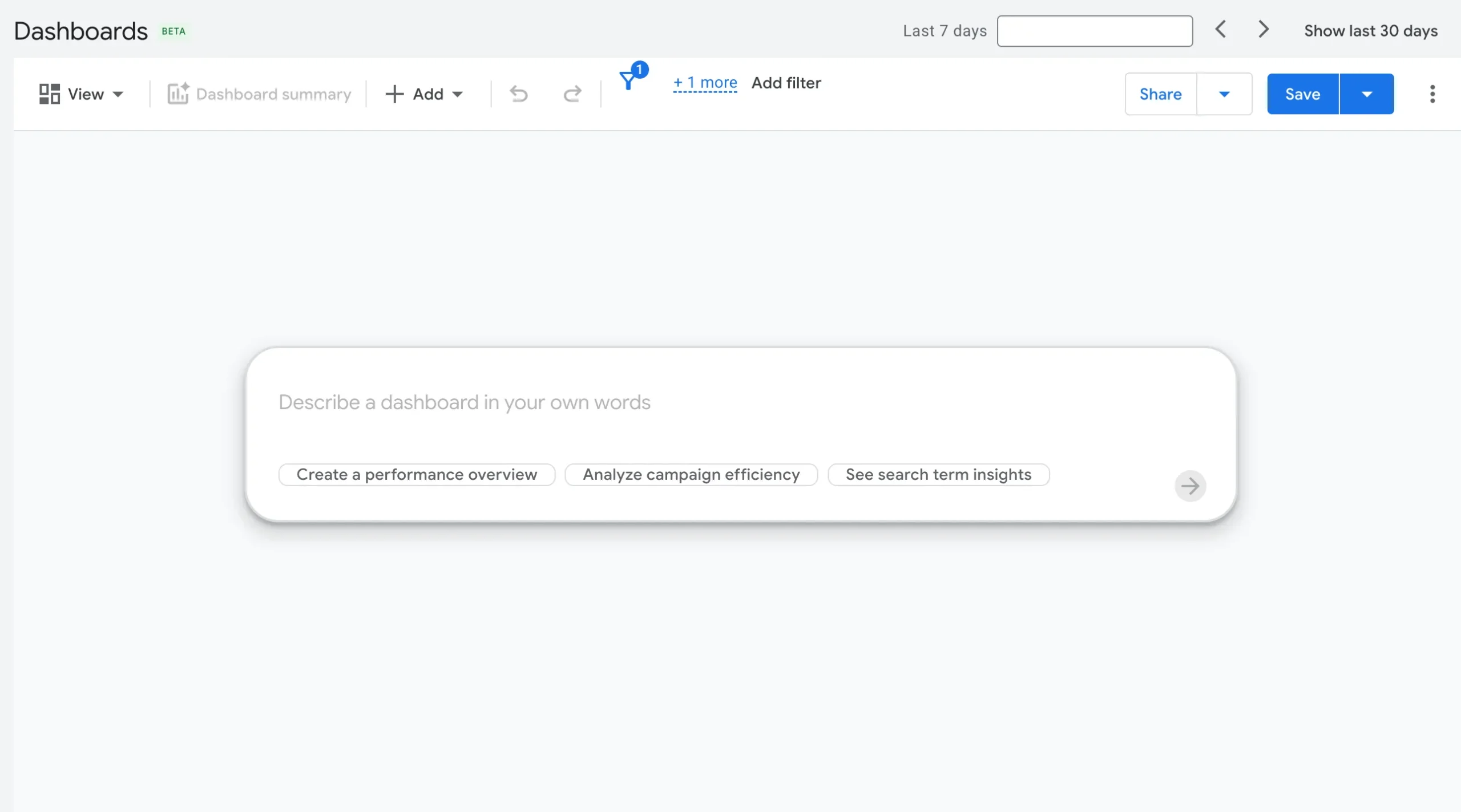
Where: Campaigns > Insights and reports > Dashboards. A new dashboard opens with a prompt box and suggestions such as “Create a performance overview”, “Analyze campaign efficiency” and “See search term insights”.
Prompts that work well for local service businesses:
- “Show cost per conversion and conversions by campaign for the last 30 days.”
- “Compare calls and form leads week over week.”
- “Which search terms spent the most without a conversion?”
PPCTAG’s take: this is the biggest time saver of the year for monthly client reports. But AI can pick the wrong metric (for example, all conversions instead of primary ones). Open each card’s settings and confirm the metric and date range before you send it. For a weekly “what changed” check, pair it with the Google Ads AI performance summary.
Google reference: Evolve your marketing with new AI tools (Google Ads & Commerce Blog) and Create and edit dashboards.
2. Lead journey mapping: show Google your sales stages
Quick answer: Lead journey mapping (Google calls it “Your customer journey” in the account) shows each stage from first visit to closed job in one visual map, with the conversion action, weekly volume and days from start for each stage. It helps you see where leads drop off and which stage to bid on.
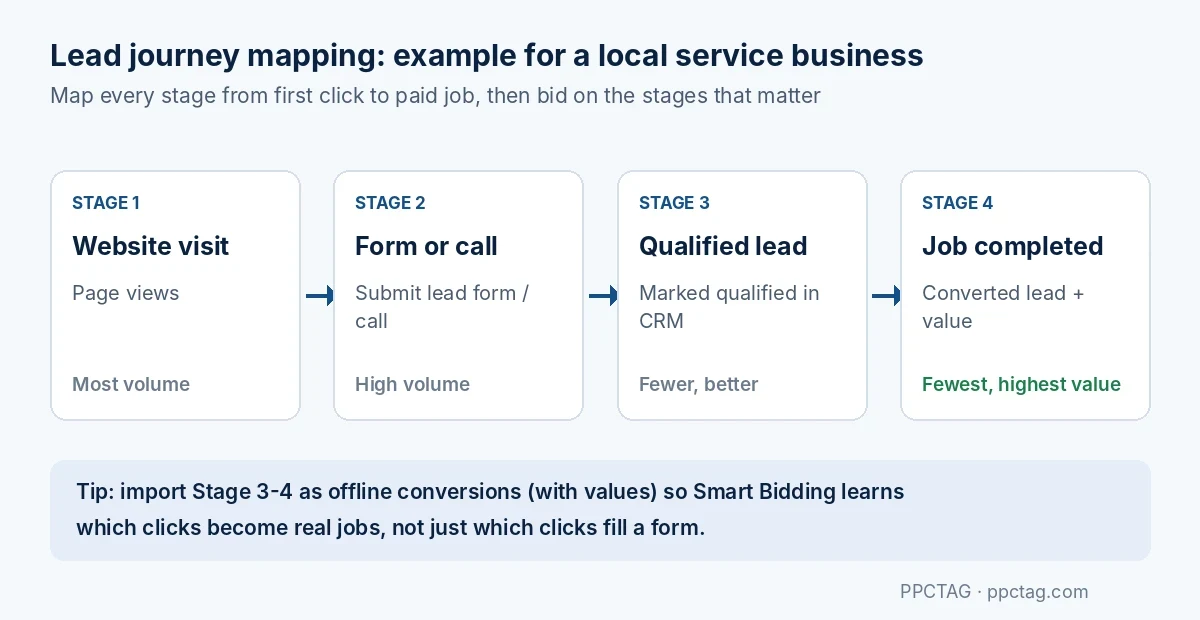
A typical home service journey has 4 stages: website visit, form or call, qualified lead (marked in your CRM), and job completed. Each stage gets fewer leads but more value. If you only bid on form fills, Google learns to find people who fill forms, including spam. If you import qualified leads and completed jobs, Google learns which clicks become paying customers.
How to start:
- List your stages and the conversion action for each (most businesses need 3-4).
- Make sure form leads capture the GCLID, or use enhanced conversions for leads.
- Import “qualified” and “job completed” as offline conversions with a value.
- Open the journey map and check that each stage has data and the days between stages look right.
PPCTAG’s take: this is the most important feature on this list for lead quality. It only works if your CRM sends the later stages back to Google Ads. See sending call conversions with the Data Manager API and the call tracking dashboard.
Google reference: Lead journey mapping (Google announcement) and Generate leads with Google Ads.
3. Missed opportunities: what low budgets and bids cost you
Quick answer: Missed opportunities (Beta) moved from Google Ads Labs into the Recommendations tab in July 2026. It estimates the clicks, conversions and conversion value you missed because a budget was too low or bids were too low, and suggests a fix per campaign.
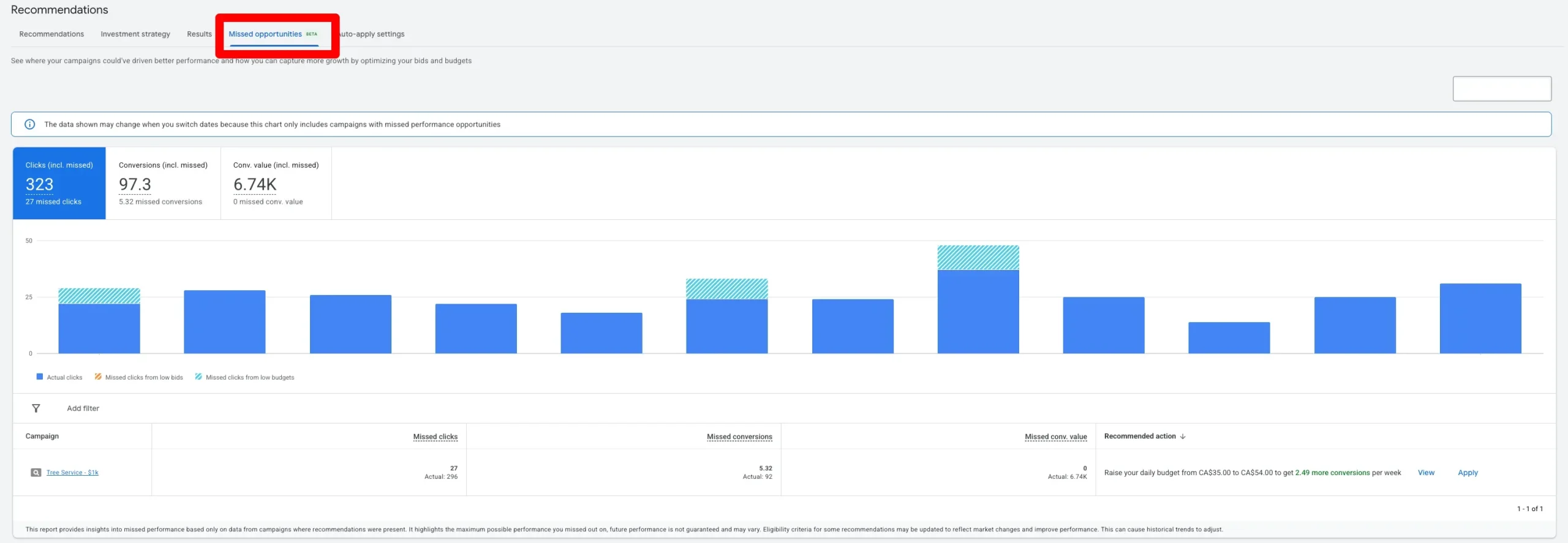
Where: Campaigns > Recommendations > Missed opportunities.
What I saw in a real tree service account: 27 missed clicks and about 5 missed conversions, all from a low budget (the striped parts of the bars), with a suggestion to raise the daily budget from CA$35 to CA$54 for about 2.5 more conversions per week. That is a clear, testable suggestion, and it shows when you lost leads (the striped weeks).
PPCTAG’s take: use this as a reason to look, not a reason to spend. Before raising a budget, check that the extra conversions would be real leads (not page views or duplicate calls), and that your cost per lead in those weeks was acceptable. If the cause is “low bids”, review your target CPA before raising budgets.
Google reference: Missed opportunity reporting (Google announcement) and Types of recommendations.
4. Channel prioritization: decide where your budget goes first
Quick answer: Channel prioritization lets you set Google Search, Search partners and the Display Network to high or low priority, and cap the budget share of low-priority channels. Google spends on high-priority channels first. Review it now: Google says the current Display spend allocation setup goes away in February 2027.
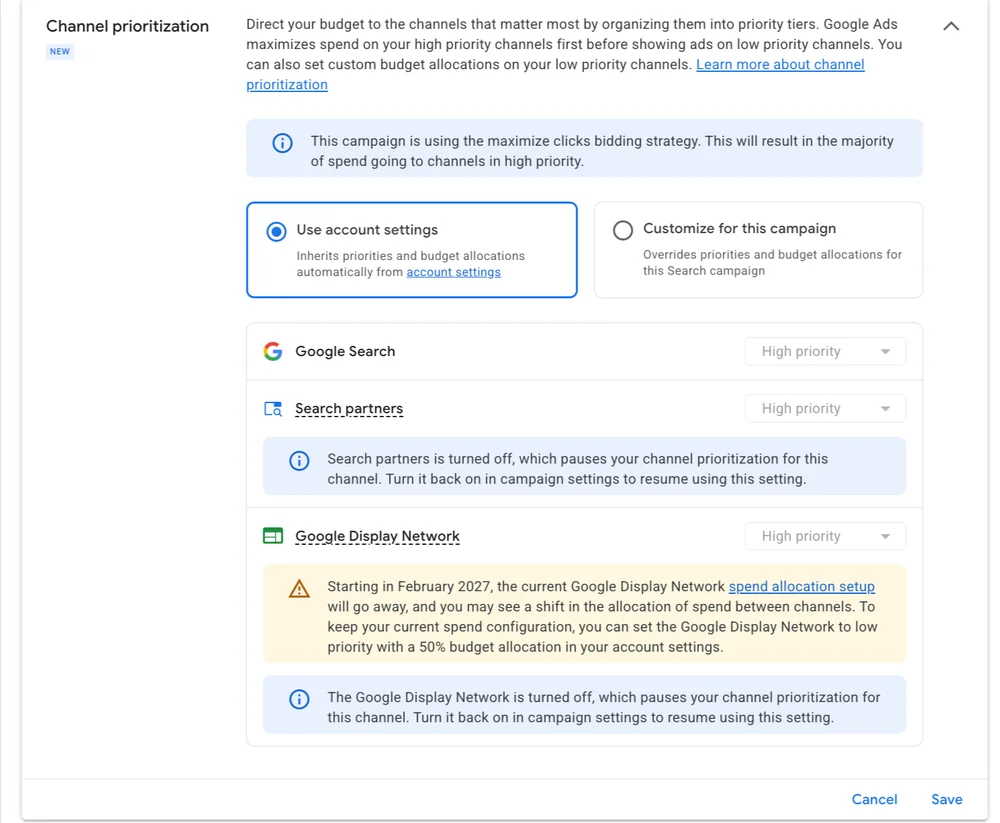
You can use the account settings or choose “Customize for this campaign”. The yellow warning in the screenshot is important: to keep today’s behaviour after February 2027, Google suggests setting the Display Network to low priority with a 50% budget allocation.
PPCTAG’s take: for most local service Search campaigns, keep Google Search high priority and Display off or low. I wrote a full setup guide: Google Ads channel prioritization: how to set it up.
5. Performance Max “Partners” setting (Alpha)
Quick answer: Some accounts now see a “Partners” section (Alpha) in Performance Max campaign settings. It lets you turn Search partners and the Google Display Network on or off for that campaign. Before this, Performance Max decided on its own.
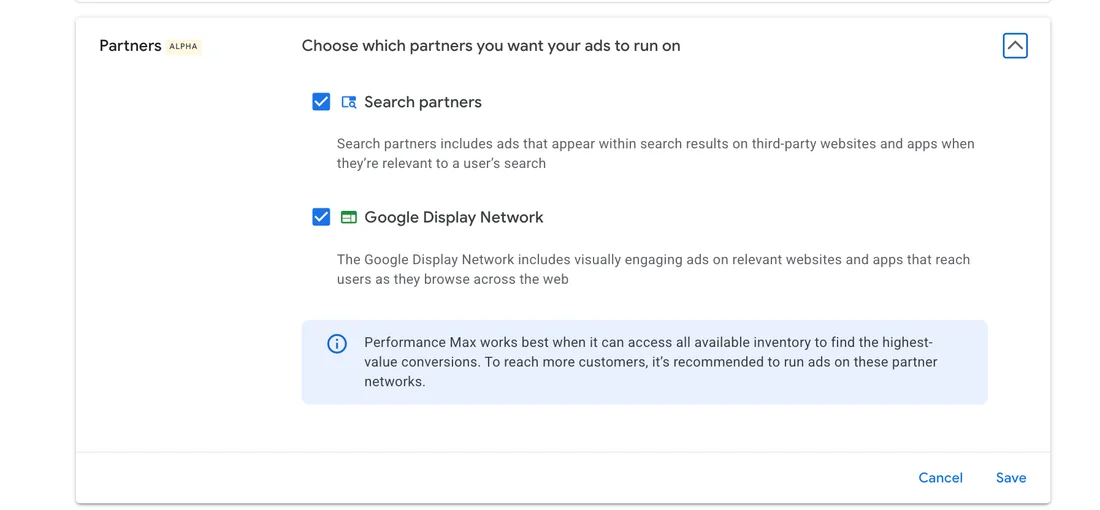
When both boxes are ticked, Google shows a note recommending all inventory for the best results. For lead generation, partner and Display traffic often brings cheap clicks and spam forms, so test with them off if your lead quality is poor.
PPCTAG’s take: if you have this setting, test it. See my Performance Max test for a cleaning company for what happens when PMax spends on low-quality placements.
6. Performance Max can send clicks to your Business Profile
Quick answer: When you create a Performance Max campaign for local store visits, Google now asks “Where should people go after clicking your ads?” You can choose your website or “Google Business Profile (optimized for ads)”, a Google-hosted page with built-in tracking of calls and direction requests.
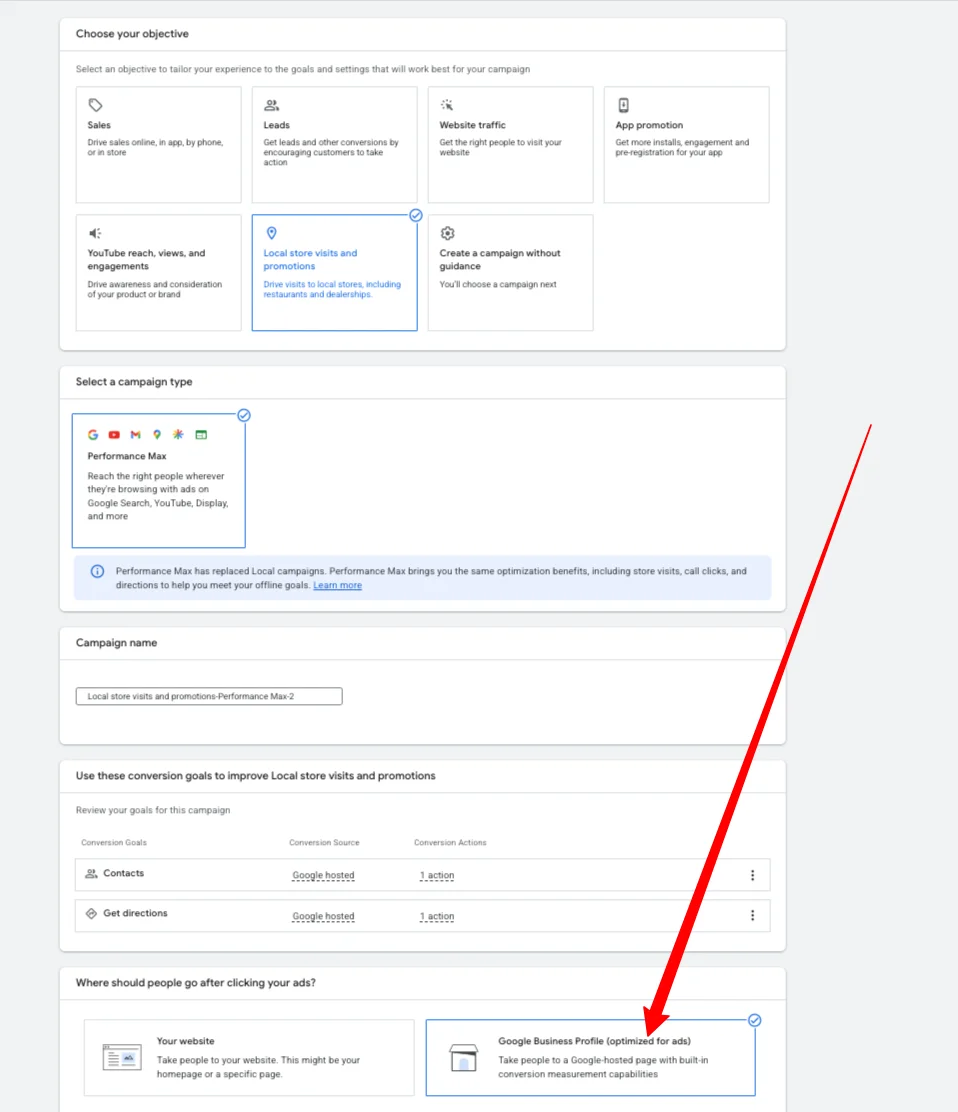
Where: New campaign > Local store visits and promotions > Performance Max > Where should people go after clicking your ads? Google notes that this destination uses Google-hosted conversion sources (calls and directions) instead of your website conversions.
PPCTAG’s take: useful for businesses with a weak or slow website and strong reviews, such as salons, clinics and law offices with a physical location. But you lose control of the landing page and your website conversion data for that campaign. Keep your Business Profile complete, with photos, hours, services and recent reviews.
Google reference: About Business Profile (optimized for your ad) and Create a Performance Max campaign with store goals.
7. Asset activity: weekly AI ideas for your headlines
Quick answer: Asset activity (Beta), spotted in November 2026, is a new page under Assets. It shows weekly insight cards about your ads: which headlines perform best, how competitors’ headlines differ from yours, and industry search trends. It is filterable by Featured, Asset performance, Competitor performance and Industry trends.
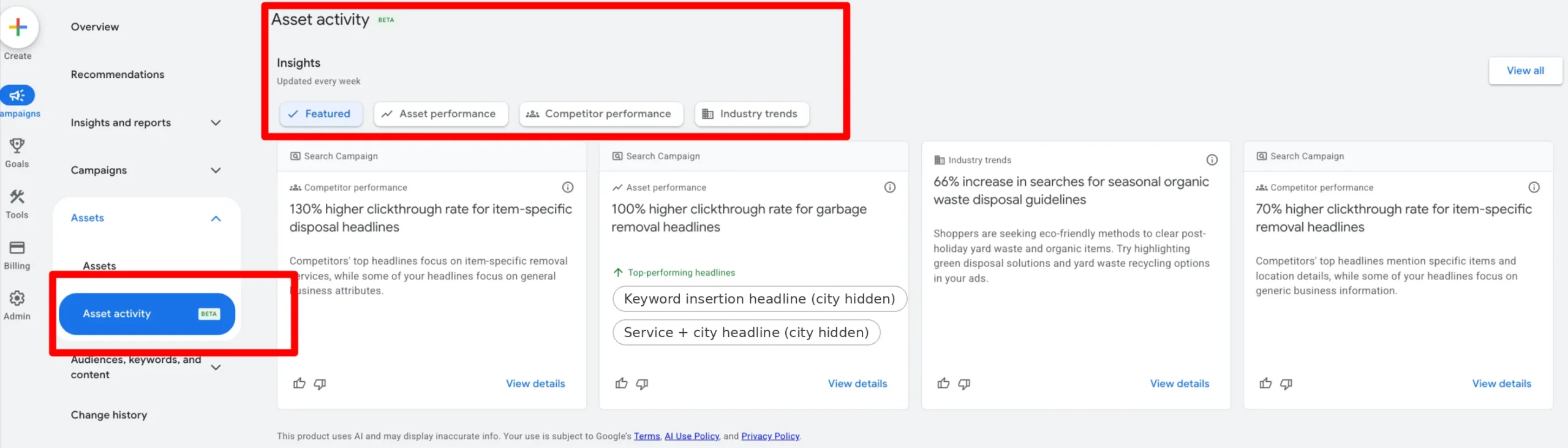
In a junk removal account, the cards said competitors’ top headlines mention specific items and locations, while some of our headlines were generic. Another card showed that headlines with the service plus city name were the top performers. That is a practical, testable idea: write headlines like “Couch & Mattress Removal” and “[Service] in [City]”.
PPCTAG’s take: one of the few AI features worth checking every week. Use the cards for ideas, then test them in your responsive search ads. More on headline and asset best practice: Google Ads assets guide.
Google reference: Google has no help article for Asset activity yet. The closest official page is About the Insights page.
8. Local Services Ads booking and scheduling
Quick answer: Local Services Ads can show a “Book” option so customers schedule a job directly from your ad. Bookings are managed in your booking partner’s software (for example ServiceTitan or Workiz), where you manage appointments, availability and services. The feature is US-only and not available for healthcare.
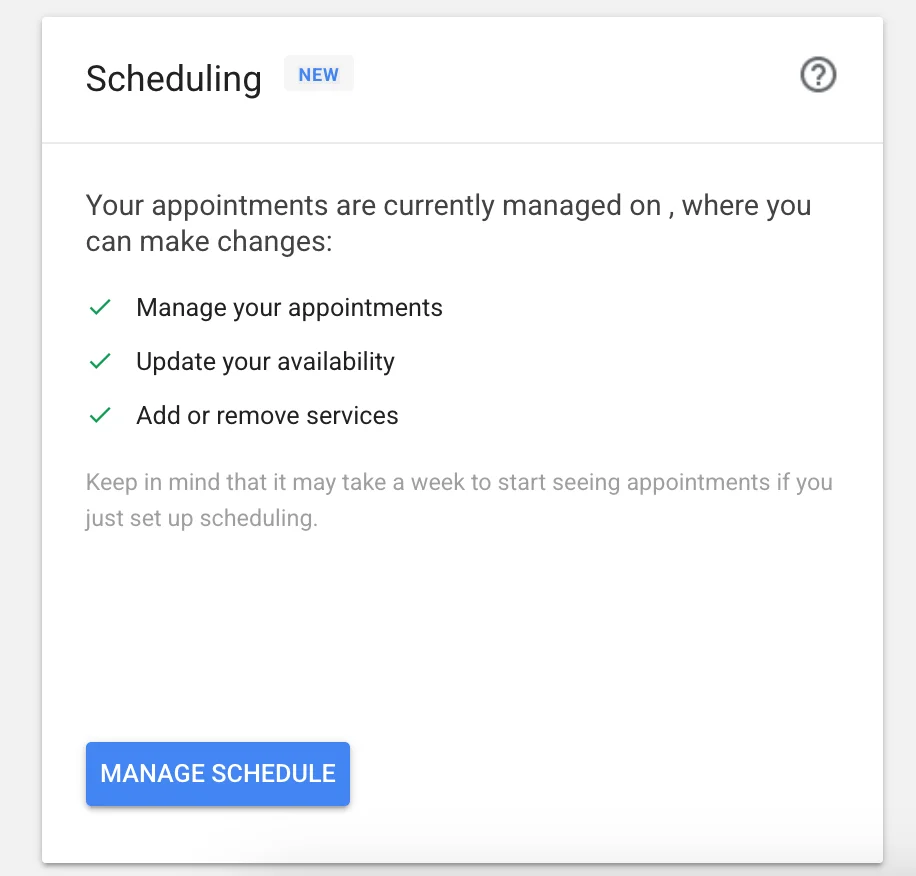
The Scheduling card tells you where appointments are managed and that it can take about a week to see bookings after setup. Booking leads give customers a way to reach you when you can’t answer the phone, which matters because missed calls are a common reason LSA leads are lost.
PPCTAG’s take: if you already use a supported booking tool, turn it on. Keep your available time slots accurate so you don’t get bookings you can’t serve. Related: LSA missed call charges and the move of LSA into Google Ads.
Google reference: About booking leads in Local Services Ads and Local Services Ads booking partners.
Other 2026 Google Ads changes we covered
- Google Ads AI performance summary: a short AI explanation of why performance changed.
- Local Services Ads moving to Performance Max with pay-per-lead goals.
- AI Max for Search campaigns: what it changes and what to check.
- Ads in Google AI Mode.
- The invalid traffic card.
- Google tag and Tag Manager unification.
- Google Ads policy updates, November 2026.
Which new features should a local business set up first?
- Channel prioritization: it has a deadline (February 2027) and directly controls spend.
- Lead journey mapping: better lead data improves every other campaign.
- Missed opportunities: a 10-minute monthly budget check.
- Asset activity: a weekly source of headline tests.
- AI Dashboards: faster monthly reporting.
- LSA booking, PMax Partners and the Business Profile destination: only if they fit your business and your account has them.
Not seeing a feature? Most of these are Beta or Alpha and roll out account by account. If it’s not in your account yet, check again in a few weeks.
FAQs
What are the biggest new Google Ads features in 2026?
For local service businesses: AI Dashboards, lead journey mapping, the Missed opportunities report, channel prioritization, the Performance Max Partners setting, the Business Profile destination for Performance Max, Asset activity insights and Local Services Ads booking.
Why don’t I see these features in my Google Ads account?
Many are Beta or Alpha and Google releases them to some accounts first. Availability can also depend on country, campaign type and account history. Check the menus listed in this guide again after a few weeks.
Are the Missed opportunities numbers accurate?
They are Google’s estimates of what more budget or higher bids might have brought, not guaranteed results. Use them to spot campaigns limited by budget, then check lead quality and cost per lead before you increase spend.
What happens to Display Network spend in February 2027?
Google shows a warning that the current Display spend allocation setup goes away in February 2027 and spend between channels may shift. To keep similar behaviour, Google suggests setting Display to low priority with a 50% budget allocation in account settings.
Should I send Performance Max clicks to my Business Profile instead of my website?
Test it if your website converts poorly and your Business Profile is strong. Keep your website as the destination if it converts well, since you control the page and keep your own conversion data.
Sources
- PPCTAG: Google Ads channel prioritization guide
- PPCTAG: Google Ads AI performance summary
- Google: Evolve your marketing with new AI tools
- Google Ads Help: Create and edit dashboards
- Google: Lead journey mapping
- Google Ads Help: Generate leads with Google Ads
- Google: Missed opportunity reporting
- Google Ads Help: Types of recommendations
- Google Ads Help: Business Profile (optimized for your ad)
- Google Ads Help: Performance Max with store goals
- Google Ads Help: About the Insights page
- Local Services Ads Help: About booking leads
- Local Services Ads Help: Booking partners